







Question: Write a java program to do the following: 1. Declare an integer matrix of size NxM, which will be filled with digits (0-9) entered (row
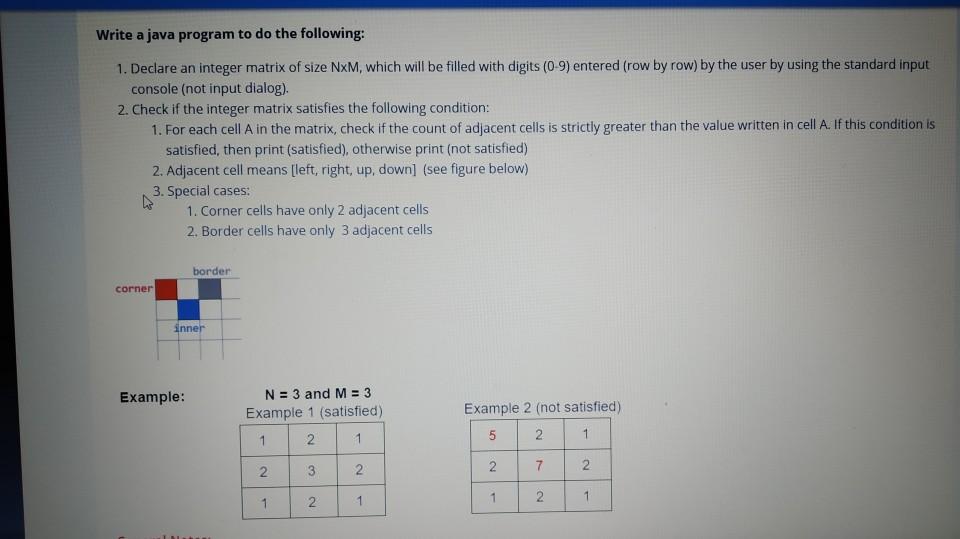
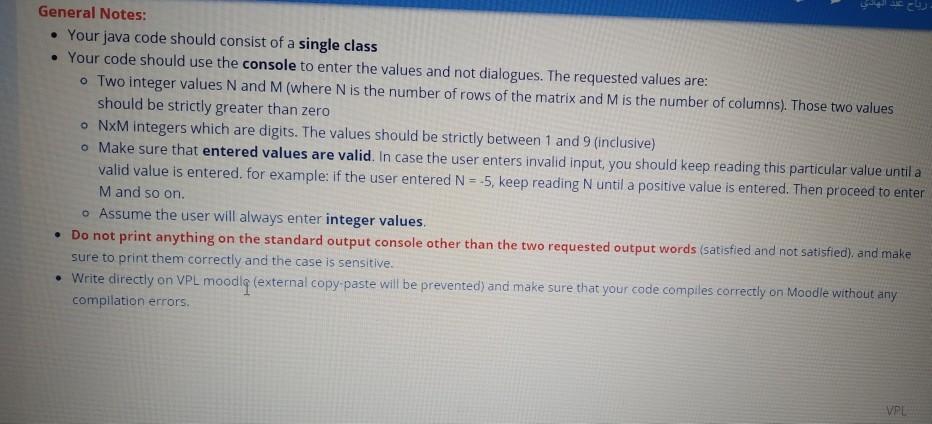
Write a java program to do the following: 1. Declare an integer matrix of size NxM, which will be filled with digits (0-9) entered (row by row) by the user by using the standard input console (not input dialog) 2. Check if the integer matrix satisfies the following condition: 1. For each cell A in the matrix, check if the count of adjacent cells is strictly greater than the value written in cell A. If this condition is satisfied, then print (satisfied), otherwise print (not satisfied) 2. Adjacent cell means [left, right, up, down] (see figure below) 3. Special cases: 1. Corner cells have only 2 adjacent cells 2. Border cells have only 3 adjacent cells border corner inner Example: N = 3 and M = 3 Example 1 (satisfied) Example 2 (not satisfied) 5 2 1 2 1 3 N 2 2 7 2. 1 2 1 1 1 2 General Notes: Your java code should consist of a single class . Your code should use the console to enter the values and not dialogues. The requested values are: o Two integer values N and M (where N is the number of rows of the matrix and M is the number of columns). Those two values should be strictly greater than zero NXM integers which are digits. The values should be strictly between 1 and 9 (inclusive) . Make sure that entered values are valid. In case the user enters invalid input, you should keep reading this particular value until a valid value is entered, for example: if the user entered N=-5, keep reading N until a positive value is entered. Then proceed to enter Mand so on. Assume the user will always enter integer values. Do not print anything on the standard output console other than the two requested output words (satisfied and not satisfied), and make sure to print them correctly and the case is sensitive. Write directly on VPL moodiq (external copy paste will be prevented and make sure that your code compiles correctly on Moodle without any compilation errors VPL
Step by Step Solution
There are 3 Steps involved in it

Get step-by-step solutions from verified subject matter experts
 Study Help