







Question: Write a JAVA program to evaluate the following expression. num1+num2um3*(num4-num5)%num6-num7 num1, num2, num3, num4, num5, num6 and num7 are variables defined in the data section
Write a JAVA program to evaluate the following expression.
num1+num2um3*(num4-num5)%num6-num7
num1, num2, num3, num4, num5, num6 and num7 are variables defined in the data section of your program with the data given below.
When you evaluate the above expression you should follow the normal order of operations for evaluating a math expression.
If you do not follow the order of operations as given below points will be deducted.
You should group the operations in order of precedence according to the following for (), +, -, *, / and %:
() has the highest precedence.
%,* and / have the next highest precedence.
- and + have the lowest precedence
Once you group operators according to precedence you should work left to right.
For example for the given expression you should follow the following order:
- num4 - num5
- num2um3 (quotient in eax, remainder in edx ignored)
- result from step 2 * result from step 1
- result from step 3 % num6 (Remainder is in edx after div, quotient in eax ignored)
- num1 plus result from step 4
- result from step 5 - num 7
Note: it would be helpful to put the above steps as comments in your program as you do the steps.
Note: even though addition and multiplication are communicative (7+4 gives the same answer as 4+7 and 1*3 gives the same answer as 3*1) you should keep your operands in the order in which they are in the expression. In other words in 7+4, 7 is operand 1 and 4 is operand 2. In 3 * 1 3 is operand 1 and 1 is operand 2
To add operand1 (7) to operand 2(4) in assembly(7+4): mov bl, 7 ;bl = operand 1 add bl, 4 ; bl = bl+4 or bl = 7+4 - destination is always populated with operand 1
For multiplication al, ax or eax should always be populated with operand 1. In 5*3, 5 is operand 1.
Division ( '/' ) and Modulus ( '%' )
Remember when you are dividing by a dword you are dividing into edx:eax. If the number you are dividing into (the dividend) is only in eax you must clear out edx by setting it to zero before dividing.
For example do 20 / 5
mov eax, 20 ;operand1 in eax mov ebx, 5 ;operand2 in ebx mov edx, 0 ; set edx to 0 since dividing into edx:eax div ebx ; quotient in eax
Note: if you are doing a dword division immediately after a dword multiplication you should not zero out edx before doing the division for the following 2 reasons: 1. If the product fits into eax alone, edx will be automatically zeroed out for you by the multiplication 2. If part of the product ends up in edx and you zero out edx before doing the division then your result may be incorrect.
Modulus is the remainder after a division.
For example 7 % 4 = 3 (quotient = 1 and remainder = 3)
If you are dividing by a dword you should look for the remainder in edx.
For example to do 7 % 4
mov eax, 7 ;operand1 in eax mov ebx, 4 ;operand2 in ebx mov edx, 0 ; set edx to 0 since dividing into edx:eax div ebx ;quotient in eax, remainder in edx reminder of 3 should be in edx
Notice that the above operations for modulus and division are the same. The only difference is where you look for the answer after doing the division. For '/' look in eax for the quotient. For '%' look in edx for the remainder.
The above is only true for dword division. The registers used for word and byte division are different.
Library functions (Put the following prototypes in the prototype section of your code above main)
WriteHex PROTO ;write the number stored in eax to the console as a hex number ;before calling WriteHex put the number to write into eax
WriteString PROTO ; write null-terminated string to console ; edx contains the address of the string to write ; before calling WriteString put the address of the string to write into edx ; e.g. mov edx, offset message ;address of message is copied to edx
ExitProcess PROTO,dwExitCode:DWORD ; exit to the operating system
ReadChar PROTO ;Irvine code for getting a single char from keyboard ;Character is stored in the al register. ;Can be used to pause program execution until key is hit.
WriteChar PROTO ;Irvine code for printing a single char to the console. ;Character to be printed must be in the al register.
You can copy most of the above prototypes from WriteStringCharLFconstants.asm.
The prototype for WriteHex should be in your program 1.
Note: the following code should be the last 2 lines of your main function:
call ReadChar ;pause execution INVOKE ExitProcess,0 ;exit to dos: like C++ exit(0)
Constants
Declare 1 constant, LF for a line feed. This can be done just below the prototype section. Put the following divider above the constant section.
;************************ Constants ***************************
Declare a constant LF to hold the ASCII value for a linefeed: LF equ 0Ah
A linefeed moves the cursor to the next line.
You can embed a LF in your declaration of the string variables below.
Example: name byte ",LF,0
If the above string were printed with WriteString as follows, Joe Johnson would print then the cursor would move to the beginning of the next line.
mov edx, offset name call WriteString
You could also embed a LF at the beginning of a string which would move the cursor to the next line then the string would print:
name byte LF," Joe Johnson",0
See WriteStringLFconstants.asm on Canvas for examples of declaring strings with embedded LF and how to declare constants.
Do not unnecessarily print a LFs using WriteChar. For efficiency you should combine LFs with an existing string wherever possible then print the whole string using WriteString.
Variables (.DATA) Declare the following variables (use the variable names given below) and initialize them to the data given below:
A dword named num1 initialized to 0CB7FB84 hex.
A dword named num2 initialized to 0F56A2C57 hex.
A dword named num3 initialized to 0ADC1547 hex.
A dword named num4 initialized to 0C7A25A9 hex.
A dword named num5 initialized to 0B461ACB hex
A dword named num6 initialized to 0D3494 hex
A dword named num7 initialized to 1514ABC hex
Also declare variables in the data section that are initialized to the following messages which should be zero terminated strings. You may wish to embed one or more LF in your declarations below so that when the string prints the cursor will move down one or two lines.
The following should be declared as zero terminated strings.
a. "Program 2 by Joe Johnson" ;substitute your name for my name b. "num1+num2um3*(num4-num5)%num6num7=" c. "Hit any key to exit!"
Important: your messages must match the above messages exactly including case and punctuation except substitute your name for my name.
Do not declare a variable for a single character like LF or space.
To print a single character use WriteChar.
You should not declare a zero terminated string for a single character.
You should use meaningful names for your variables. Do not use msg1, msg2 etc.
You may also wish to declare any other variables you may need to hold intermediate results if you run out of registers to use. These variables should be declared of the proper size to hold the values to be stored in them.
Registers you can use
You can use the eax, ebx, ecx, edx, esi or edi registers. Do not use esp which contains the stack pointer. If you use esp your program might crash.
Macros Do not use macros in this program. We will use macros in later programs. In general do not use instructions, macros or programming techniques we have not discussed in class without asking first.
Output
The output should be formatted to look as follows. Your messages should be the same as my messages except you should substitute your name for my name below and your result will be different since you are working with different data.
Note: for this assignment I have selected data small enough so that the results will fit in 32 bits.
Sample output (5 lines of output including blank lines) (Please match the format and text below. Substitute your name for my name. Your result will be different than the result below.)
Program 2 by Joe Johnson
num1+num2um3*(num4-num5)%num6-num7=00554C11h
Hit any key to exit!
1. Your equation result will be different since you will be using different numbers, but the format should match the format above with a blank line between each line of text and no spaces in the expression.
2. There is no blank line before the first line of output.
3. There is one blank line between the title and expression
4. You should create a zero terminated string out of the expression including the '=' and print it using WriteString
5. There are no spaces in the expression
6. You should print the result after the '=' using WriteHex.
7. You should terminate the result with a lower case 'h'
8. There is one blank line between the expression and exit message
Note: to reemphasize, the expression should be a string printed by WriteString. The result (printed after the '=') is a hex number printed using WriteHex and is followed by a 'h'.
Hint: how can you efficiently print the 'h' and the following LFs without using WriteChar?
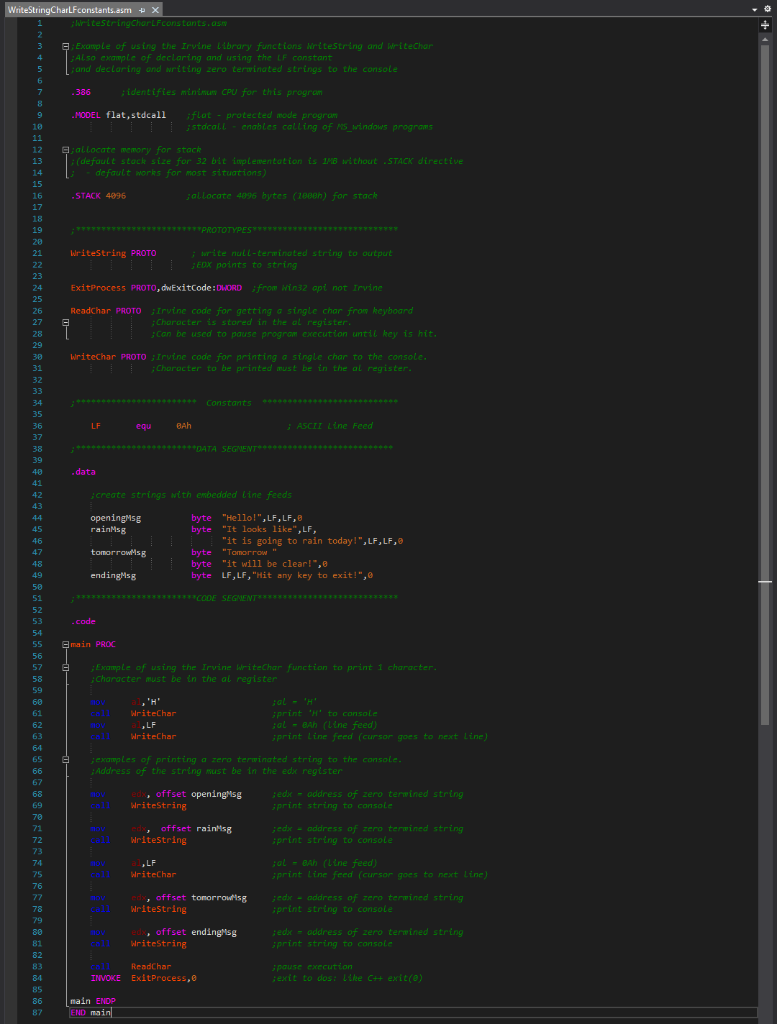
WriteString CharlFconstants.asm + X 1 writestring Charli constants. 2 3 Example of using the Irvine Library functions Writestring and writechar ALSO example of declaring and using the li constant 5 and declaring and writing zero terwinated strings to the console 6 7 386 ; identifies minimum CPU for this program 8 9 ..MODEL flat,stdcall flat - protected mode program 10 stdcall enables calling of MS_windows programs 11 12 allocate memory for stack 13 ; (default stack size for 32 bit implementation is 1MB without .STACK directive 14 default works for most situations) 15 16 STACK 4096 jallocate 4096 bytes (1000h) for stack 17 18 19 *****PROTOTYPES 28 21 IdriteString PROTO write null-terminated string to output 22 ;EDx points to string 23 24 ExitProcess PROTO, dwExitCode: DWORD from Win32 api not Irvine 25 26 Readchar PROTO Irvine code for getting a single char from keyboard 27 ;Character is stored in the al register 28 can be used to pause program execution until key is hit. 29 38 Writechar PROTO ;Irvine code for printing a single char to the console. 31 ; Character to be printed must be in the al register. 32 33 34 ************** constants *************** 35 36 LF equ BAL ASCII Line Feed 37 38 ******DATA SEGNENT 39 48 41 42 create strings with embedded line feeds 43 44 openingMsg byte "Hello!", LF, LF, 45 rainMsg byte "It looks like", LF, 46 "it is going to rain today!", LF, LF, 47 tomorrowse byte "Tomorrow 48 byte "it will be clear!", 49 endingMsg byte LF, LF, "Hit any key to exit!",0 50 51 ********CODE SEGMENT********** 52 53 .code 54 55 Emain PROC 56 ; Example of using the Irvine WriteChar function to print i character. 58 character must be in the al register data WriteChar LF Writechar print 'H' to console zal - BAh (Line feed) sprint Line feed (cursor goes to next Line) 3 jexamples of printing a zero terwinated string to the console. Address of the string must be in the edx register . offset openingMsg WriteString jedx - address of zero terwined string sprint string to console offset rains writestring jedx - address of zero terwined string sprint string to console 60 6 62 63 64 65 66 67 68 69 70 71 72 73 74 75 76 77 78 79 88 81 82 83 84 85 86 87 LF WriteChar jaL - BAh (Line feed) sprint Line feed (cursor goes to next Line) ed, offset tomorrowls Writestring ; edx - address of zero terwined string sprint string to console offset ending isg WriteString jedx = address of zero terwined string print string to console ReadChar INVOKE ExitProcess, spouse execution exit to dos: Like C# exit() main ENDP END main WriteString CharlFconstants.asm + X 1 writestring Charli constants. 2 3 Example of using the Irvine Library functions Writestring and writechar ALSO example of declaring and using the li constant 5 and declaring and writing zero terwinated strings to the console 6 7 386 ; identifies minimum CPU for this program 8 9 ..MODEL flat,stdcall flat - protected mode program 10 stdcall enables calling of MS_windows programs 11 12 allocate memory for stack 13 ; (default stack size for 32 bit implementation is 1MB without .STACK directive 14 default works for most situations) 15 16 STACK 4096 jallocate 4096 bytes (1000h) for stack 17 18 19 *****PROTOTYPES 28 21 IdriteString PROTO write null-terminated string to output 22 ;EDx points to string 23 24 ExitProcess PROTO, dwExitCode: DWORD from Win32 api not Irvine 25 26 Readchar PROTO Irvine code for getting a single char from keyboard 27 ;Character is stored in the al register 28 can be used to pause program execution until key is hit. 29 38 Writechar PROTO ;Irvine code for printing a single char to the console. 31 ; Character to be printed must be in the al register. 32 33 34 ************** constants *************** 35 36 LF equ BAL ASCII Line Feed 37 38 ******DATA SEGNENT 39 48 41 42 create strings with embedded line feeds 43 44 openingMsg byte "Hello!", LF, LF, 45 rainMsg byte "It looks like", LF, 46 "it is going to rain today!", LF, LF, 47 tomorrowse byte "Tomorrow 48 byte "it will be clear!", 49 endingMsg byte LF, LF, "Hit any key to exit!",0 50 51 ********CODE SEGMENT********** 52 53 .code 54 55 Emain PROC 56 ; Example of using the Irvine WriteChar function to print i character. 58 character must be in the al register data WriteChar LF Writechar print 'H' to console zal - BAh (Line feed) sprint Line feed (cursor goes to next Line) 3 jexamples of printing a zero terwinated string to the console. Address of the string must be in the edx register . offset openingMsg WriteString jedx - address of zero terwined string sprint string to console offset rains writestring jedx - address of zero terwined string sprint string to console 60 6 62 63 64 65 66 67 68 69 70 71 72 73 74 75 76 77 78 79 88 81 82 83 84 85 86 87 LF WriteChar jaL - BAh (Line feed) sprint Line feed (cursor goes to next Line) ed, offset tomorrowls Writestring ; edx - address of zero terwined string sprint string to console offset ending isg WriteString jedx = address of zero terwined string print string to console ReadChar INVOKE ExitProcess, spouse execution exit to dos: Like C# exit() main ENDP END main
Step by Step Solution
There are 3 Steps involved in it

Get step-by-step solutions from verified subject matter experts
 Study Help