







Question: Write a java program using processing. Use IF-then-else in order to answer the question. (Please kindly use processing to answer the question, do not use
Write a java program using processing. Use IF-then-else in order to answer the question. (Please kindly use processing to answer the question, do not use any other software)
In this question, students should work with the drawing text on the canvas. The code will ask for a number and the code should be able to detect the type of the entered number; either it is an integer or float or even if it is not a number. Also, they need to know about input command and get string from users with input command. In order to do so, the library below should be imported at the beginning of the code:
import javax.swing.JOptionPane;
The code should be written in a way that when it is run, if user presses button n on the keyboard, an input box like below appears on the screen.
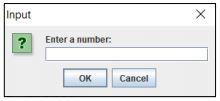
In the box above if user for example enters 3, the code should write the number of the type of that on the canvas like below:
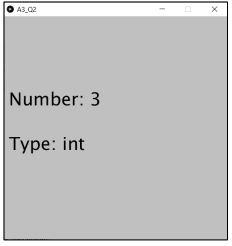
The position of the strings on the canvas is optional and it should be selected in a way that it is readable.
Hint: In order to detect float numbers, look for character . In the entered string.
Below there are two more examples of the desired code:
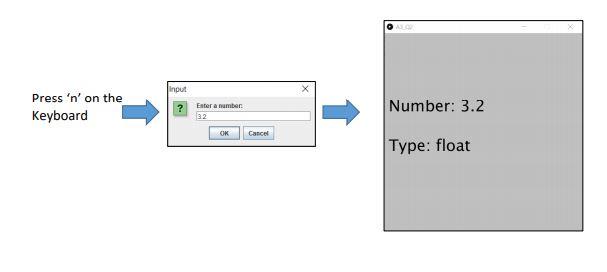
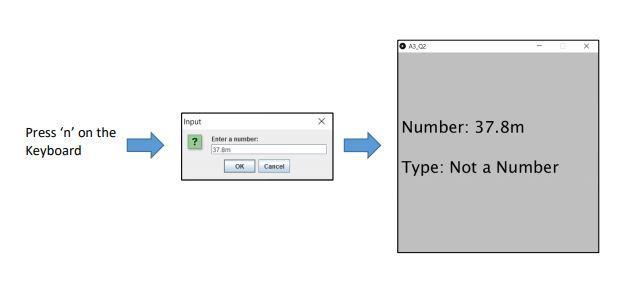
Tips:
- Use IF-then-else for applying the condition
- use void keyPressed() for making the dialogue box appear when key 'n' is pressed
- use canvas size (500,500);
Please kindly use PROCESSING for answering the above java question.
Input x ? Enter a number: OK Cancel A3_02 Number: 3 Type: int input Press 'n' on the Keyboard Enter a number: 32 Number: 3.2 OK Cancel Type: float A3.02 Input Number: 37.8m Press 'n' on the Keyboard ? Enter a number: 37. OK Cancel Type: Not a Number
Step by Step Solution
There are 3 Steps involved in it

Get step-by-step solutions from verified subject matter experts
 Study Help