







Question: Write a Java program which uses the LWJGL (Lightweight Java Game Library) library to draw a window of 640x480 in the center of the screen.
Write a Java program which uses the LWJGL (Lightweight Java Game Library) library to draw a window of 640x480 in the center of the screen.
.
.
Here's how to setup LWJGL with netbeans.
http://wiki.lwjgl.org/wiki/Setting_Up_LWJGL_with_NetBeans.html
.
.
Your program should then read in coordinates from a file titled coordinates.txt and draw the primitives in the same window using the algorithms for each primitive as discussed in class.
.
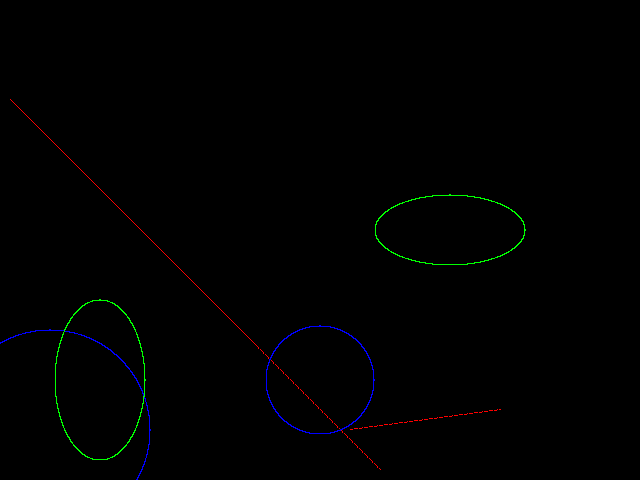
The program should draw the primitives in different colors (red for lines, blue for circles and green for ellipses) on a black background.
.
Use the glVertex2f() command to plot the primitives pixel by pixel.
,
Finally, your program should also use the input.Keyboard class to have the escape key quit your application.
.
.
The given coordinates.txt file will be in the following format:
l -15,-15 150,180 c 100,150 80 e 225,370 35,75 l -100,100 50,75 e 200,-100 50,50
l stands for a line and is followed by a space, this is then followed by the two endpoints of the line separated by a space.
.
c stands for a circle followed by a space, the center of the circle, space and then the radius of the circle.
.
e stands for ellipse followed by a space, center of the ellipse, space again followed by value of rx and ry(separated by a comma).
.
.
Here's the coordinates.txt file:
////////////////////////////////////////////////////////////
c 320,100 54 e 100,100 45,80 l 10,380 380,10 l 350,50 500,70 e 450,250 75,35 c 50,50 100
////////////////////////////////////////////////////////////
Here's the output:
Step by Step Solution
There are 3 Steps involved in it

Get step-by-step solutions from verified subject matter experts
 Study Help