







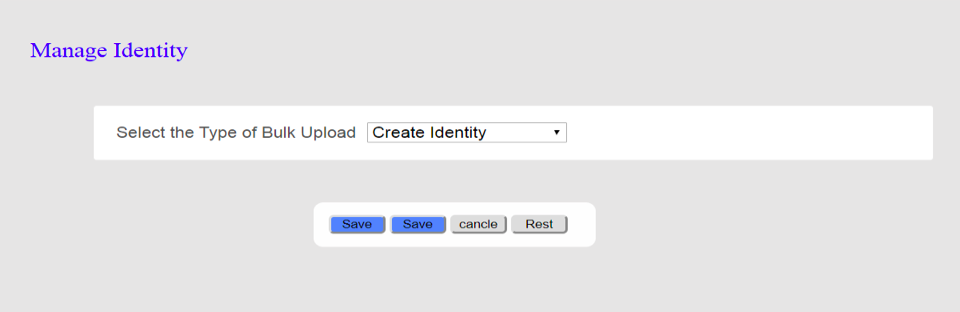
Question: WRITE A JAVASERVER FACES PROGRAM OF THE UI DESIGN BELOW . (WILL GUARANTEE A THUMBS UP) BELOW ARE INSTRUCTIONS: Need Help Creating screenshot image below
WRITE A JAVASERVER FACES PROGRAM OF THE UI DESIGN BELOW . (WILL GUARANTEE A THUMBS UP)
BELOW ARE INSTRUCTIONS:
Need Help Creating screenshot image below using JSF(JavaServes Faces)
*** PLEASE ALSO NOTICE THAT THERE IS TWO SAVE BUTTONS. ONE OF THE BUTTONS SHOULD BE "NEXT"
***When clicked on Next button ,Need to display the other form(SCREENSHOT) as below:
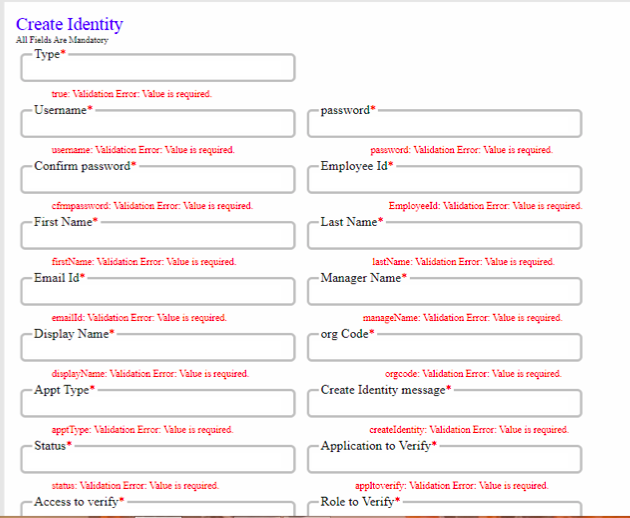
Manage Identity Select the Type of Bulk Upload Create Identity Save Save cancle Rest Create Identity All Fields Are Mandatory Type* true: Validation Error: Value is required Username password wemame: Validation Error: Value is required. - Confirm password* password: Validation Error: Value is required Employee Id* cimpazzuord: Validation Error: Value is required First Name* Employeeld: Validation Errer. Value is required. Last Name* firstName: Validation Error: Value is required. Email Id* lastName: Validation Error: Value is required Manager Name* emailld: Validation Error Valve is required. -Display Name manageName: Validation Error: Value is required org Code displayName: Validation Error: Value is required. -Appt Type orgcode: Validation Error: Value is required Create Identity message* appt Type: Validation Error: Value is required -Status* createIdentity: Validation Error: Value is required Application to Verify status: Validation Error: Value is required Access to verify appltoverify: Validation Error: Valve is required. Role to Verify*
Step by Step Solution
There are 3 Steps involved in it

Get step-by-step solutions from verified subject matter experts
 Study Help