







Question: Write a linux bash shell script to perform a file backup In this project, you need to write a Linux Bash Shell script to perform
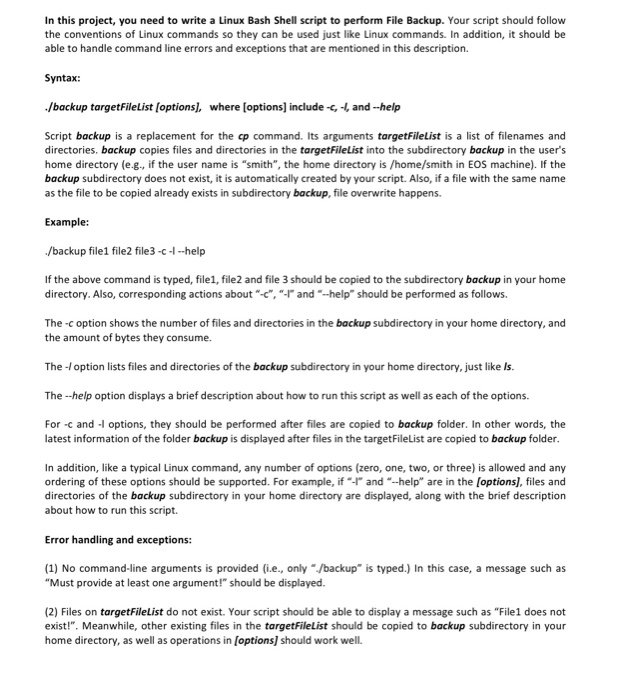
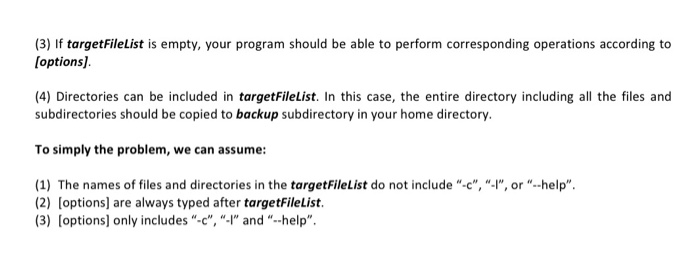
In this project, you need to write a Linux Bash Shell script to perform File Backup. Your script should follow the conventions of Linux commands so they can be used just like Linux commands. In addition, it should be able to handle command line errors and exceptions that are mentioned in this description. Syntax: /backup targetFileList [options, whre [options] include -c, - and-help Script backup is a replacement for the cp command. Its arguments targetFilelist is a list of filenames and directories. backup copies files and directories in the targetFileList into the subdirectory backup in the user's home directory (e.g., if the user name is "smith", the home directory is /home/smith in EOS machine). If the backup subdirectory does not exist, it is automatically created by your script. Also, if a file with the same name as the file to be copied already exists in subdirectory backup, file overwrite happens. Example: /backup file1 file2 file3-c-help If the above command is typed, file1, file2 and file 3 should be copied to the subdirectory backup in your home directory. Also, corresponding actions about "-c", andhelp should be performed as follows. The -c option shows the number of files and directories in the backup subdirectory in your home directory, and the amount of bytes they consume. The -Ioption lists files and directories of the backup subdirectory in your home directory, just like Is The -help option displays a brief description about how to run this script as well as each of the options. For -c and options, they should be performed after files are copied to backup folder. In other words, the latest information of the folder backup is displayed after files in the targetFileList are copied to backup folder In addition, like a typical Linux command, any number of options (zero, one, two, or three) is allowed and any ordering of these options should be supported. For example, if and"-help are in the [options], files and directories of the backup subdirectory in your home directory are displayed, along with the brief description about how to run this script. Error handling and exceptions: (1) No command-line arguments is provided (i.e., only /backup" is typed.) In this case, a message such as "Must provide at least one argument!" should be displayed. (2) Files on targetFileList do not exist. Your script should be able to display a message such as "File1 does not exist!". Meanwhile, other existing files in the targetFileList should be copied to backup subdirectory in your home directory, as well as operations in (options] should work well. In this project, you need to write a Linux Bash Shell script to perform File Backup. Your script should follow the conventions of Linux commands so they can be used just like Linux commands. In addition, it should be able to handle command line errors and exceptions that are mentioned in this description. Syntax: /backup targetFileList [options, whre [options] include -c, - and-help Script backup is a replacement for the cp command. Its arguments targetFilelist is a list of filenames and directories. backup copies files and directories in the targetFileList into the subdirectory backup in the user's home directory (e.g., if the user name is "smith", the home directory is /home/smith in EOS machine). If the backup subdirectory does not exist, it is automatically created by your script. Also, if a file with the same name as the file to be copied already exists in subdirectory backup, file overwrite happens. Example: /backup file1 file2 file3-c-help If the above command is typed, file1, file2 and file 3 should be copied to the subdirectory backup in your home directory. Also, corresponding actions about "-c", andhelp should be performed as follows. The -c option shows the number of files and directories in the backup subdirectory in your home directory, and the amount of bytes they consume. The -Ioption lists files and directories of the backup subdirectory in your home directory, just like Is The -help option displays a brief description about how to run this script as well as each of the options. For -c and options, they should be performed after files are copied to backup folder. In other words, the latest information of the folder backup is displayed after files in the targetFileList are copied to backup folder In addition, like a typical Linux command, any number of options (zero, one, two, or three) is allowed and any ordering of these options should be supported. For example, if and"-help are in the [options], files and directories of the backup subdirectory in your home directory are displayed, along with the brief description about how to run this script. Error handling and exceptions: (1) No command-line arguments is provided (i.e., only /backup" is typed.) In this case, a message such as "Must provide at least one argument!" should be displayed. (2) Files on targetFileList do not exist. Your script should be able to display a message such as "File1 does not exist!". Meanwhile, other existing files in the targetFileList should be copied to backup subdirectory in your home directory, as well as operations in (options] should work well
Step by Step Solution
There are 3 Steps involved in it

Get step-by-step solutions from verified subject matter experts
 Study Help