







Question: Write a matlab code to design a robotic arm with the following workspace and configuration space specifications. The robotic arm will have a certain number
Write a matlab code to design a robotic arm with the following workspace and
configuration space specifications. The robotic arm will have a certain number of
joints and links. You are free to use as many degrees of freedom as you want
according to the requirements. While designing this robot, keep in mind not to
make a redundant configuration space or maximum EXTRA joints are fine for
this assignment After designing the robotic arm, you are required to simulate it in
MATLAB, apply forward and inverse kinematics.Required Functions in your code:
Forward Kinematics function: Input will be the values of all joint coordinates
and output should be a pose transformation matrix
Forward Kinematics function: Input will be the values of all joint coordinates
and output should be a vector value of x y and z ie the position of end effector in
D space Describe singular points if any in your configurations.
Inverse Kinematics function: You are required to write a function for inverse
kinematic. Input to function: Cartesian coordinates to any point, and output will be
the joint coordinates required to reach that point ie function will take any
configurationpose of end effector and find out all joint coordinates for that pose.
GUI:
GUI is not required but marking will be relevant based on efforts. Therefore, if
GUI is present credit will be given.
Plots and Visualization:
Plot results of forward kinematics by running it in a loop and plotting all the
posespositions of end effector that can occur. This loop will take time to
process and plot, do not worry
Plot your robot link structure using the dh table.
Any other plots that you can think of Configuration Space:
You can use any combination of revolute and prismatic joints. You can use as
many numbers of joints as you want. Although you will have to justify your
configuration space and every joint that you will add in your arm. So think
carefully while designing and do not make your space redundant.Workspace:
It is understood that above functions should only operate inside workspace.
Hint: You need validation checks for this
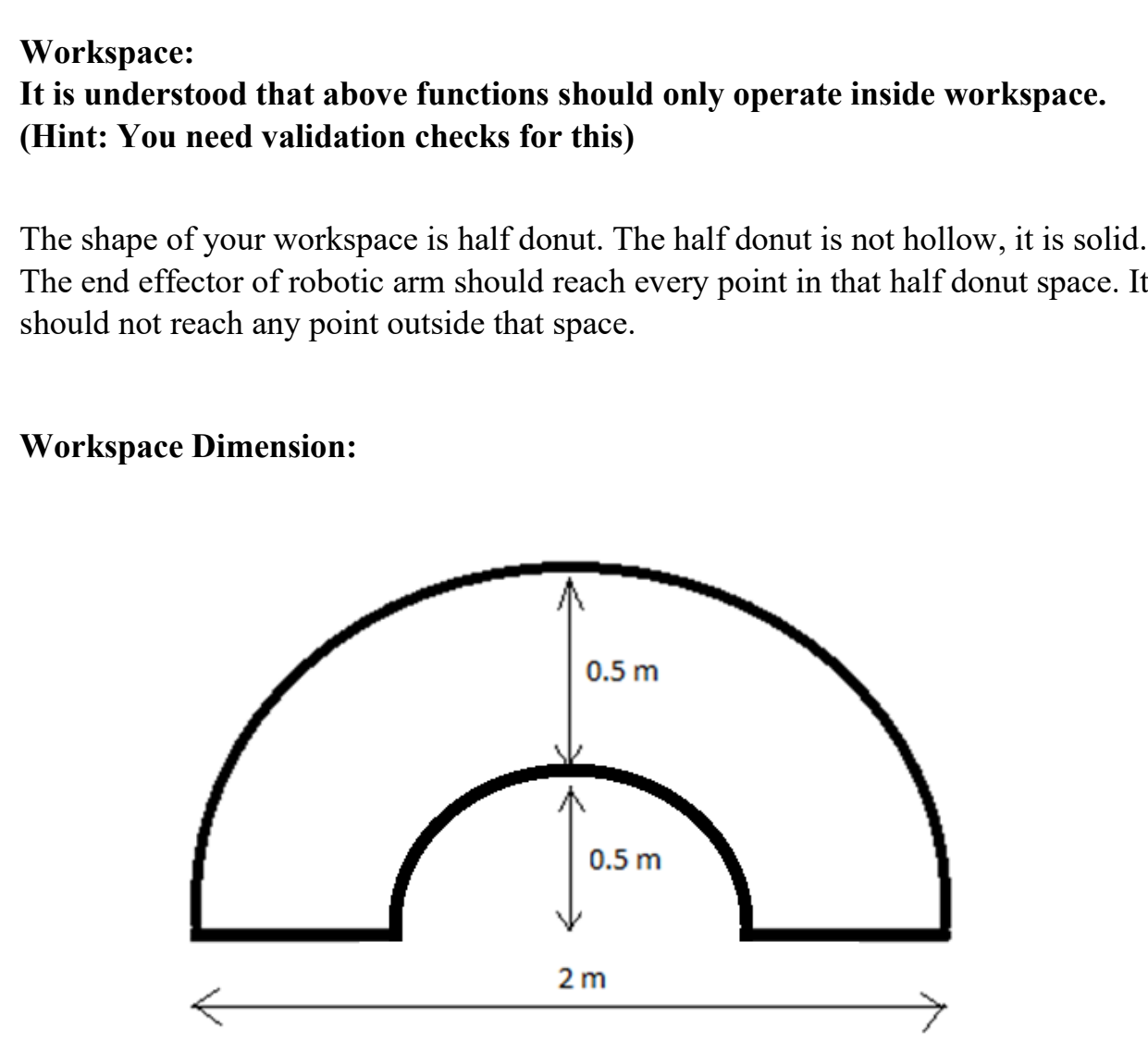
The shape of your workspace is half donut. The half donut is not hollow, it is solid.
The end effector of robotic arm should reach every point in that half donut space. It
should not reach any point outside that space.
Workspace:
It is understood that above functions should only operate inside workspace. Hint: You need validation checks for this
The shape of your workspace is half donut. The half donut is not hollow, it is solid. The end effector of robotic arm should reach every point in that half donut space. It should not reach any point outside that space.
Woulromonn nimmoninn. #matlab
Step by Step Solution
There are 3 Steps involved in it
1 Expert Approved Answer
Step: 1 Unlock

Question Has Been Solved by an Expert!
Get step-by-step solutions from verified subject matter experts
Step: 2 Unlock
Step: 3 Unlock
 Study Help