







Question: Write a MATLAB GUI code to upload any image and enable the user to apply basic image processing methods. The required main methods are:
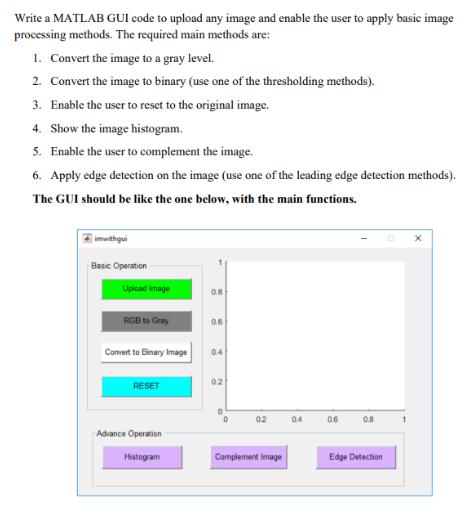
Write a MATLAB GUI code to upload any image and enable the user to apply basic image processing methods. The required main methods are: 1. Convert the image to a gray level. 2. Convert the image to binary (use one of the thresholding methods). 3. Enable the user to reset to the original image. 4. Show the image histogram. 5. Enable the user to complement the image. 6. Apply edge detection on the image (use one of the leading edge detection methods). The GUI should be like the one below, with the main functions. imwithgui Basic Operation Upload Image RGB to Gray Convert to Binary Image RESET Advance Operation Histogram 0.8 0.6 04 02 02 Complement Image 04 0.6 0.8 Edge Detection 1
Step by Step Solution
There are 3 Steps involved in it
Heres the stepbystep breakdown of the MATLAB code Create a new MATLAB function called imwithgui using the MATLAB Editor Inside the imwithgui function create the GUI figure using the figure function Se... View full answer

Get step-by-step solutions from verified subject matter experts
 Study Help