







Question: Write a MATLAB main function that will call subfunctions to accomplish the task described below. All code must be contained within a single m -
Write a MATLAB main function that will call subfunctions to accomplish the task described below.
All code must be contained within a single mfile and you should submit your lab mfile using Canvas.
Unless specified, you can handle the flow of the program however you choose.
Feel free to discuss the assignment, but you must do your own work.
Do not echo the results of the tasks below to the MATLAB Command Window.
Comment your work.
In mechanical testing, load cells and extensometers are often used to measure the response of a specimen to
loading. A load cell outputs a voltage that can be calibrated to measure load ie force on a specimen.
Extensometers output a voltage that can be calibrated to measure the distance between the two extensometer
arms, which, when in contact with the specimen, will move when the specimen deforms and can be used to
measure specimen deformation.
A cylindrical specimen SI was glued into end caps for mechanical testing and tested using a transient
loading protocol consisting of a series of trapezoidal loading pulses followed by recovery periods. Deformation
data was collected using one load cell and extensometers: one extensometer was mounted across the
specimen end caps to record axial deformation and two and : were mounted in contact with the specimen
to record deformation in two transverse directions. Data was collected at for the length of the test eg
data was collected every for a time period before the specimens were loaded and then until the final
recovery period ended Extensometer data was recorded in after being converted from voltage and load
data was recorded in after being converted from voltage
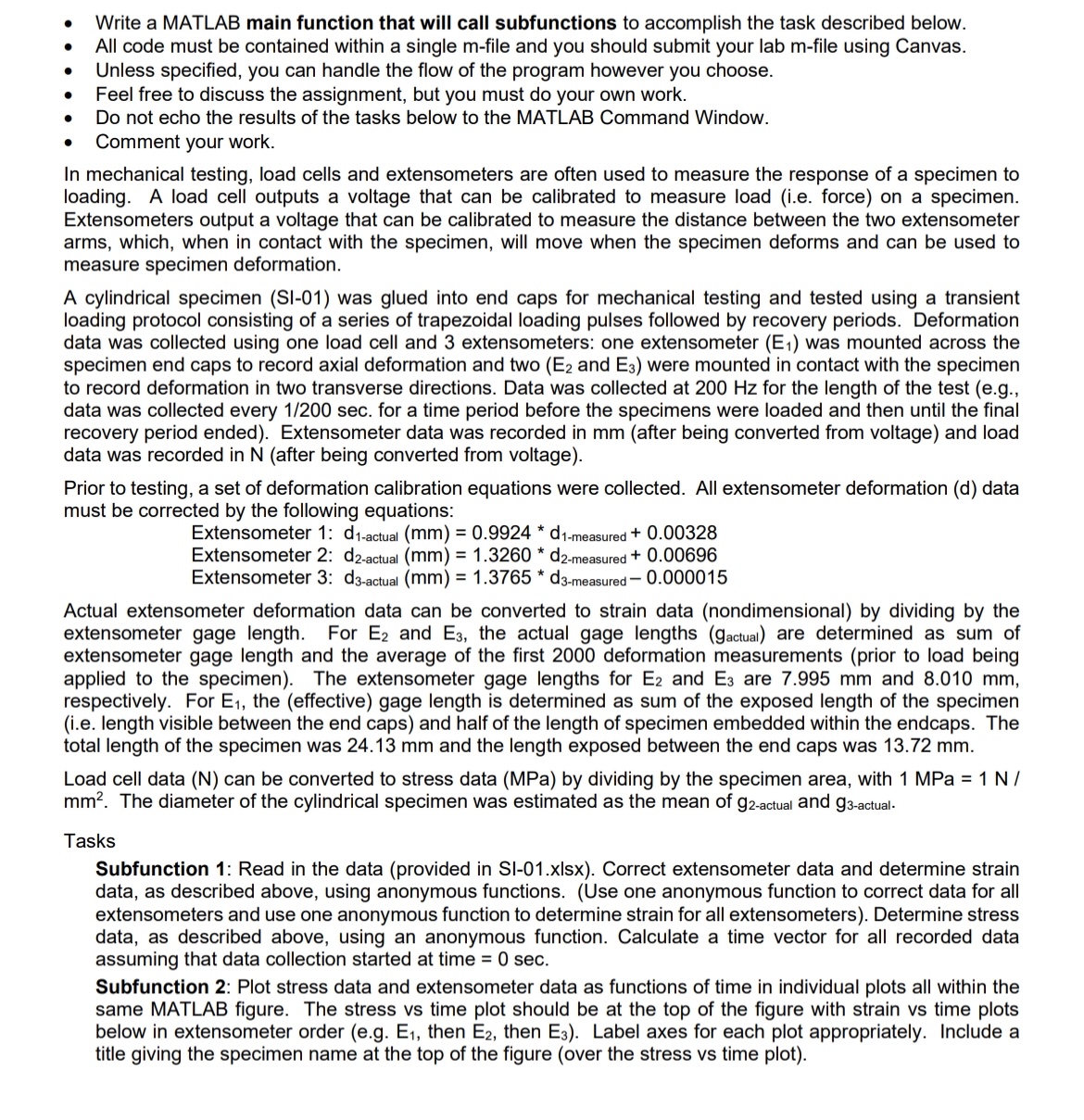
Prior to testing, a set of deformation calibration equations were collected. All extensometer deformation d data
must be corrected by the following equations:
Extensometer :
Extensometer :
Extensometer :
Actual extensometer deformation data can be converted to strain data nondimensional by dividing by the
extensometer gage length. For and the actual gage lengths gactual are determined as sum of
extensometer gage length and the average of the first deformation measurements prior to load being
applied to the specimen The extensometer gage lengths for and are and
respectively. For the effective gage length is determined as sum of the exposed length of the specimen
ie length visible between the end caps and half of the length of specimen embedded within the endcaps. The
total length of the specimen was and the length exposed between the end caps was
Load cell data can be converted to stress data by dividing by the specimen area, with MPa
The diameter of the cylindrical specimen was estimated as the mean of and
Tasks
Subfunction : Read in the data provided in SIxIsx Correct extensometer data and determine strain
data, as described above, using anonymous functions. Use one anonymous function to correct data for all
extensometers and use one anonymous function to determine strain for all extensometers Determine stress
data, as described above, using an anonymous function. Calculate a time vector for all recorded data
assuming that data collection started at time
Subfunction : Plot stress data and extensometer data as functions of time in individual plots all within the
same MATLAB figure. The stress vs time plot should be at the top of the figure with strain vs time plots
below in extensometer order eg then then Label axes for each plot appropriately. Include a
title giving the specimen name at the top of the figure over the stress vs time plot
Step by Step Solution
There are 3 Steps involved in it
1 Expert Approved Answer
Step: 1 Unlock

Question Has Been Solved by an Expert!
Get step-by-step solutions from verified subject matter experts
Step: 2 Unlock
Step: 3 Unlock
 Study Help