







Question: Write a MIPS calculator for floating point numbers. First, write four procedures: addCalc: This procedure will add two floating point numbers (in Sf12 and Sf13)
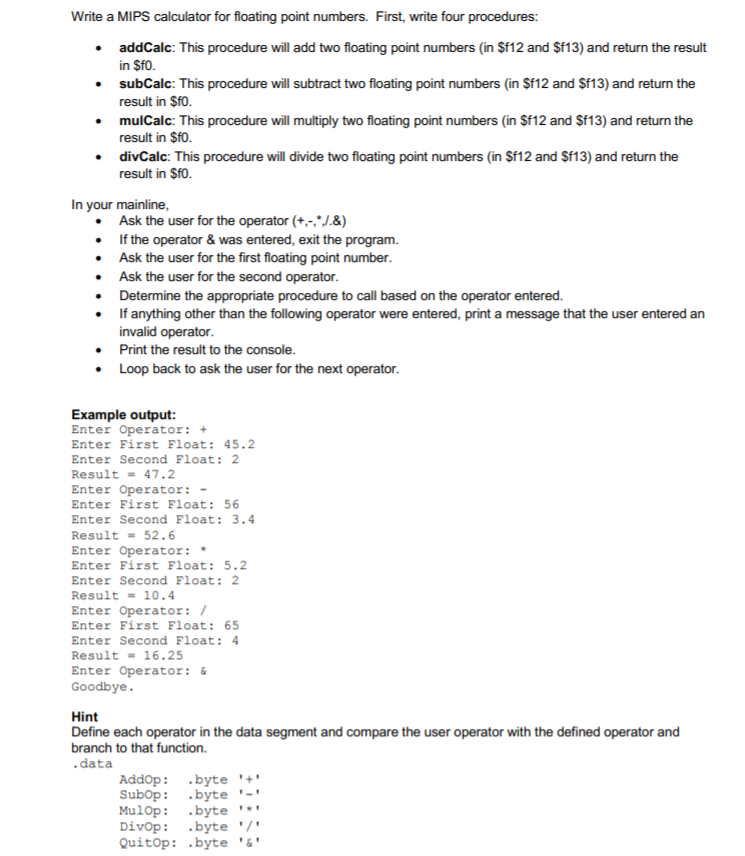
Write a MIPS calculator for floating point numbers. First, write four procedures: addCalc: This procedure will add two floating point numbers (in Sf12 and Sf13) and return the result in SfO. subCalc: This procedure will subtract two floating point numbers (in Sf12 and Sf13) and return the result in $f0. mulCalc: This procedure will multiply two floating point numbers (in Sf12 and Sf13) and return the result in $f0. divCalc: This procedure will divide two floating point numbers (in Sf12 and Sf13) and return the result in $f0. In your mainline Ask the user for the operator +.J.&) . If the operator & was entered, exit the program. .Ask the user for the first floating point number Ask the user for the second operator Determine the appropriate procedure to call based on the operator entered. .If anything other than the following operator were entered, print a message that the user entered an invalid operator Print the result to the console Loop back to ask the user for the next operator Example output: Enter Operator: + Enter First Float: 45.2 Enter Second Float: 2 Result47.2 Enter Operator: - Enter First Float: 56 Enter Second Float: 3.4 Result-52.6 Enter Operator: Enter First Float: 5.2 Enter Second Float: 2 Result-10.4 Enter Operator: I Enter First Float: 65 Enter Second Float: 4 Result-16.25 Enter Operator: Goodbye 5 5 5 Hint Define each operator in the data segment and compare the user operator with the defined operator and branch to that function. .data Addop: .byte Subop: byte-' MulOp: .byte '*' Divop: .byte'7 Quitop: .byte & Write a MIPS calculator for floating point numbers. First, write four procedures: addCalc: This procedure will add two floating point numbers (in Sf12 and Sf13) and return the result in SfO. subCalc: This procedure will subtract two floating point numbers (in Sf12 and Sf13) and return the result in $f0. mulCalc: This procedure will multiply two floating point numbers (in Sf12 and Sf13) and return the result in $f0. divCalc: This procedure will divide two floating point numbers (in Sf12 and Sf13) and return the result in $f0. In your mainline Ask the user for the operator +.J.&) . If the operator & was entered, exit the program. .Ask the user for the first floating point number Ask the user for the second operator Determine the appropriate procedure to call based on the operator entered. .If anything other than the following operator were entered, print a message that the user entered an invalid operator Print the result to the console Loop back to ask the user for the next operator Example output: Enter Operator: + Enter First Float: 45.2 Enter Second Float: 2 Result47.2 Enter Operator: - Enter First Float: 56 Enter Second Float: 3.4 Result-52.6 Enter Operator: Enter First Float: 5.2 Enter Second Float: 2 Result-10.4 Enter Operator: I Enter First Float: 65 Enter Second Float: 4 Result-16.25 Enter Operator: Goodbye 5 5 5 Hint Define each operator in the data segment and compare the user operator with the defined operator and branch to that function. .data Addop: .byte Subop: byte-' MulOp: .byte '*' Divop: .byte'7 Quitop: .byte &
Step by Step Solution
There are 3 Steps involved in it

Get step-by-step solutions from verified subject matter experts
 Study Help