







Question: Write a MIPS program to rearrange an array such that even positioned numbers are greater than odd. Prompt the user to input a number from
Write a MIPS program to rearrange an array such that even positioned numbers are greater
than odd.
Prompt the user to input a number from to Store it in variable X
Prompt the user to input a number from to Store it in variable Y
Exit if the number is not an integer and not within the desired range
Create a random array of X integers where the max value of the integer is Y
You will use the syscall procedure SysAlloc in SysCalls.asm to dynamically
allocate an array with X elements in the heap. This is similar to the malloc
function.
Then you will use the syscall RandomIntRange in SysCalls.asm to generate
random integers.
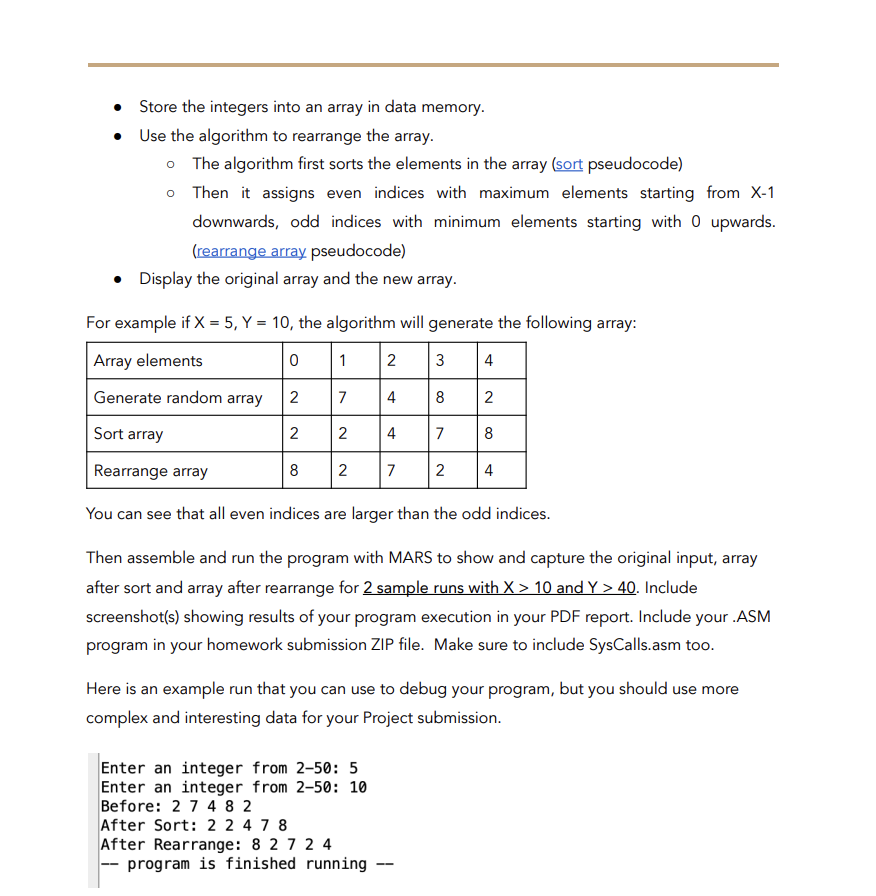
Store the integers into an array in data memory.
Use the algorithm to rearrange the array.
The algorithm first sorts the elements in the array sort pseudocode
Then it assigns even indices with maximum elements starting from X
downwards, odd indices with minimum elements starting with upwards.
rearrange array pseudocode
Display the original array and the new array.
For example if X Y the algorithm will generate the following array:
Array elements
Generate random array
Sort array
Rearrange array
You can see that all even indices are larger than the odd indices.
Then assemble and run the program with MARS to show and capture the original input, array
after sort and array after rearrange for sample runs with X and Y Include
screenshots showing results of your program execution in your PDF report. Include your ASM
program in your homework submission ZIP file. Make sure to include SysCalls.asm too.
Here is an example run that you can use to debug your program, but you should use more
complex and interesting data for your Project submission.
Step by Step Solution
There are 3 Steps involved in it
1 Expert Approved Answer
Step: 1 Unlock

Question Has Been Solved by an Expert!
Get step-by-step solutions from verified subject matter experts
Step: 2 Unlock
Step: 3 Unlock
 Study Help