







Question: Write a program called sales.py that uses a list to hold the sums of the sales for each month. The list will have 12 items
Write a program called sales.py that uses a list to hold the sums of the sales for each month. The list will have 12 items with index 0 corresponds with month of Jan, index 1 with month Feb, etc. o Write a function called Convert() which is passed a string which is a month name (ex. Jan) and returns the matching index (ex. 0). Hint use a list of strings to hold the months in the correct order, e.g., months = [Jan, Feb, ] o
Month Name Index
Jan 0
Feb 1
Mar 2
Apr 3
May 4
Jun 5
Jul 6
Aug 7
Sep 8
Oct 9
Nov 10
Dec 11
Download the text file sales.txt from Blackboard and put it in your PyCharm project folder. Open and read the file which contains an unknown number of data sets. Each data set contains a month name on one line and the sales for the month on the second line. Because of this format, reading the file using a simple for loop can be tricky (because you have to read two lines to obtain one record). As a result you may want to call the readline() function and use a while loop (calling the readline() function twice). Note readline() does not strip off the newline character at the end of the line, so you will need to strip this off your string (using the replace( , ) function).
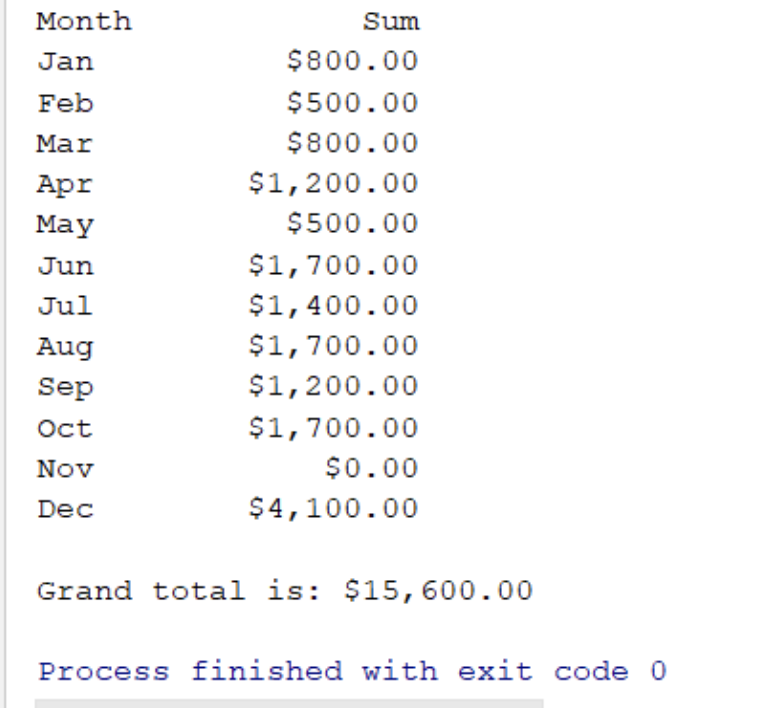
Using a list with 12 floating point numbers to accumulate your sales by month. As you read each pair of data, call the Convert() function to index the list and update the correct sale sum in the lists of sums by month. Compute the grand total of all sales.
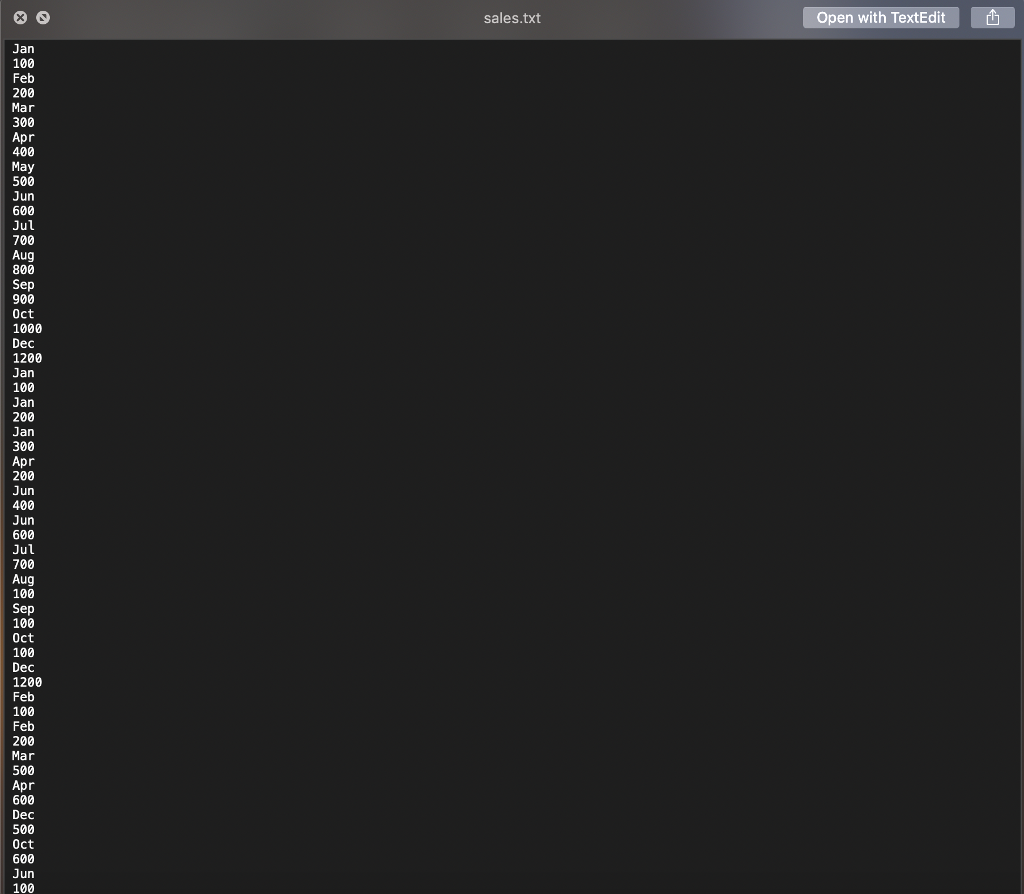
sales.txt Open with TextEdit Jan 100 Feb 200 Mar 300 Apr 400 May 500 Jun 600 700 Aug 800 900 Oct 1000 Dec 1200 Jan 100 Jan 200 Jan 300 Apr 200 Jun 400 Jun 600 700 Aug 100 Sep 100 Oct 100 Dec 1200 Feb 100 Feb 200 Mar 500 Apr 600 Dec 500 0ct 600 Jun 100
Step by Step Solution
There are 3 Steps involved in it

Get step-by-step solutions from verified subject matter experts
 Study Help