







Question: GPA Calculator (gpa_calculator.py) You've decided to build a program to track your Grade Point Average (GPA). Your program will prompt the user to enter
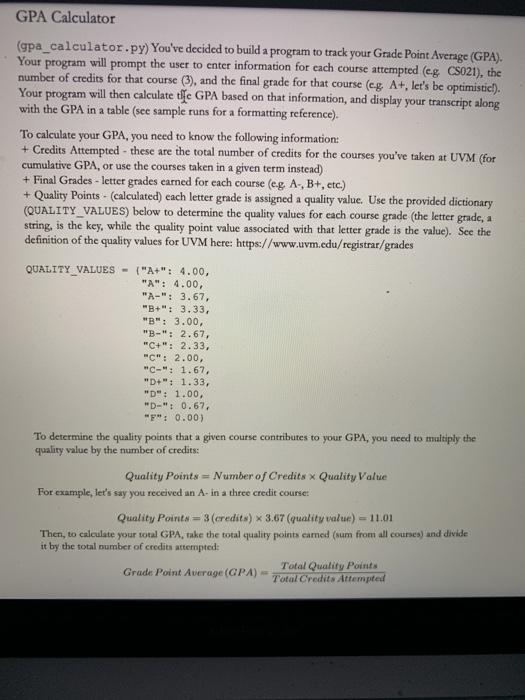
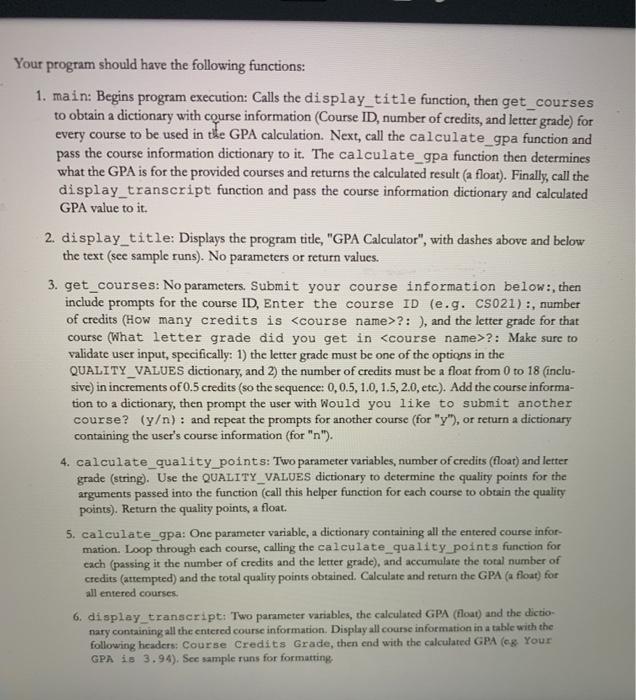
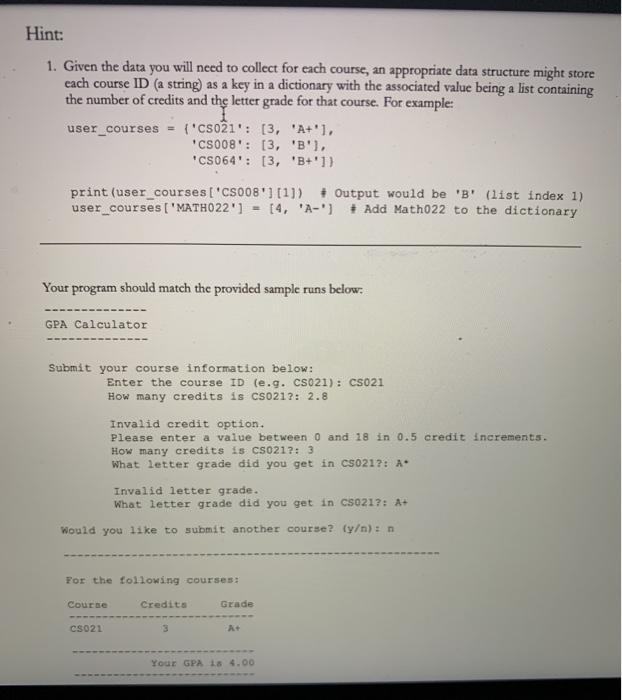
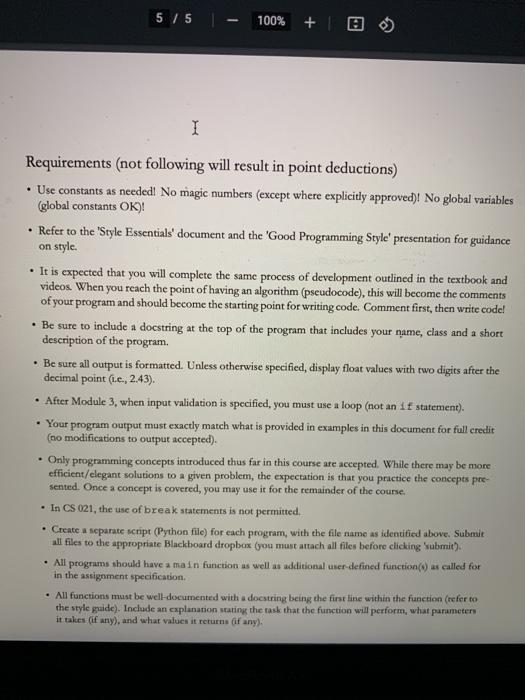
GPA Calculator (gpa_calculator.py) You've decided to build a program to track your Grade Point Average (GPA). Your program will prompt the user to enter information for each course attempted (eg. CS021), the number of credits for that course (3), and the final grade for that course (eg, A+, let's be optimistic!). Your program will then calculate the GPA based on that information, and display your transcript along with the GPA in a table (see sample runs for a formatting reference). To calculate your GPA, you need to know the following information: + Credits Attempted - these are the total number of credits for the courses you've taken at UVM (for cumulative GPA, or use the courses taken in a given term instead) + Final Grades - letter grades earned for each course (eg. A-, B+, etc.) + Quality Points - (calculated) each letter grade is assigned a quality value. Use the provided dictionary (QUALITY VALUES) below to determine the quality values for each course grade (the letter grade, a string, is the key, while the quality point value associated with that letter grade is the value). See the definition of the quality values for UVM here: https://www.uvm.edu/registrar/grades QUALITY VALUES - ("A+": 4.00, "A": 4.00, "A-": 3.67, "B+": 3.33, "B": 3.00, "B-": 2.67, "C+": 2.33, "C": 2.00, "C-": 1.67, "D+": 1.33, "D": 1.00, "D-": 0.67, "F": 0.00) To determine the quality points that a given course contributes to your GPA, you need to multiply the quality value by the number of credits: Quality Points = Number of Credits x Quality Value For example, let's say you received an A- in a three credit course: Quality Points=3 (credits) x 3.67 (quality value) = 11.01 Then, to calculate your total GPA, take the total quality points earned (sum from all courses) and divide it by the total number of credits attempted: Grade Point Average (GPA) = Total Quality Points Total Credits Attempted Your program should have the following functions: 1. main: Begins program execution: Calls the display_title function, then get_courses to obtain a dictionary with course information (Course ID, number of credits, and letter grade) for every course to be used in the GPA calculation. Next, call the calculate_gpa function and pass the course information dictionary to it. The calculate_gpa function then determines what the GPA is for the provided courses and returns the calculated result (a float). Finally, call the display_transcript function and pass the course information dictionary and calculated GPA value to it. 2. display_title: Displays the program title, "GPA Calculator", with dashes above and below the text (see sample runs). No parameters or return values. 3. get_courses: No parameters. Submit your course information below:, then include prompts for the course ID, Enter the course ID (e.g. CS021):, number of credits (How many credits is ?: ), and the letter grade for that course (What letter grade did you get in ?: Make sure to validate user input, specifically: 1) the letter grade must be one of the options in the QUALITY_VALUES dictionary, and 2) the number of credits must be a float from 0 to 18 (inclu- sive) in increments of 0.5 credits (so the sequence: 0, 0.5, 1.0, 1.5, 2.0, etc.). Add the course informa- tion to a dictionary, then prompt the user with Would you like to submit another course? (y/n): and repeat the prompts for another course (for "y"), or return a dictionary containing the user's course information (for "n"). 4. calculate quality_points: Two parameter variables, number of credits (float) and letter grade (string). Use the QUALITY VALUES dictionary to determine the quality points for the arguments passed into the function (call this helper function for each course to obtain the quality points). Return the quality points, a float. 5. calculate_gpa: One parameter variable, a dictionary containing all the entered course infor- mation. Loop through each course, calling the calculate_quality_points function for each (passing it the number of credits and the letter grade), and accumulate the total number of credits (attempted) and the total quality points obtained. Calculate and return the GPA (a float) for all entered courses. 6. display_transcript: Two parameter variables, the calculated GPA (float) and the dictio nary containing all the entered course information. Display all course information in a table with the following headers: Course Credits Grade, then end with the calculated GPA (eg. Your GPA is 3.94). See sample runs for formatting. Hint: 1. Given the data you will need to collect for each course, an appropriate data structure might store each course ID (a string) as a key in a dictionary with the associated value being a list containing the number of credits and the letter grade for that course. For example: user_courses ('CS021': [3, 'A+'1, 'CS008': [3, 'B'), 'CS064': [3, 'B+']) print (user_courses ['CS008'] [1]) # Output would be 'B' (list index 1) user_courses ['MATH022'] = [4, 'A-'] # Add Math022 to the dictionary Your program should match the provided sample runs below: GPA Calculator Submit your course information below: Enter the course ID (e.g. CS021): CS021 How many credits is CS021?: 2.8 Invalid letter grade. What letter grade did you get in CS0217: A+ Would you like to submit another course? (y/n): n Invalid credit option. Please enter a value between 0 and 18 in 0.5 credit increments. How many credits is CS021?: 3 What letter grade did you get in CS021?: A* For the following courses: Credits Course CS021 Grade A+ Your GPA 18 4.00 5/5 100% + I Requirements (not following will result in point deductions) Use constants as needed! No magic numbers (except where explicitly approved)! No global variables (global constants OK)! Refer to the 'Style Essentials' document and the 'Good Programming Style' presentation for guidance on style. It is expected that you will complete the same process of development outlined in the textbook and videos. When you reach the point of having an algorithm (pseudocode), this will become the comments of your program and should become the starting point for writing code. Comment first, then write code! Be sure to include a docstring at the top of the program that includes your name, class and a short description of the program. Be sure all output is formatted. Unless otherwise specified, display float values with two digits after the decimal point (L.e., 2.43). After Module 3, when input validation is specified, you must use a loop (not an if statement). Your program output must exactly match what is provided in examples in this document for full credit (no modifications to output accepted). Only programming concepts introduced thus far in this course are accepted. While there may be more efficient/elegant solutions to a given problem, the expectation is that you practice the concepts pre- sented. Once a concept is covered, you may use it for the remainder of the course. In CS 021, the use of break statements is not permitted. Create a separate script (Python file) for each program, with the file name as identified above. Submit all files to the appropriate Blackboard dropbox (you must attach all files before clicking 'submit). All programs should have a main function as well as additional user-defined function(s) as called for in the assignment specification. All functions must be well-documented with a docstring being the first line within the function (refer to the style guide). Include an explanation stating the task that the function will perform, what parameters it takes (if any), and what values it returns (if any). GPA Calculator (gpa_calculator.py) You've decided to build a program to track your Grade Point Average (GPA). Your program will prompt the user to enter information for each course attempted (eg. CS021), the number of credits for that course (3), and the final grade for that course (eg, A+, let's be optimistic!). Your program will then calculate the GPA based on that information, and display your transcript along with the GPA in a table (see sample runs for a formatting reference). To calculate your GPA, you need to know the following information: + Credits Attempted - these are the total number of credits for the courses you've taken at UVM (for cumulative GPA, or use the courses taken in a given term instead) + Final Grades - letter grades earned for each course (eg. A-, B+, etc.) + Quality Points - (calculated) each letter grade is assigned a quality value. Use the provided dictionary (QUALITY VALUES) below to determine the quality values for each course grade (the letter grade, a string, is the key, while the quality point value associated with that letter grade is the value). See the definition of the quality values for UVM here: https://www.uvm.edu/registrar/grades QUALITY VALUES - ("A+": 4.00, "A": 4.00, "A-": 3.67, "B+": 3.33, "B": 3.00, "B-": 2.67, "C+": 2.33, "C": 2.00, "C-": 1.67, "D+": 1.33, "D": 1.00, "D-": 0.67, "F": 0.00) To determine the quality points that a given course contributes to your GPA, you need to multiply the quality value by the number of credits: Quality Points = Number of Credits x Quality Value For example, let's say you received an A- in a three credit course: Quality Points=3 (credits) x 3.67 (quality value) = 11.01 Then, to calculate your total GPA, take the total quality points earned (sum from all courses) and divide it by the total number of credits attempted: Grade Point Average (GPA) = Total Quality Points Total Credits Attempted Your program should have the following functions: 1. main: Begins program execution: Calls the display_title function, then get_courses to obtain a dictionary with course information (Course ID, number of credits, and letter grade) for every course to be used in the GPA calculation. Next, call the calculate_gpa function and pass the course information dictionary to it. The calculate_gpa function then determines what the GPA is for the provided courses and returns the calculated result (a float). Finally, call the display_transcript function and pass the course information dictionary and calculated GPA value to it. 2. display_title: Displays the program title, "GPA Calculator", with dashes above and below the text (see sample runs). No parameters or return values. 3. get_courses: No parameters. Submit your course information below:, then include prompts for the course ID, Enter the course ID (e.g. CS021):, number of credits (How many credits is ?: ), and the letter grade for that course (What letter grade did you get in ?: Make sure to validate user input, specifically: 1) the letter grade must be one of the options in the QUALITY_VALUES dictionary, and 2) the number of credits must be a float from 0 to 18 (inclu- sive) in increments of 0.5 credits (so the sequence: 0, 0.5, 1.0, 1.5, 2.0, etc.). Add the course informa- tion to a dictionary, then prompt the user with Would you like to submit another course? (y/n): and repeat the prompts for another course (for "y"), or return a dictionary containing the user's course information (for "n"). 4. calculate quality_points: Two parameter variables, number of credits (float) and letter grade (string). Use the QUALITY VALUES dictionary to determine the quality points for the arguments passed into the function (call this helper function for each course to obtain the quality points). Return the quality points, a float. 5. calculate_gpa: One parameter variable, a dictionary containing all the entered course infor- mation. Loop through each course, calling the calculate_quality_points function for each (passing it the number of credits and the letter grade), and accumulate the total number of credits (attempted) and the total quality points obtained. Calculate and return the GPA (a float) for all entered courses. 6. display_transcript: Two parameter variables, the calculated GPA (float) and the dictio nary containing all the entered course information. Display all course information in a table with the following headers: Course Credits Grade, then end with the calculated GPA (eg. Your GPA is 3.94). See sample runs for formatting. Hint: 1. Given the data you will need to collect for each course, an appropriate data structure might store each course ID (a string) as a key in a dictionary with the associated value being a list containing the number of credits and the letter grade for that course. For example: user_courses ('CS021': [3, 'A+'1, 'CS008': [3, 'B'), 'CS064': [3, 'B+']) print (user_courses ['CS008'] [1]) # Output would be 'B' (list index 1) user_courses ['MATH022'] = [4, 'A-'] # Add Math022 to the dictionary Your program should match the provided sample runs below: GPA Calculator Submit your course information below: Enter the course ID (e.g. CS021): CS021 How many credits is CS021?: 2.8 Invalid letter grade. What letter grade did you get in CS0217: A+ Would you like to submit another course? (y/n): n Invalid credit option. Please enter a value between 0 and 18 in 0.5 credit increments. How many credits is CS021?: 3 What letter grade did you get in CS021?: A* For the following courses: Credits Course CS021 Grade A+ Your GPA is 4.00 5/5 100% + I Requirements (not following will result in point deductions) Use constants as needed! No magic numbers (except where explicitly approved)! No global variables (global constants OK)! Refer to the 'Style Essentials' document and the 'Good Programming Style' presentation for guidance on style. It is expected that you will complete the same process of development outlined in the textbook and videos. When you reach the point of having an algorithm (pseudocode), this will become the comments of your program and should become the starting point for writing code. Comment first, then write code! Be sure to include a docstring at the top of the program that includes your name, class and a short description of the program. Be sure all output is formatted. Unless otherwise specified, display float values with two digits after the decimal point (L.e., 2.43). After Module 3, when input validation is specified, you must use a loop (not an if statement). Your program output must exactly match what is provided in examples in this document for full credit (no modifications to output accepted). Only programming concepts introduced thus far in this course are accepted. While there may be more efficient/elegant solutions to a given problem, the expectation is that you practice the concepts pre- sented. Once a concept is covered, you may use it for the remainder of the course. In CS 021, the use of break statements is not permitted. Create a separate script (Python file) for each program, with the file name as identified above. Submit all files to the appropriate Blackboard dropbox (you must attach all files before clicking 'submit). All programs should have a main function as well as additional user-defined function(s) as called for in the assignment specification. All functions must be well-documented with a docstring being the first line within the function (refer to the style guide). Include an explanation stating the task that the function will perform, what parameters it takes (if any), and what values it returns (if any).
Step by Step Solution
3.40 Rating (162 Votes )
There are 3 Steps involved in it
defining dictionaty of quality values to be used in program QUALITYVALUES A400 A400 A367 B333 B300 B267 C233 C200 C167 D133 D100 D067 F000 function to display title def displaytitle print print GPA Ca... View full answer

Get step-by-step solutions from verified subject matter experts
 Study Help