







Question: Write a program in Python and comment each step Only use the most basic functions and loops, such as the 'format' function, 'while', 'for', 'if',
Write a program in Python and comment each step
Only use the most basic functions and loops, such as the 'format' function, 'while', 'for', 'if', and 'else' loops.
Do not display something like this in your program print("{:4d}".format(i+j), end="")
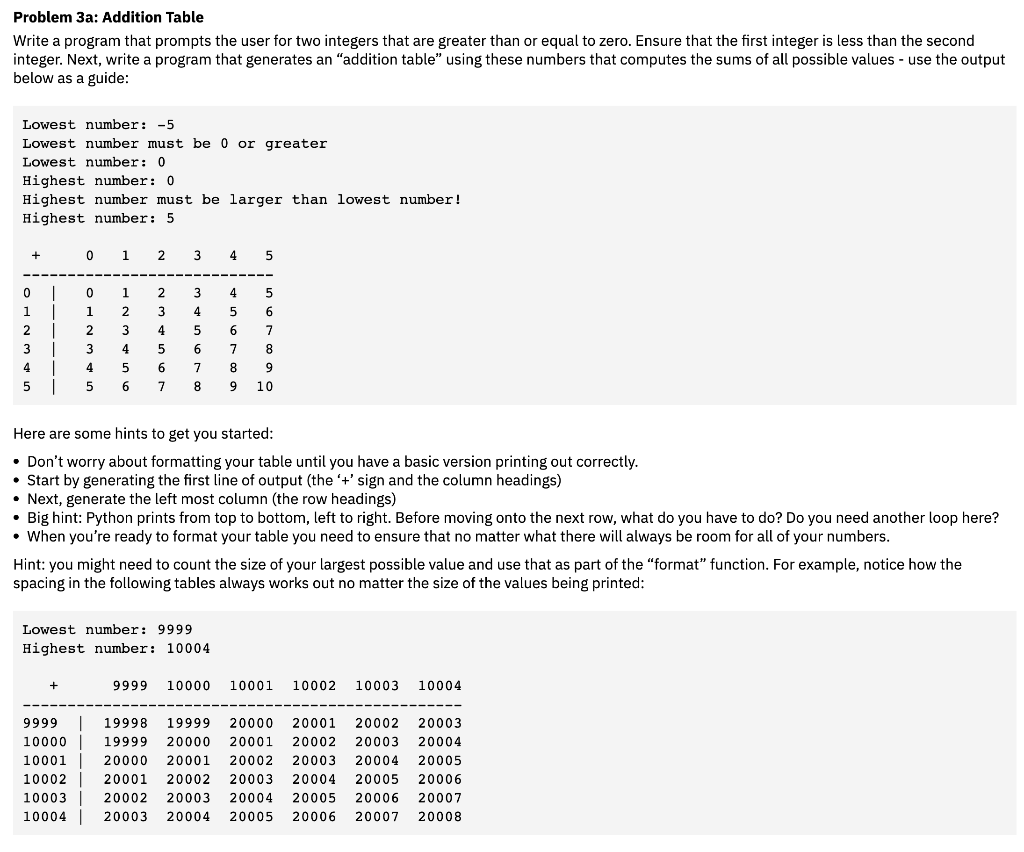
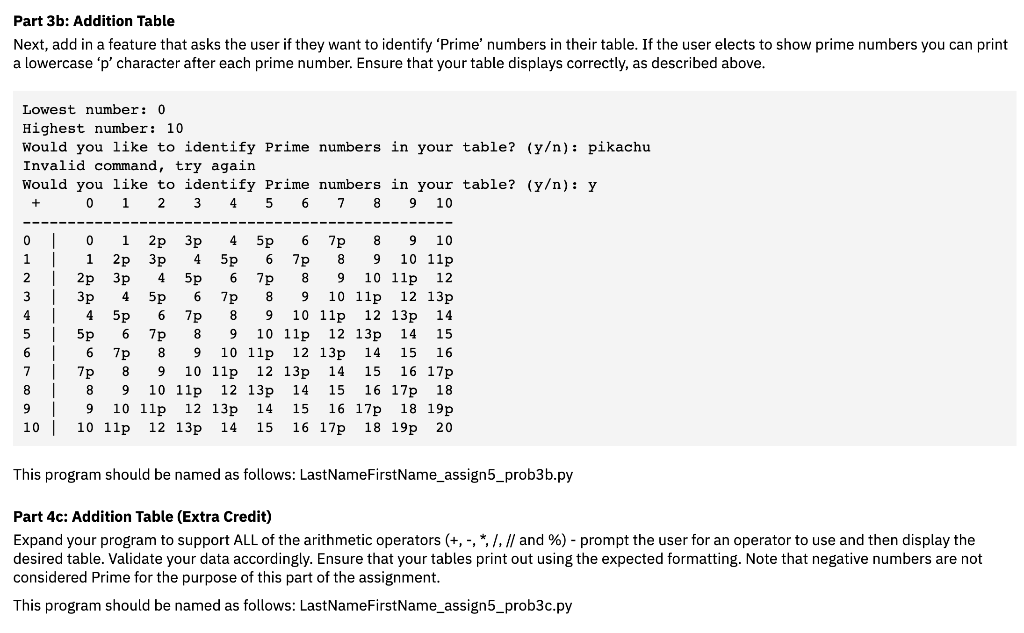
Problem 3a: Addition Table Write a program that prompts the user for two integers that are greater than or equal to zero. Ensure that the first integer is less than the second integer. Next, write a program that generates an addition table" using these numbers that computes the sums of all possible values - use the output below as a guide: Here are some hints to get you started: - Don't worry about formatting your table until you have a basic version printing out correctly. - Start by generating the first line of output (the '+' sign and the column headings) - Next, generate the left most column (the row headings) - Big hint: Python prints from top to bottom, left to right. Before moving onto the next row, what do you have to do? Do you need another loop here? - When you're ready to format your table you need to ensure that no matter what there will always be room for all of your numbers. Hint: you might need to count the size of your largest possible value and use that as part of the "format" function. For example, notice how the spacing in the following tables always works out no matter the size of the values being printed: Lowest number: 9999 Highest number: 10004 Part 3b: Addition Table Next, add in a feature that asks the user if they want to identify 'Prime' numbers in their table. If the user elects to show prime numbers you can print a lowercase ' p ' character after each prime number. Ensure that your table displays correctly, as described above. Lowest number: 0 Highest number: 10 Would you like to identify Prime numbers in your table? (y) : pikachu Invalid command, try again Would voll 1ikp to identifv Drime numbers in vour table? (y): y This program should be named as follows: LastNameFirstName_assign5_prob3b.py Part 4c: Addition Table (Extra Credit) Expand your program to support ALL of the arithmetic operators (+,,,/,// and %) - prompt the user for an operator to use and then display the desired table. Validate your data accordingly. Ensure that your tables print out using the expected formatting. Note that negative numbers are not considered Prime for the purpose of this part of the assignment. This program should be named as follows: LastNameFirstName_assign5_prob3c.py
Step by Step Solution
There are 3 Steps involved in it

Get step-by-step solutions from verified subject matter experts
 Study Help