



Question: Write a program that computes the balance of a customer's bank account based on a transaction type and the amount entered by user. The transaction
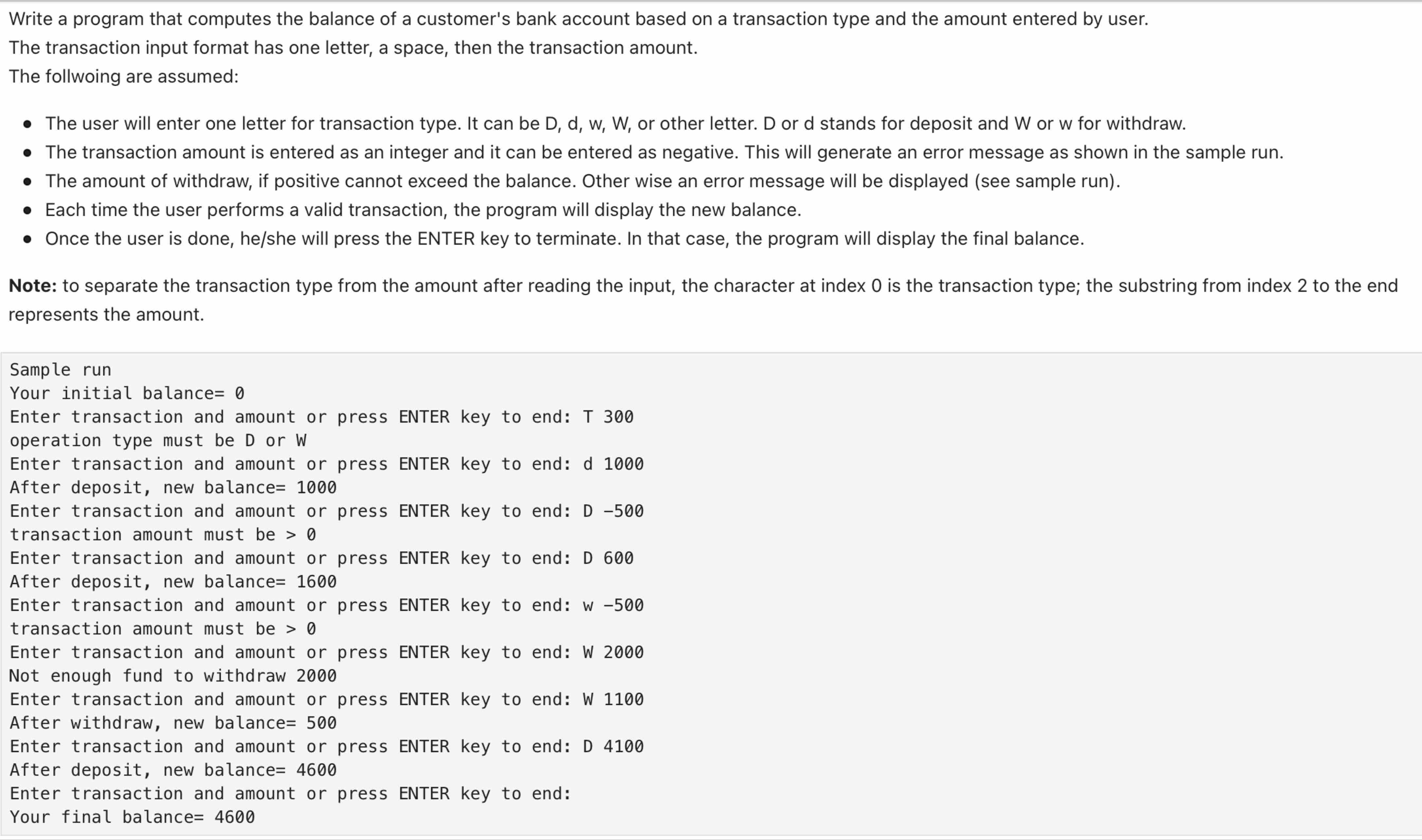
Write a program that computes the balance of a customer's bank account based on a transaction type and the amount entered by user.
The transaction input format has one letter, a space, then the transaction amount.
The follwoing are assumed:
The user will enter one letter for transaction type. It can be or other letter. D or d stands for deposit and W or w for withdraw.
The transaction amount is entered as an integer and it can be entered as negative. This will generate an error message as shown in the sample run.
The amount of withdraw, if positive cannot exceed the balance. Other wise an error message will be displayed see sample run
Each time the user performs a valid transaction, the program will display the new balance.
Once the user is done, heshe will press the ENTER key to terminate. In that case, the program will display the final balance.
Note: to separate the transaction type from the amount after reading the input, the character at index is the transaction type; the substring from index to the end
represents the amount.
Sample run
Your initial balance
Enter transaction and amount or press ENTER key to end: T
operation type must be or
Enter transaction and amount or press ENTER key to end:
After deposit, new balance
Enter transaction and amount or press ENTER key to end: D
transaction amount must be
Enter transaction and amount or press ENTER key to end: D
After deposit, new balance
Enter transaction and amount or press ENTER key to end:
transaction amount must be
Enter transaction and amount or press ENTER key to end: W
Not enough fund to withdraw
Enter transaction and amount or press ENTER key to end: W
After withdraw, new balance
Enter transaction and amount or press ENTER key to end: D
After deposit, new balance
Enter transaction and amount or press ENTER key to end:
Your final balance
Step by Step Solution
There are 3 Steps involved in it
1 Expert Approved Answer
Step: 1 Unlock

Question Has Been Solved by an Expert!
Get step-by-step solutions from verified subject matter experts
Step: 2 Unlock
Step: 3 Unlock