







Question: Write a program that explores the seating patterns related to course performance by using an array of student scores. The program should do the following:
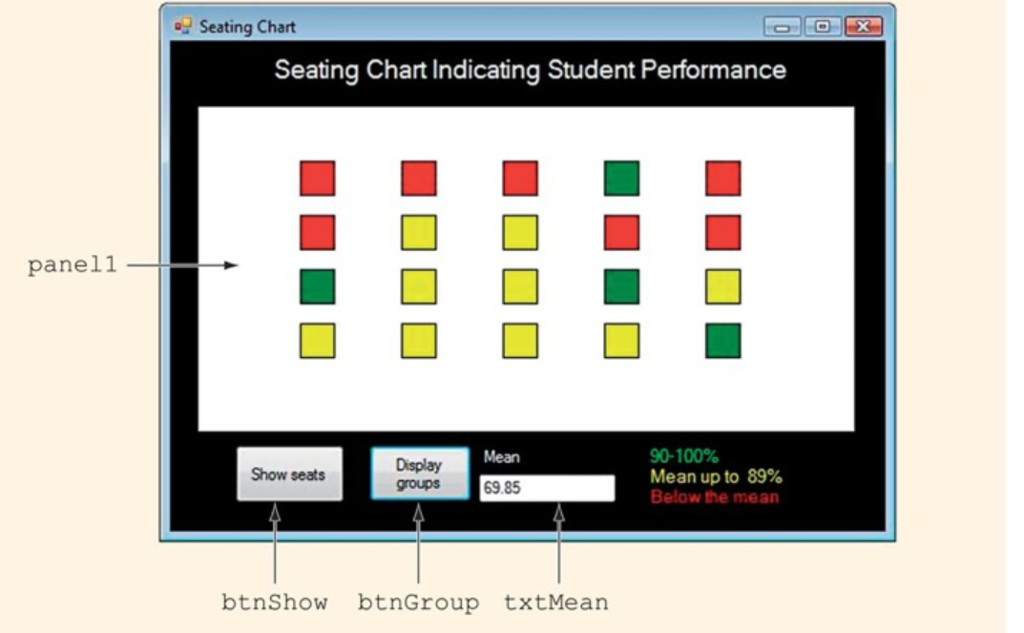
Write a program that explores the seating patterns related to course performance by using an array of student scores. The program should do the following: Draw a seating chart of the classroom. Show where people sit and use color coding on the seats to indicate the student's current level of performance. The color-coding scheme should be as follows: RedFor students who are below the class mean YellowFor students who are at or above the mean but below 90 percent GreenFor students who are in the top 10 percent The program should use the following: A two-dimensional array of student scores instead of a one-dimensional array. The two-dimensional array of scores having the same number of rows and columns as the arrangement of seats in the classroom. Save the program as Seating.cpp. Code so far ...ments\Class Info\Programing Files\Seating\Seating\Form1.h 1 #pragma once namespace Seating { using namespace System; using namespace System::ComponentModel; using namespace System::Collections; using namespace System::Windows::Forms; using namespace System::Data; using namespace System::Drawing; ///
/// Summary for MyForm ///
public ref class MyForm : public System::Windows::Forms:: Form { public: MyForm(void) { InitializeComponent(); // //TODO: Add the constructor code here // } protected: ///
/// Clean up any resources being used. ///
~MyForm() { if (components) { delete components; } } private: System::Windows::Forms:: Label^ label1; protected: private: System::Windows::Forms:: Label^ label2; private: System::Windows::Forms:: Label^ label3; private: System::Windows::Forms:: Label^ label4; private: System::Windows::Forms:: Label^ label5; private: System::Windows::Forms:: Button^ btnShow; private: System::Windows::Forms:: Button^ btnGroup; private: System::Windows::Forms:: TextBox^ txtMean; private: System::Windows::Forms:: Panel^ panel1; private: ///
...ments\Class Info\Programing Files\Seating\Seating\Form1.h 2 /// Required designer variable. ///
System::ComponentModel:: Container ^components; #pragma region Windows Form Designer generated code ///
/// Required method for Designer support - do not modify /// the contents of this method with the code editor. ///
void InitializeComponent(void) { this->label1 = (gcnew System::Windows::Forms:: Label()); this->label2 = (gcnew System::Windows::Forms:: Label()); this->label3 = (gcnew System::Windows::Forms:: Label()); this->label4 = (gcnew System::Windows::Forms:: Label()); this->label5 = (gcnew System::Windows::Forms:: Label()); this->btnShow = (gcnew System::Windows::Forms:: Button()); this->btnGroup = (gcnew System::Windows::Forms:: Button()); this->txtMean = (gcnew System::Windows::Forms:: TextBox()); this->panel1 = (gcnew System::Windows::Forms:: Panel()); this->SuspendLayout(); // // label1 // this->label1->AutoSize = true; this->label1->Font = (gcnew System::Drawing::Font(L"Microsoft Sans Serif", 16.2F, System::Drawing:: FontStyle::Regular, System::Drawing::GraphicsUnit::Point, static_cast(0))); this->label1->ForeColor = System::Drawing::SystemColors::ButtonHighlight; this->label1->Location = System::Drawing:: Point(71, 22); this->label1->Name = L"label1"; this->label1->Size = System::Drawing:: Size(594, 32); this->label1->TabIndex = 0; this->label1->Text = L"Seating Chart Indicating Student Performance"; // // label2 // this->label2->AutoSize = true; this->label2->ForeColor = System::Drawing::SystemColors::ButtonHighlight; this->label2->Location = System::Drawing:: Point(373, 428); this->label2->Name = L"label2"; this->label2->Size = System::Drawing:: Size(43, 17); this->label2->TabIndex = 1; this->label2->Text = L"Mean"; // ...ments\Class Info\Programing Files\Seating\Seating\Form1.h 3 // label3 // this->label3->AutoSize = true; this->label3->ForeColor = System::Drawing:: Color::Lime; this->label3->Location = System::Drawing:: Point(617, 395); this->label3->Name = L"label3"; this->label3->Size = System::Drawing:: Size(65, 17); this->label3->TabIndex = 2; this->label3->Text = L"90-100%"; // // label4 // this->label4->AutoSize = true; this->label4->ForeColor = System::Drawing:: Color::Yellow; this->label4->Location = System::Drawing:: Point(620, 428); this->label4->Name = L"label4"; this->label4->Size = System::Drawing:: Size(111, 17); this->label4->TabIndex = 3; this->label4->Text = L"Mean up to 89%"; // // label5 // this->label5->AutoSize = true; this->label5->ForeColor = System::Drawing:: Color::Red; this->label5->Location = System::Drawing:: Point(623, 465); this->label5->Name = L"label5"; this->label5->Size = System::Drawing:: Size(108, 17); this->label5->TabIndex = 4; this->label5->Text = L"Below the mean"; // // btnShow // this->btnShow->Location = System::Drawing:: Point(34, 429); this->btnShow->Name = L"btnShow"; this->btnShow->Size = System::Drawing:: Size(96, 53); this->btnShow->TabIndex = 5; this->btnShow->Text = L"Show Seats"; this->btnShow->UseVisualStyleBackColor = true; this->btnShow->Click += gcnew System::EventHandler(this, &MyForm::btnShow_Click); // // btnGroup // this->btnGroup->Location = System::Drawing:: Point(187, 428); this->btnGroup->Name = L"btnGroup"; this->btnGroup->Size = System::Drawing:: Size(96, 53); this->btnGroup->TabIndex = 6; this->btnGroup->Text = L"Display Groups"; this->btnGroup->UseVisualStyleBackColor = true; ...ments\Class Info\Programing Files\Seating\Seating\Form1.h 4 this->btnGroup->Click += gcnew System::EventHandler(this, &MyForm::btnGroup_Click); // // txtMean // this->txtMean->Location = System::Drawing:: Point(376, 465); this->txtMean->Name = L"txtMean"; this->txtMean->Size = System::Drawing:: Size(100, 22); this->txtMean->TabIndex = 7; // // panel1 // this->panel1->BackColor = System::Drawing::SystemColors::ButtonHighlight; this->panel1->Location = System::Drawing:: Point(34, 80); this->panel1->Name = L"panel1"; this->panel1->Size = System::Drawing:: Size(697, 303); this->panel1->TabIndex = 8; this->panel1->Paint += gcnew System::Windows::Forms:: PaintEventHandler(this, &MyForm::panel1_Paint); // // MyForm // this->AutoScaleDimensions = System::Drawing:: SizeF(8, 16); this->AutoScaleMode = System::Windows::Forms:: AutoScaleMode::Font; this->BackColor = System::Drawing:: SystemColors::ActiveCaptionText; this->ClientSize = System::Drawing:: Size(789, 511); this->Controls->Add(this->panel1); this->Controls->Add(this->txtMean); this->Controls->Add(this->btnGroup); this->Controls->Add(this->btnShow); this->Controls->Add(this->label5); this->Controls->Add(this->label4); this->Controls->Add(this->label3); this->Controls->Add(this->label2); this->Controls->Add(this->label1); this->Name = L"MyForm"; this->Text = L"Seating Chart"; this->ResumeLayout(false); this->PerformLayout(); } #pragma endregion static const int NUMROWS = 4; static const int NUMCOLS = 5; Graphics^ g; Brush^ redBrush; Brush^ yellowBrush; ...ments\Class Info\Programing Files\Seating\Seating\Form1.h 5 Brush^ greenBrush; Pen^ blackPen; private: System::Void Form1_Load(System::Object^ sender, System::EventArgs^ e) { g = panel1->CreateGraphics(); redBrush = gcnew SolidBrush(Color::Red); yellowBrush = gcnew SolidBrush(Color::Yellow); greenBrush = gcnew SolidBrush(Color::Green); blackPen = gcnew Pen(Color::Black); } private: System::Void btnShow_Click(System::Object^ sender, System::EventArgs^ e) { panel1->Refresh(); for (int row = 0; row DrawRectangle(blackPen, seat); } private: System::Void btnGroup_Click(System::Object^ sender, System::EventArgs^ e) { panel1->Refresh(); }; } having trouble with the last button which populates the form with colored squares according to grade. Thanks sorry for length
panel Seating Chart Seating Chart Indicating Student Performance 90-100% Display Show seats groups Mean up to 89% 69.85 Below the mean bt.n Show btnGroup txtMean
Step by Step Solution
There are 3 Steps involved in it

Get step-by-step solutions from verified subject matter experts
 Study Help