







Question: Write a program to analyze students scores. Each students ID and 4 original test scores are saved in the attached file student_ID_scores.txt . Assume there
Write a program to analyze students scores. Each students ID and 4 original test scores are saved in the attached file student_ID_scores.txt. Assume there are exactly 15 students in the class.
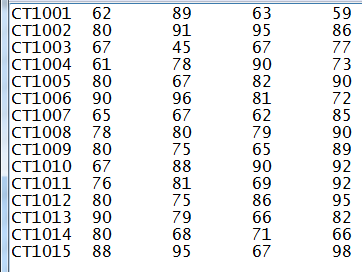
The program first opens the file, reads students IDs and scores from the file and saves them in two arrays:
Create a one-dimensional string array IDs to store the students IDs.
Create a (parallel) two-dimensional int array scores to store students original test scores. This array has 5 columns, the original 4 test scores should be saved in the first 4 columns, and the last column will be used to save the average score after the calculation in next step.
The program then retrieves test scores from the array scores, calculates average score and determines the final letter grade based on the rules in the table below for each student. Assume average score is integer value.
average score = (score1 + score2 + score3 + score4) / 4
| Average score | Letter grade |
| 90 ~ 100 | A |
| 80 ~ 89 | B |
| 70 ~ 79 | C |
| 60 ~ 70 | D |
| 0 ~ 60 | F |
The average score should be saved back in the 5th column of scores array.
Create a new parallel one-dimensional char array grades to save each students letter grade.
Program also needs to find the number of A, number of B, number of C, number of D and number of F grade. As well as the highest, lowest and average score of the class.
Finally, program will display all of the original scores and all results on the computer screen using the format shown as the sample output below.
The program must contain at least the following functions:
(1) A function GetScores to read and store data into IDs and scores arrays.
(2) A function AnalyzeScores to calculate students average score, determine letter grade, get the number of A, B, C, D and F, find the highest, lowest and average score of the class.
(3) A function DisplayResults to display all of the results as shown in the sample output.
Sample output:
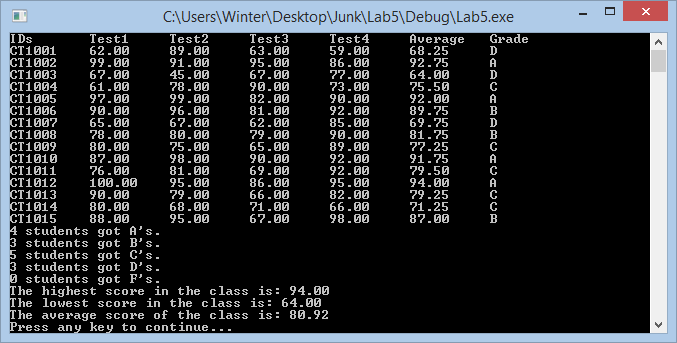
The main driver function is provided, please follow the instructions and existing code to complete the definition of other functions:
#include
#include
#include
#include
using namespace std;
const int SIZE = 15;
const int COLUMN = 5;
void GetScores(ifstream& inf, string IDData[], double scoresData[][COLUMN]);
void AnalyzeScores(double scoresData[][COLUMN], char grade[], int gradeCount[], double stats[]);
void DisplayResults(string IDData[], double scoresData[][COLUMN], char grade[], int gradeCount[], double stats[]);
int main()
{
// define variables
string IDs[SIZE];
double scores[SIZE][COLUMN];
char grades[SIZE];
int gradeCount[5] = { 0, 0, 0, 0, 0 }; // number of A, B, C, D, and F grades
double stats[3] = { 0.0, 0.0, 0.0 }; // highest, lowest, and average grade
// get input file
ifstream inFile;
inFile.open("student_ID_scores.txt");
if (!inFile)
{
cout
cout
return 1;
}
// run analysis
GetScores(inFile, IDs, scores);
AnalyzeScores(scores, grades, gradeCount, stats);
DisplayResults(IDs, scores, grades, gradeCount, stats);
inFile.close();
//system("pause");
char exit;
cout
cin >> exit;
return 0;
}
I need help on this problem.
Thank you.
967302509225268 587797898999869 357021295096617 696988676968676 915876705815985 894769687887769 207100580760008 686689678678988 123456789012345 000000000111111
Step by Step Solution
There are 3 Steps involved in it

Get step-by-step solutions from verified subject matter experts
 Study Help