







Question: Write a program to compute tips for services rendered. The program should request the persons occupation, the amount of the bill, and the percentage tip
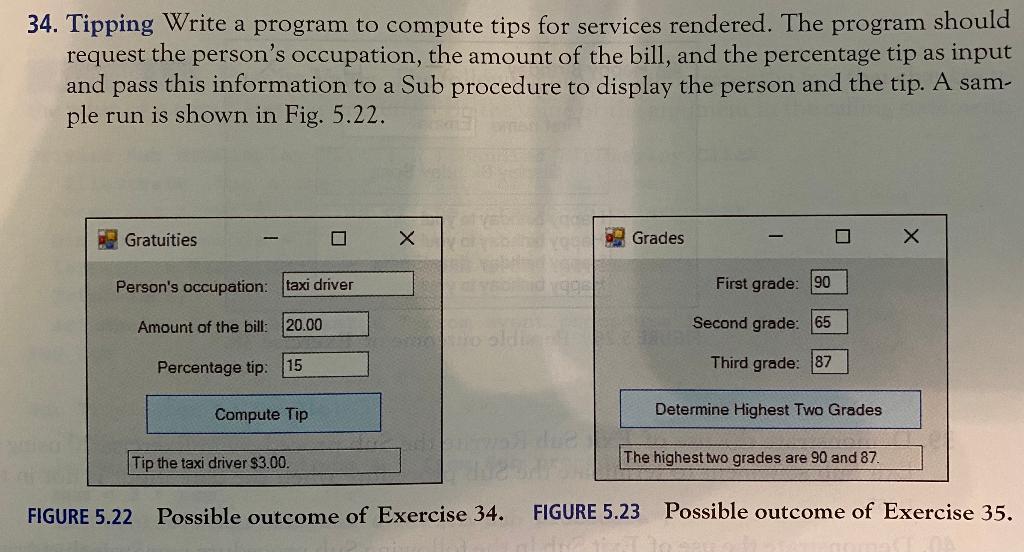
Write a program to compute tips for services rendered. The program should request the persons occupation, the amount of the bill, and the percentage tip as input and pass this information to a Sub procedure to display the person and the tip. A sample run is shown in Fig. 5.22.
Public Class Form1 Private Sub txtCompute_Click(ByVal sender As System.Object, ByVal e As System.EventArgs) Handles txtCompute.Click If txtOccup.Text = "" And txtBill.Text = "" And txtTip.Text = "" Then MsgBox("all values are required") Else Dim occup As String = txtOccup.Text.ToString() Dim amt As Double = Val(txtBill.Text) DisplayResult(occup, amt) End If End Sub Sub DisplayResult(ByVal occupation As String, ByVal bill As Double) Dim percent As Double percent = bill * Val(txtTip.Text) / 100 txtResult.Items.Clear() txtResult.Items.Add("Tip the " & occupation & " $ " & percent) End Sub End Class
This is what I have so far but my last read-only text box "txtResult" doesn't go with that equation I set up.
34. Tipping Write a program to compute tips for services rendered. The program should request the person's occupation, the amount of the bill, and the percentage tip as input and pass this information to a Sub procedure to display the person and the tip. A sam- ple run is shown in Fig. 5.22. a Gratuities X Grades Person's occupation: taxi driver First grade: 90 Amount of the bill: 20.00 Second grade: 65 Percentage tip: 15 Third grade: 87 Compute Tip Determine Highest Two Grades Tip the taxi driver $3.00. The highest two grades are 90 and 87. FIGURE 5.22 Possible outcome of Exercise 34. FIGURE 5.23 Possible outcome of Exercise 35
Step by Step Solution
There are 3 Steps involved in it

Get step-by-step solutions from verified subject matter experts
 Study Help