







Question: Write a program to read the potentiometer and display its value on the 4 LEDs. a. The analogRead() function returns a value from 0 to
Write a program to read the potentiometer and display its value on the 4 LEDs.
a. The analogRead() function returns a value from 0 to 1023, a 10 bit number.
b. You have to convert the value to a 4 bit number and display it on the LEDs.
potentiometer code
// Constants and variables section
const int PotPin = A0; // input pin for the potentiometer
int PotReading = 0; // variable to hold potentiometer value
void setup()
{
Serial.begin(9600); // Opens the default serial channel at 9600 baud
}
void loop()
{
PotReading = analogRead(PotPin); // Read the pot
Serial.print("Potentiometer = "); // Beginning of message
Serial.print(PotReading); // potentiometer reading in decimal
Serial.print(" dec, "); // decimal indicator in message
Serial.print(PotReading, BIN); // potentiometer reading in binary
Serial.println(" bin"); // binary indicator in message, puts a linefeed at end
delay(200); //waits 200 msec for 5 Hz sampling rate
}
hint
1. Reducing a 10 bit number to a 4 bit number is the equivalent of dividing it by 64
2. You must look at each bit of your 4 bit number and use the bit value to turn on or off the appropriate
LED. (bit = 1, LED ON; bit = 0, LED OFF).
3. The following function allows you to determine the value of a particular bit in a binary number:
bit_value = bitRead(x, n);
x is the variable containing the binary number
n is the bit to be read, starting with bit 0 which is the least significant (rightmost) bit
bit_value is the variable that will contain the bit value returned by the bitRead( ) function, the
variable can have any name. It could be of type integer or char or boolean.
See the Arduino Language Reference for more details on this function.
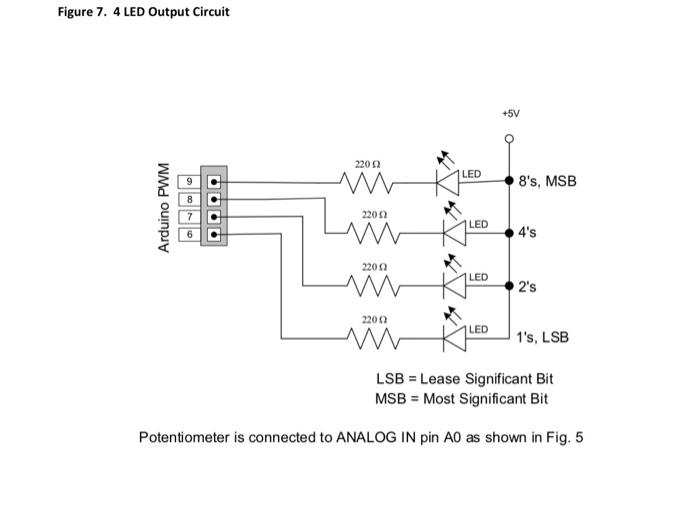
Figure 7. 4 LED Output Circuit +5V 220 22 LED w 8's, MSB Arduino PWM 220 LED 6 M M 4's 22002 LED M 2's 2200 LED 1's, LSB LSB = Lease Significant Bit MSB = Most Significant Bit Potentiometer is connected to ANALOG IN pin AO as shown in Fig. 5
Step by Step Solution
There are 3 Steps involved in it
1 Expert Approved Answer
Step: 1 Unlock

Question Has Been Solved by an Expert!
Get step-by-step solutions from verified subject matter experts
Step: 2 Unlock
Step: 3 Unlock
 Study Help