







Question: Write a program which uses the capabilities of shelved objects. The program will maintain a telephone database. The commands to use the database are as
Write a program which uses the capabilities of shelved objects. The program will maintain a telephone database. The commands to use the database are as follows:
whois phone-number Find the information associated with a phone number
add phone-number information Add information to a phone number listing in the database
search keyword Find all entries which include keyword.
quit Exit the application.
some valid commands:
add 2162215680 Fred Smith
add 2063607788 Roberta Flores
quit
subsequent sessions might be:
whois 2162215680
search Flores
search fred
add 2162215680 Owes me $50.
Quit
commands are read in as strings and the line is parsed into command and arguments
Telephone Database Example 1
| Psuedo Code
import shelve
main() try: ##open a shelved object phoneDB = shelve.open(SomeName) except IOError: ## If there are problems opening that shelved file print an error else: ## this else will continue to run the program if the shelve file ## exists ## print the menu specified above as to the possible commands
## prompt user for command cmd = input(Command: )
## If the command is not quit while cmd != quit: ## use the string split method to parse out the command words = cmd.split()
## get the operating command, the first word if words[0] == whois: try: ##just a non-specified block print(words[1], phoneDB[words[1]]) except: print an error elif words[0] == add: ##use the get() function or the has_key() function ## for all the words in words from [2:] add to the end of the ## value for that key tmpData = phoneDB.get(words[1], -> ) for w in words[2:]: tmpData = tmpData + + w phoneDB[words[1]] = tmpData elif words[0] == search: for w in phoneDB.keys(): if phoneDB[w].find(words[1]) >= 0: print(w, phoneDB[w]) else: ## just print that there is no command by that name ##get another command cmd = input(Command: )
close phoneDB return
|
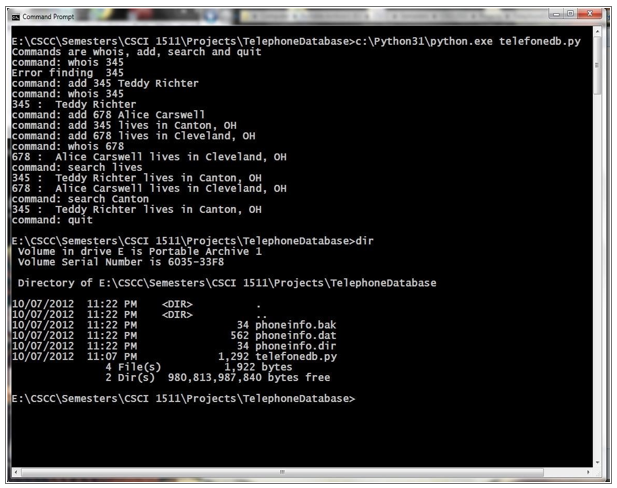
:CSCCSemesterslCSCI 1511\Projects\TelephoneDatabase>c:\Python31\python.exe telefonedb.py Commands are whois, add, search and quit ommand: whois 345 rror finding 345 ommand: add 345 Teddy Richter ommand: whois 345 345 Teddy Richter ommand: add 678 Alice Carswe11 command: add 345 lives in Canton, OH command: add 678 ives in Cleveland, OH command: whois 678 678 Alice Carswell 1ives in cleveland, OH command: search lives 345 Teddy Richter 1ives in Canton, OH 678 Alice Carswel1lives in Cleveland, OH command: search Canton 345 Teddy Richter lives in Canton, OH command: quit 8 8 E:cSccSemesters\CSCI 1511 Projects\TelephoneDatabase dir Volume in drive E is Portable Archive 1 Volume Serial Number is 6035-33F8 Directory of E:\cscc\Semesters\cSCI 1511\Projects\TelephoneDatabase 10/07/2012 11:22 PM
Step by Step Solution
There are 3 Steps involved in it

Get step-by-step solutions from verified subject matter experts
 Study Help