







Question: write a python code In Prac 6 we wrote a program to calculate a person's BMI and weight category using functions. Copy those functions (not
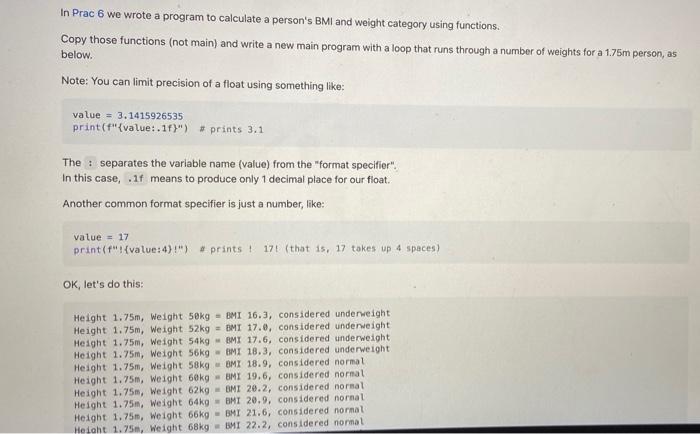
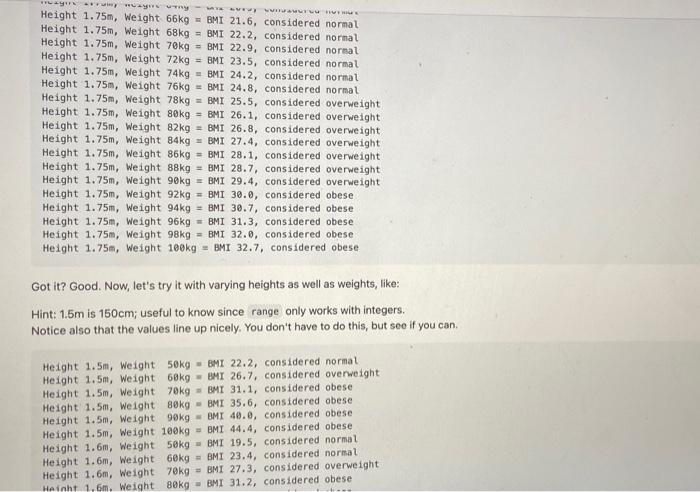
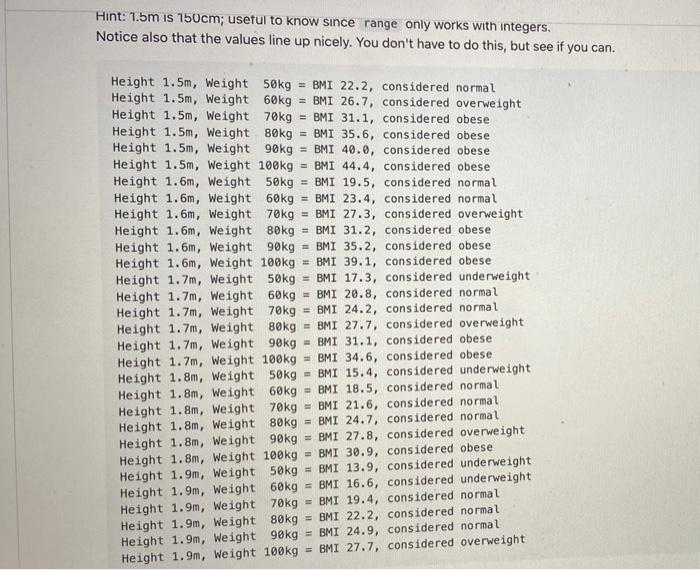
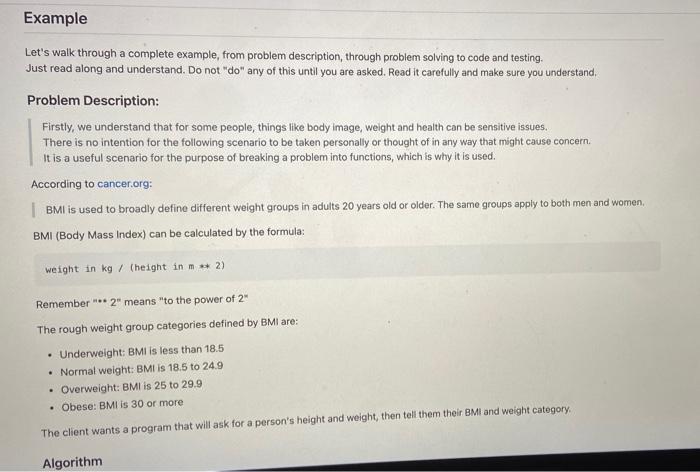
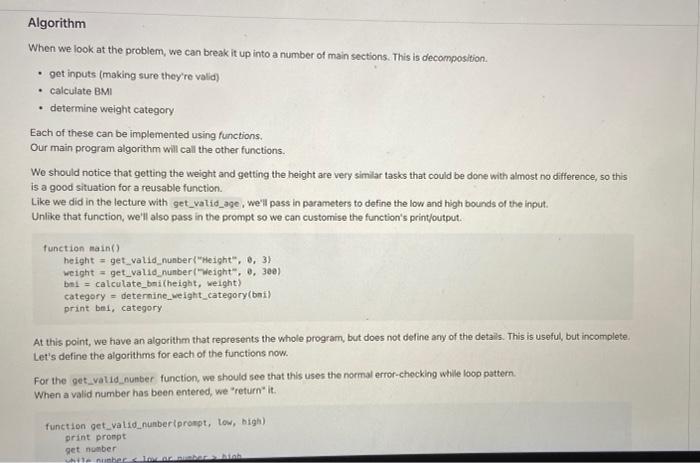
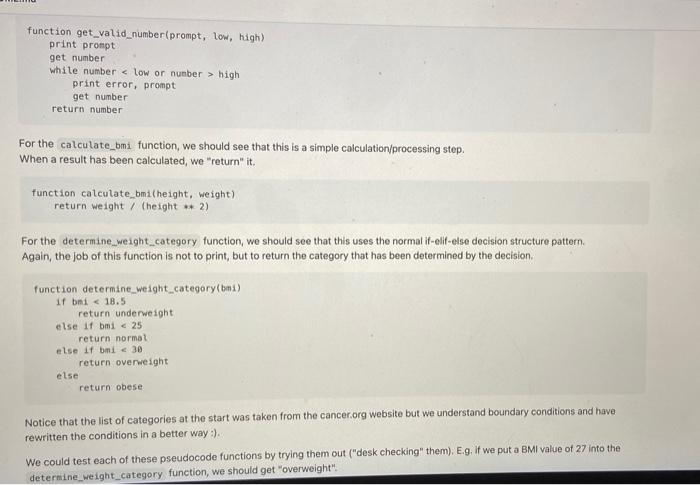
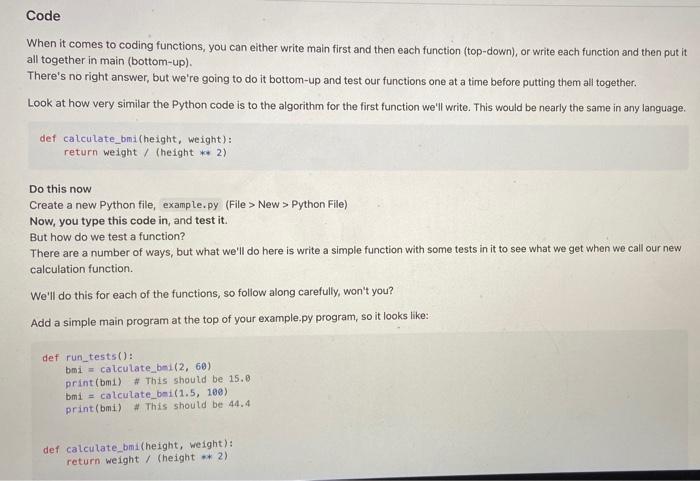
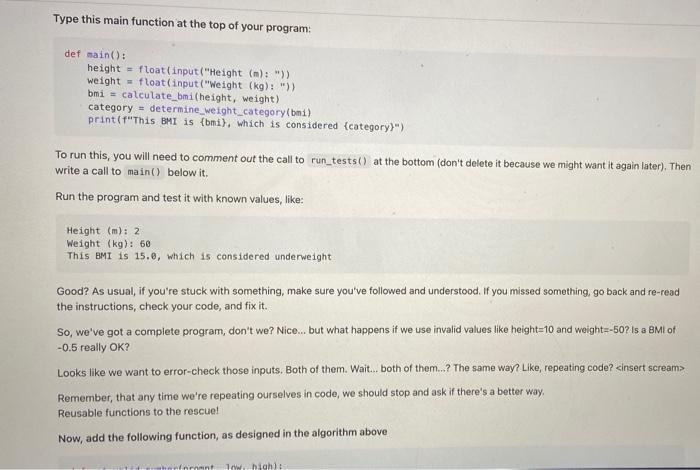
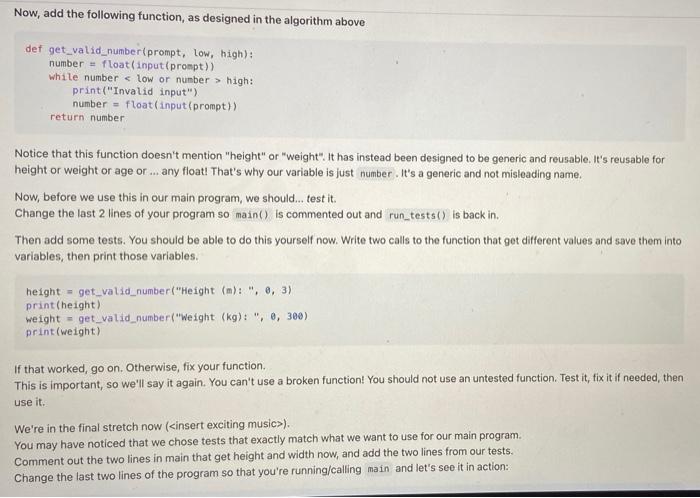
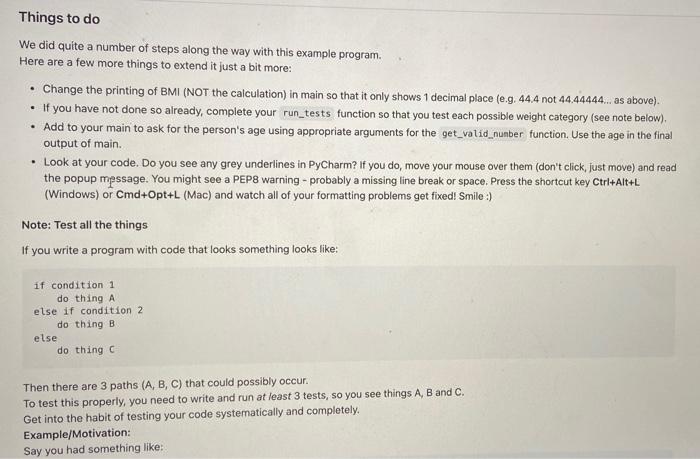
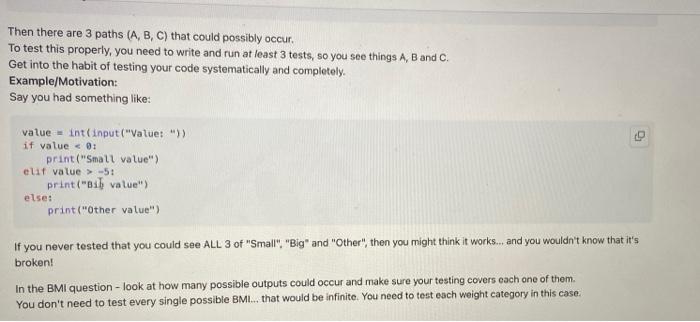
In Prac 6 we wrote a program to calculate a person's BMI and weight category using functions. Copy those functions (not main) and write a new main program with a loop that runs through a number of weights for a 1.75m person, as below. Note: You can limit precision of a float using something like: value = 3.1415926535 print("{value:.1f}") # prints 3.1 The : separates the variable name (value) from the "format specifior". In this case, .11 means to produce only 1 decimal place for our float. Another common format specifier is just a number, like: value = 17 print("value:4)!) #prints ! 17! (that is, 17 takes up 4 spaces) OK, let's do this: Height 1.75m, Weight 50kg - BMI 16.3, considered underweight Height 1.75m, Weight 52kg = BMI 17.0, considered underweight Height 1.75m, Weight 54kg - BMI 17.6, considered underweight Height 1.75m, Weight 56kg - BMI 18.3, considered underweight Height 1.75m, Weight 58kg BMI 18.9, considered normal Height 1.75m, Weight 60kg - BMI 19.6, considered normal Height 1.75m, Weight 62kg BMI 20.2, considered normal Height 1.75m, Weight 64kg - BMI 20.9, considered nornal Height 1.750, Weight 66kg - BMI 21.6, considered normal Heiaht 1.75m, Weight 68kg - BMI 22.2, considered normal VER " AM Height 1.75m, Weight 66kg = BMI 21.6, considered normal Height 1.75m, Weight 68kg BMI 22.2, considered normal Height 1.75m, Weight 70kg = BMI 22.9, considered normal Height 1.75m, Weight 72kg = BMI 23.5, considered normal Height 1.75m, Weight 74kg = BMI 24.2, considered normal Height 1.75m, Weight 76kg BMI 24.8, considered normal Height 1.75m, Weight 78kg = BMI 25.5, considered overweight Height 1.75m, Weight 80kg = BMI 26.1, considered overweight Height 1.75m, Weight 82kg = BMI 26.8, considered overweight Height 1.75m, Weight 84kg = BMI 27.4, considered overweight Height 1.75m, Weight 86kg = BMI 28.1, considered overweight Height 1.75m, Weight 88kg BMI 28.7, considered overweight Height 1.75m, Weight 90kg = BMI 29.4, considered overweight Height 1.75m, Weight 92kg = BMI 30.0, considered obese Height 1.75m, Weight 94kg = BMI 30.7, considered obese Height 1.75m, Weight 96kg = BMI 31.3, considered obese Height 1.75m, Weight 98kg = BMI 32.0, considered obese Height 1.75m, Weight 100kg - BMI 32.7, considered obese Got it? Good. Now, let's try it with varying heights as well as weights, like: Hint: 1.5m is 150cm; useful to know since range only works with integers. Notice also that the values line up nicely. You don't have to do this, but see if you can Height 1.5m, Weight 50kg - BMI 22.2, considered normal Height 1.5m, Weight 68kg - BMI 26.7, considered overweight Height 1.5m, Weight 70kg BMI 31.1, considered obese Height 1.5m, Weight 80kg - BMI 35.6, considered obese Height 1.5m, Weight 90kg - BMI 40.0, considered obese Height 1.5m, Weight 100kg BMI 44.4, considered obese Height 1.6m, Weight 50kg BMI 19.5, considered normal Height 1.6m, Weight 60kg = BMI 23.4, considered normal Height 1.6m, Weight 70kg BMI 27.3, considered overweight Haint 1.6m, Weight 80kg - BMI 31.2, considered obese Hint: 1.5m is 150cm; useful to know since range only works with integers. Notice also that the values line up nicely. You don't have to do this, but see if you can. Height 1.5m, Weight 50kg = BMI 22.2, considered normal Height 1.5m, Weight 60kg = BMI 26.7, considered overweight Height 1.5m, Weight 70kg = BMI 31.1, considered obese Height 1.5m, Weight 80kg = BMI 35.6, considered obese Height 1.5m, Weight 90kg = BMI 40.0, considered obese Height 1.5m, Weight 100kg = BMI 44.4, considered obese Height 1.6m, Weight 50kg = BMI 19.5, considered normal Height 1.6m, Weight 60kg = BMI 23.4, considered normal Height 1.6m, Weight 70kg = BMI 27.3, considered overweight Height 1.6m Weight 80kg = BMI 31.2, considered obese Height 1.6m, Weight 90kg = BMI 35.2, considered obese Height 1.6m, Weight 100kg = BMI 39.1, considered obese Height 1.7m, Weight 50kg = BMI 17.3, considered underweight Height 1.7m, Weight 60kg = BMI 20.8, considered normal Height 1.7m, Weight 70kg = BMI 24.2, considered normal Height 1.7m, Weight 80kg = BMI 27.7, considered overweight Height 1.7m, Weight 90kg = BMI 31.1, considered obese Height 1.7m, Weight 100kg = BMI 34.6, considered obese Height 1.8m, Weight 50kg = BMI 15.4, considered underweight Height 1.8m, Weight 60kg = BMI 18.5, considered normal Height 1.8m, Weight 70kg = BMI 21.6, considered normal Height 1.8m, Weight 80kg = BMI 24.7, considered normal Height 1.8m, Weight 90kg = BMI 27.8, considered overweight Height 1.8m, Weight 100kg = BMI 30.9, considered obese Height 1.9m, Weight 50kg = BMI 13.9, considered underweight Height 1.9m, Weight 60kg = BMI 16.6, considered underweight Height 1.9m, Weight 70kg = BMI 19.4, considered normal Height 1.9m, Weight 80kg = BMI 22.2, considered normal Height 1.9m, Weight 90kg = BMI 24.9, considered normal Height 1.9m, Weight 100kg = BMI 27.7, considered overweight Example Let's walk through a complete example, from problem description, through problem solving to code and testing. Just read along and understand. Do not "do" any of this until you are asked. Read it carefully and make sure you understand. Problem Description: Firstly, we understand that for some people, things like body image, weight and health can be sensitive issues. There is no intention for the following scenario to be taken personally or thought of in any way that might cause concern It is a useful scenario for the purpose of breaking a problem into functions, which is why it is used. According to cancer.org: | BMI is used to broadly define different weight groups in adults 20 years old or older. The same groups apply to both men and women. BMI (Body Mass Index) can be calculated by the formula: weight in kg / (height in m ** 2) Remember** 2" means "to the power of 2" - The rough weight group categories defined by BMI are: Underweight: BMI is less than 18.5 Normal weight: BMI is 18.5 to 24.9 Overweight: BMI is 25 to 29.9 Obese: BMI is 30 or more The client wants a program that will ask for a person's height and weight, then tell them their BMI and weight category Algorithm Algorithm When we look at the problem, we can break it up into a number of main sections. This is decomposition: get inputs (making sure they're valid) calculate BMI determine weight category Each of these can be implemented using functions. Our main program algorithm will call the other functions. We should notice that getting the weight and getting the height are very similar tasks that could be done with almost no difference, so this is a good situation for a reusable function. Like we did in the lecture with get_valid_age, we'll pass in parameters to define the low and high bounds of the input. Unlike that function, we'll also pass in the prompt so we can customise the function's print/output. function main() height = get_valid nunber{"height", 0, 3) weight = get_valid number weight", 0, 300) bmt = calculate_bni (height, weight) category - determine_weight_category(oni) print bni, category At this point, we have an algorithm that represents the whole program, but does not define any of the details. This is useful, but incomplete Let's define the algorithms for each of the functions now. For the get_vatio number function, we should see that this uses the normal error-checking while loop pattern When a valid number has been entered, we "return it. function get_validnumberiprompt, low, bigh) print prompt get number berbah function get_valid_number(prompt, low, high) print prompt get number while number high print error, prompt get number return number For the calculate_bmi function, we should see that this is a simple calculation/processing step When a result has been calculated, we "return" it. function calculate_bmi(height, weight) return weight / (height ** 2) For the determine_weight_category function, we should see that this uses the normal if-elif-else decision structure pattern. Again, the job of this function is not to print, but to return the category that has been determined by the decision function determine_weight_category(bm) If bmi New > Python File) Now, you type this code in, and test it. But how do we test a function? There are a number of ways, but what we'll do here is write a simple function with some tests in it to see what we get when we call our new calculation function We'll do this for each of the functions, so follow along carefully, won't you? Add a simple main program at the top of your example.py program, so it looks like: det run_tests(): bmi = calculate_bmi(2, 60) print(mi) # This should be 15.8 bmi = calculate_bmi(1.5, 100) print(mi) # This should be 44.4 def calculate_bmi(height, weight): return weight / (height - 2) Type this main function at the top of your program: def maino: height = float(input("Height (m): ")) weight = float(input("Weight (kg): ")) bmi = calculate_bmi(height, weight) category - determine_weight_category(bni) print("This BMI is {bni), which is considered (category)") To run this, you will need to comment out the call to run_tests() at the bottom (don't delete it because we might want it again later), Then write a call to main() below it. Run the program and test it with known values, like: Heigl (m): 2 Weight (kg): 60 This BMI is 15.0, which is considered underweight Good? As usual, if you're stuck with something, make sure you've followed and understood. If you missed something, go back and re-read the instructions, check your code, and fix it. So, we've got a complete program, don't we? Nice... but what happens if we use invalid values like height=10 and weight=-60? Is a BMI of -0.5 really OK? Looks like we want to error-check those inputs. Both of them. Wait... both of them...? The same way? Like, repeating code?
Step by Step Solution
There are 3 Steps involved in it

Get step-by-step solutions from verified subject matter experts
 Study Help