







Question: Write a R program to: Read in the sensor data provided in lab 1. Download sensor.csv data Display the first 20 rows using (head.(0.5 marks)
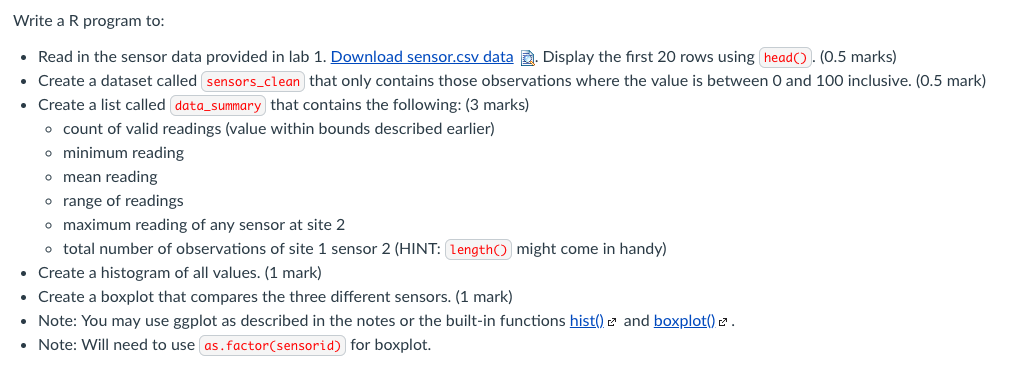
Write a R program to: Read in the sensor data provided in lab 1. Download sensor.csv data Display the first 20 rows using (head.(0.5 marks) Create a dataset called sensors-clean that only contains those observations where the value is between 0 and 100 ?nclusive. 0.5 mark Create a list called data_summary that contains the following: (3 marks) . count of valid readings (value within bounds described earlier) minimum reading o mean reading o range of readings o maximum reading of any sensor at site 2 o total number of observations of site 1 sensor 2 (HINT: engthO might come in handy) Create a histogram of all values. (1 mark) Create a boxplot that compares the three different sensors. (1 mark) and boxplot) e Note: You may use ggplot as described in the notes or the built-in functions hist0 Note: Will need to use as.factor(sensorid) for boxplot. Write a R program to: Read in the sensor data provided in lab 1. Download sensor.csv data Display the first 20 rows using (head.(0.5 marks) Create a dataset called sensors-clean that only contains those observations where the value is between 0 and 100 ?nclusive. 0.5 mark Create a list called data_summary that contains the following: (3 marks) . count of valid readings (value within bounds described earlier) minimum reading o mean reading o range of readings o maximum reading of any sensor at site 2 o total number of observations of site 1 sensor 2 (HINT: engthO might come in handy) Create a histogram of all values. (1 mark) Create a boxplot that compares the three different sensors. (1 mark) and boxplot) e Note: You may use ggplot as described in the notes or the built-in functions hist0 Note: Will need to use as.factor(sensorid) for boxplot
Step by Step Solution
There are 3 Steps involved in it

Get step-by-step solutions from verified subject matter experts
 Study Help