







Question: Write a script that inputs a line of plaintext and a distance value and outputs an encrypted text using a Caesar cipher. The script should
Write a script that inputs a line of plaintext and a distance value and outputs an encrypted text using a Caesar cipher. The script should work for any printable characters. An example of the program input and output is shown below: Hi there, I also wanted to add to this I have seen many chegg solutions. One of these solutions includes this one (which probably works because it has 17 likes)
message = input("Enter a message: ") distance = int(input("Enter the distance value: ")) result = '' for ch in message: result += chr(ord(ch) + distance) print(" " + result) I don't need to know how to write a different one; however, whenever i drop this in notepad and attempt to save it as a python script, it allows me to write my message and my distance and then crashes before it can print. Can you walk me through what I'm possibly doing wrong and if I'm not typing it right or if theres something specific I have to do ? Im still new to python and I'm very confused. THANKS
provided is a picture of the code (i also tried doing result = '' and that didn't work either)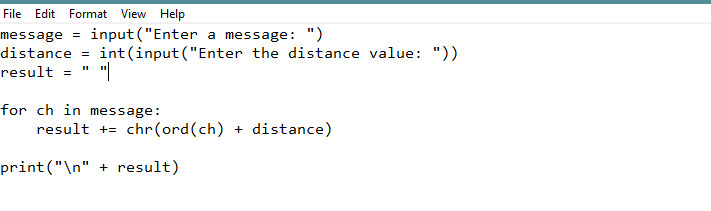
File Edit Format View Help message input("Enter a message: ") distance int(input("Enter the distance value: ")) result " for ch in message: result += chr(ord(ch) + distance) print(" " + result)
Step by Step Solution
There are 3 Steps involved in it

Get step-by-step solutions from verified subject matter experts
 Study Help