







Question: Write a script to determine whether a given file system or mount point is mounted, and output the amount of free space on the file
Write a script to determine whether a given file system or mount point is mounted, and output the amount of free space on the file system if it is mounted. If the file system is not mounted, the script should output an error. Vcloud plz idk what I did wrong
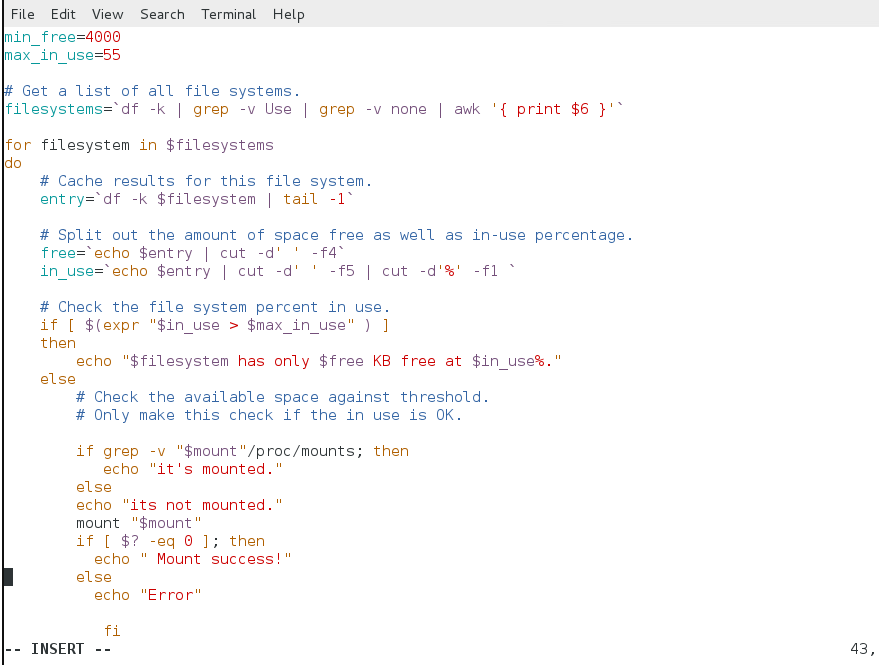
File Edit View Search Terminal Help min_free=4000 max_in use=55 # Get a list of all file systems. |filesystems='df -k | grep -v Use | grep - v none | awk '{print $6 }' for filesystem in $filesystems do # Cache results for this file system. entry='df -k $filesystem | tail -1 # Split out the amount of space free as well as in-use percentage. free='echo $entry | cut -d' ' -f4" in_use='echo $entry | cut -d' -f5 | cut-d'%' -fl' # Check the file system percent in use. if [ $(expr "$in_use > $max_in_use" ) ] then echo "$filesystem has only $free KB free at $in_use%." else # Check the available space against threshold. # Only make this check if the in use is OK. if grep -V "$mount"/proc/mounts; then echo "it's mounted." else echo "its not mounted." mount "$mount" if [ $? -eq 0 ]; then echo " Mount success!" else echo "Error" fi INSERT 43, File Edit View Search Terminal Help min_free=4000 max_in use=55 # Get a list of all file systems. |filesystems='df -k | grep -v Use | grep - v none | awk '{print $6 }' for filesystem in $filesystems do # Cache results for this file system. entry='df -k $filesystem | tail -1 # Split out the amount of space free as well as in-use percentage. free='echo $entry | cut -d' ' -f4" in_use='echo $entry | cut -d' -f5 | cut-d'%' -fl' # Check the file system percent in use. if [ $(expr "$in_use > $max_in_use" ) ] then echo "$filesystem has only $free KB free at $in_use%." else # Check the available space against threshold. # Only make this check if the in use is OK. if grep -V "$mount"/proc/mounts; then echo "it's mounted." else echo "its not mounted." mount "$mount" if [ $? -eq 0 ]; then echo " Mount success!" else echo "Error" fi INSERT 43
Step by Step Solution
There are 3 Steps involved in it

Get step-by-step solutions from verified subject matter experts
 Study Help