







Question: Write a script(.m file) that creates a matrix filled with zeros or ones. Need at least 4 lines that make a picture. 00000100000000000000000001000000000000000000010000 00000001000000000000000001000000000000000001000000 00000000010000000000000001000000000000000100000000
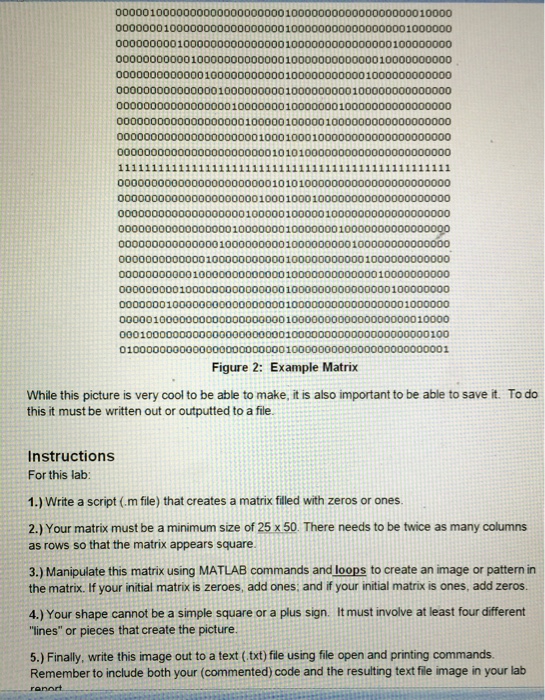
00000100000000000000000001000000000000000000010000 00000001000000000000000001000000000000000001000000 00000000010000000000000001000000000000000100000000 00000000000100000000000001000000000000010000000000 00000000000001000000000001000000000001000000000000 00000000000000010000000001000000000100000000000000 00000000000000000100000001000000010000000000000000 00000000000000000001000001000001000000000000000000 00000000000000000000010001000100000000000000000000 00000000000000000000000101010000000000000000000000 00000000000000000000000101010000000000000000000000 000000000000000000000100010001000000000000 00000000000000000001000001000001000000000000000000 000000000000000001000000010000000100000000 00000000000000010000000001000000000100000000000000 000000000000010000000000010000000000010000 0000000000010000000000000100000 0000000001000000000000000100000000 00000001000000000000000001000000000 000001000 0001000 01000000000000000000000001000000000000000000000001 0 1000000 10000 100 000000001000000000 TK-1 000000010000000 Figure 2: Example Matrix While this picture is very cool to be able to make, it is also important to be able to save it. To do this it must be written out or outputted to a file. Instructions For this lab: 1.) Write a script (.m file) that creates a matrix filled with zeros or ones as rows so that the matrix appears square 3.) Manipulate this matrix using MATLAB commands and loops to create an image or pattern in 2.) Your matrix must be a minimum size of 25 x 50 There needs to be twice as many columns the matrix. If your initial matrix is zeroes, add ones: and if your initial matrix is ones, add zeros. 4.) Your shape cannot be a simple square or a plus sign. I It must invoive at least four different "lines" or pieces that create the picture. 5.) Finally, write this image out to a text (.txt) file using file open and printing commands Remember to include both your (commented) code and the resulting text file image in your lab ranod
Step by Step Solution
There are 3 Steps involved in it

Get step-by-step solutions from verified subject matter experts
 Study Help