Question: Write a shell program, called myshell, that runs on the Linux operating system you can continue from this shell example. #include #include #include #include #include
Write a shell program, called myshell, that runs on the Linux operating system
you can continue from this shell example.
#include #include #include #include #include #include
char *shellname = "myshell";
/* Function Declarations for builtin shell commands: */ int lsh_cd(char **args); int lsh_help(char **args); int lsh_exit(char **args);
int setshellname(char **args);
/* List of builtin commands, followed by their corresponding functions. */ char *builtin_str[] = { "cd", "help", "exit", "setshellname" };
int (*builtin_func[]) (char **) = { &lsh_cd, &lsh_help, &lsh_exit, &setshellname };
int lsh_num_builtins() { return sizeof(builtin_str) / sizeof(char *); }
/* Builtin function implementations. */
/** @brief Bultin command: change directory. @param args List of args. args[0] is "cd". args[1] is the directory. @return Always returns 1, to continue executing. */ int lsh_cd(char **args) { if (args[1] == NULL) { fprintf(stderr, "lsh: expected argument to \"cd\" "); } else { if (chdir(args[1]) != 0) { perror("lsh"); } } return 1; }
/** @brief Builtin command: print help. @param args List of args. Not examined. @return Always returns 1, to continue executing. */ int lsh_help(char **args) { int i; printf("Stephen Brennan's LSH "); printf("Type program names and arguments, and hit enter. "); printf("The following are built in: ");
for (i = 0; i
printf("Use the man command for information on other programs. "); return 1; }
/** @brief Builtin command: exit. @param args List of args. Not examined. @return Always returns 0, to terminate execution. */ int lsh_exit(char **args) { return 0; }
int setshellname(char **args) { if (args[1] == NULL) shellname = "myshell"; else shellname = args[1]; return 1;
}
/** @brief Launch a program and wait for it to terminate. @param args Null terminated list of arguments (including program). @return Always returns 1, to continue execution. */ int lsh_launch(char **args) { pid_t pid; int status;
pid = fork(); if (pid == 0) { // Child process if (execvp(args[0], args) == -1) { perror("lsh"); } exit(EXIT_FAILURE); } else if (pid
return 1; }
/** @brief Execute shell built-in or launch program. @param args Null terminated list of arguments. @return 1 if the shell should continue running, 0 if it should terminate */ int lsh_execute(char **args) { int i;
if (args[0] == NULL) { // An empty command was entered. return 1; }
for (i = 0; i
return lsh_launch(args); }
/** @brief Read a line of input from stdin. @return The line from stdin. */ char *lsh_read_line(void) { #ifdef LSH_USE_STD_GETLINE char *line = NULL; ssize_t bufsize = 0; // have getline allocate a buffer for us if (getline(&line, &bufsize, stdin) == -1) { if (feof(stdin)) { exit(EXIT_SUCCESS); // We recieved an EOF } else { perror("lsh: getline "); exit(EXIT_FAILURE); } } return line; #else #define LSH_RL_BUFSIZE 1024 int bufsize = LSH_RL_BUFSIZE; int position = 0; char *buffer = malloc(sizeof(char) * bufsize); int c;
if (!buffer) { fprintf(stderr, "lsh: allocation error "); exit(EXIT_FAILURE); }
while (1) { // Read a character c = getchar();
if (c == EOF) { exit(EXIT_SUCCESS); } else if (c == ' ') { buffer[position] = '\0'; return buffer; } else { buffer[position] = c; } position++;
// If we have exceeded the buffer, reallocate. if (position >= bufsize) { bufsize += LSH_RL_BUFSIZE; buffer = realloc(buffer, bufsize); if (!buffer) { fprintf(stderr, "lsh: allocation error "); exit(EXIT_FAILURE); } } } #endif }
#define LSH_TOK_BUFSIZE 64 #define LSH_TOK_DELIM " \t \a" /** @brief Split a line into tokens (very naively). @param line The line. @return Null-terminated array of tokens. */ char **lsh_split_line(char *line) { int bufsize = LSH_TOK_BUFSIZE, position = 0; char **tokens = malloc(bufsize * sizeof(char*)); char *token, **tokens_backup;
if (!tokens) { fprintf(stderr, "lsh: allocation error "); exit(EXIT_FAILURE); }
token = strtok(line, LSH_TOK_DELIM); while (token != NULL) { tokens[position] = token; position++;
if (position >= bufsize) { bufsize += LSH_TOK_BUFSIZE; tokens_backup = tokens; tokens = realloc(tokens, bufsize * sizeof(char*)); if (!tokens) { free(tokens_backup); fprintf(stderr, "lsh: allocation error "); exit(EXIT_FAILURE); } }
token = strtok(NULL, LSH_TOK_DELIM); } tokens[position] = NULL; return tokens; }
/** @brief Loop getting input and executing it. */ void lsh_loop(void) { char *line; char **args; int status;
do { printf(" %s > ", shellname); line = lsh_read_line(); args = lsh_split_line(line); status = lsh_execute(args);
//free(line); //free(args); } while (status); }
/** @brief Main entry point. @param argc Argument count. @param argv Argument vector. @return status code */ int main(int argc, char **argv) { // Load config files, if any.
// Run command loop. lsh_loop();
// Perform any shutdown/cleanup.
return EXIT_SUCCESS; }
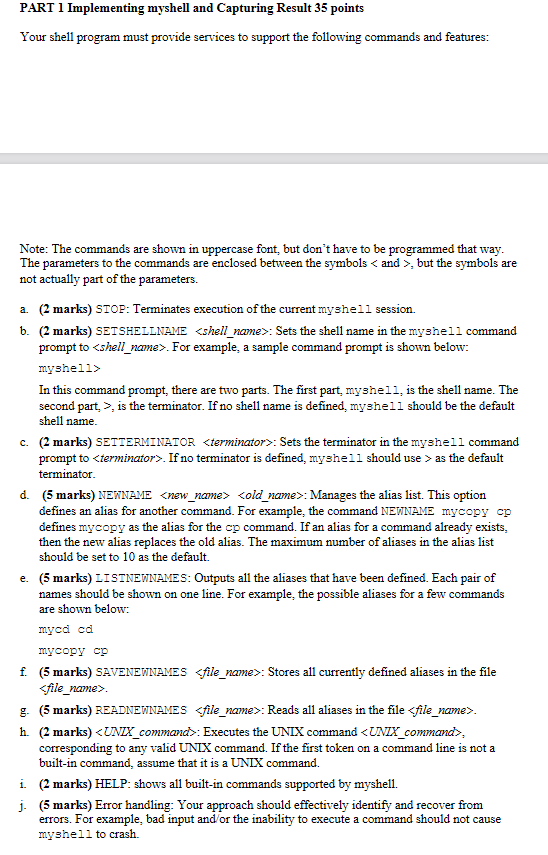
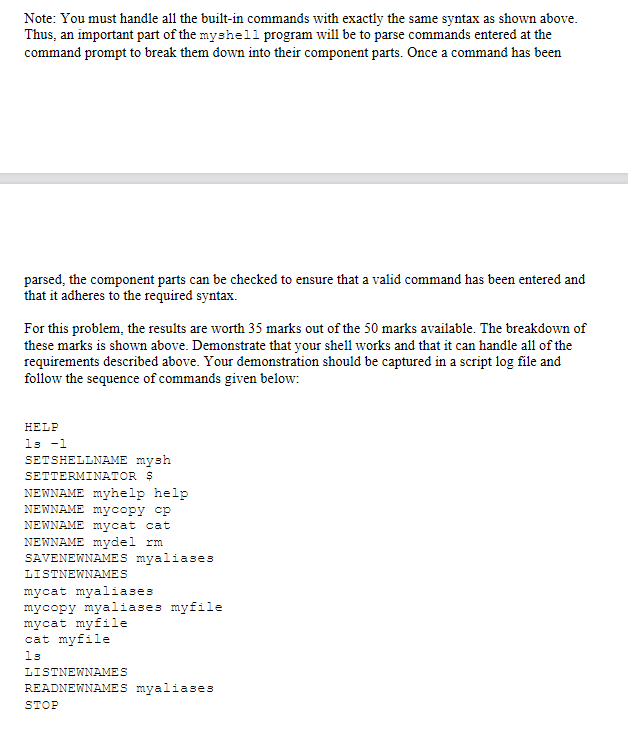
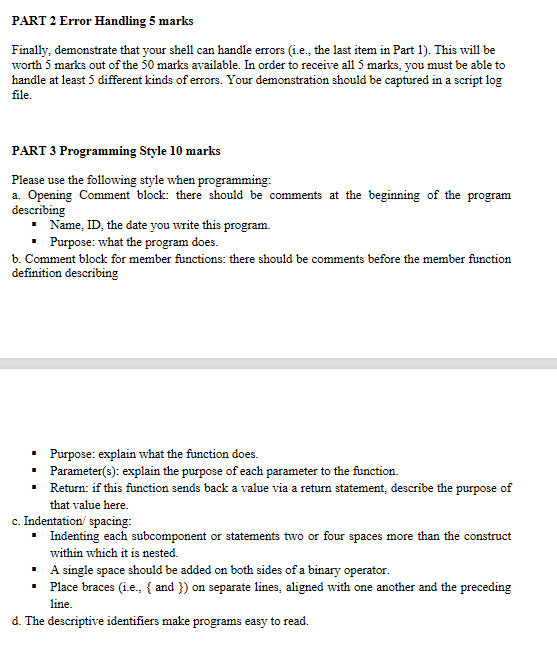
PART 1 Implementing myshell and Capturing Result 35 points Your shell program must provide services to support the following commands and features: Note: The commands are shown in uppercase font, but don't have to be programmed that way. The parameters to the commands are enclosed between the symbols , but the symbols are not actually part of the parameters. a. (2 marks) STOP: Terminates execution of the current myshell session. b. (2 marks) SETSHELLNAME : Sets the shell name in the myshell command prompt to . For example, a sample command prompt is shown below: myshell In this command prompt, there are two parts. The first part, myshell, is the shell name. The second part, >, is the terminator. If no shell name is defined, myshell should be the default shell name. c. (2 marks) SETTERMINATOR : Sets the terminator in the myshell command prompt to as the default terminator. d. (5 marks) NEWNAME : Manages the alias list. This option defines an alias for another command. For example, the command NEWNAME mycopy cp defines mycopy as the alias for the cp command. If an alias for a command already exists, then the new alias replaces the old alias. The maximum number of aliases in the alias list should be set to 10 as the default. e. (5 marks) LISTNEWNAMES: Outputs all the aliases that have been defined. Each pair of names should be shown on one line. For example, the possible aliases for a few commands are shown below: mycd cd mycopy cp f. (5 marks) SAVENEWNAMES : Stores all currently defined aliases in the file g. (5 marks) READNEWNAMES : Reads all aliases in the file . h. (2 marks) : Executes the UNIX command , corresponding to any valid UNIX command. If the first token on a command line is not a built-in command, assume that it is a UNIX command. i (2 marks) HELP: shows all built-in commands supported by myshell. j. (5 marks) Error handling: Your approach should effectively identify and recover from errors. For example, bad input and/or the inability to execute a command should not cause myshell to crash Note: You must handle all the built-in commands with exactly the same syntax as shown above. Thus, an important part of the myshell program will be to parse commands entered at the command prompt to break them down into their component parts. Once a command has been parsed, the component parts can be checked to ensure that a valid command has been entered and that it adheres to the required syntax. For this problem, the results are worth 35 marks out of the 50 marks available. The breakdown of these marks is shown above. Demonstrate that your shell works and that it can handle all of the requirements described above. Your demonstration should be captured in a script log file and follow the sequence of commands given below: HELP 13 -1 SETSHELLNAME mysh SETTERMINATOR $ NEWNAME myhelp help NEWNAME mycopy op NEWNAME mycat cat NEWNAME mydel im SAVENEWNAMES myaliases LISTNEWNAMES mycat myaliases mycopy myaliases myfile mycat myfile cat myfile 13 LISTNEWNAMES READNEWNAMES myaliases STOP PART 2 Error Handling 5 marks Finally, demonstrate that your shell can handle errors (i.e., the last item in Part 1). This will be worth 5 marks out of the 50 marks available. In order to receive all 5 marks, you must be able to handle at least 5 different kinds of errors. Your demonstration should be captured in a script log file. PART 3 Programming Style 10 marks Please use the following style when programming: a Opening Comment block: there should be comments at the beginning of the program describing Name, ID, the date you write this program. Purpose: what the program does. b. Comment block for member functions: there should be comments before the member function definition describing Purpose: explain what the function does. Parameter(s): explain the purpose of each parameter to the function. Return: if this function sends back a value via a return statement, describe the purpose of that value here. c. Indentation/ spacing: Indenting each subcomponent or statements two or four spaces more than the construct within which it is nested. A single space should be added on both sides of a binary operator. Place braces (i.e., { and }) on separate lines, aligned with one another and the preceding line d. The descriptive identifiers make programs easy to read. PART 1 Implementing myshell and Capturing Result 35 points Your shell program must provide services to support the following commands and features: Note: The commands are shown in uppercase font, but don't have to be programmed that way. The parameters to the commands are enclosed between the symbols , but the symbols are not actually part of the parameters. a. (2 marks) STOP: Terminates execution of the current myshell session. b. (2 marks) SETSHELLNAME : Sets the shell name in the myshell command prompt to . For example, a sample command prompt is shown below: myshell In this command prompt, there are two parts. The first part, myshell, is the shell name. The second part, >, is the terminator. If no shell name is defined, myshell should be the default shell name. c. (2 marks) SETTERMINATOR : Sets the terminator in the myshell command prompt to as the default terminator. d. (5 marks) NEWNAME : Manages the alias list. This option defines an alias for another command. For example, the command NEWNAME mycopy cp defines mycopy as the alias for the cp command. If an alias for a command already exists, then the new alias replaces the old alias. The maximum number of aliases in the alias list should be set to 10 as the default. e. (5 marks) LISTNEWNAMES: Outputs all the aliases that have been defined. Each pair of names should be shown on one line. For example, the possible aliases for a few commands are shown below: mycd cd mycopy cp f. (5 marks) SAVENEWNAMES : Stores all currently defined aliases in the file g. (5 marks) READNEWNAMES : Reads all aliases in the file . h. (2 marks) : Executes the UNIX command , corresponding to any valid UNIX command. If the first token on a command line is not a built-in command, assume that it is a UNIX command. i (2 marks) HELP: shows all built-in commands supported by myshell. j. (5 marks) Error handling: Your approach should effectively identify and recover from errors. For example, bad input and/or the inability to execute a command should not cause myshell to crash Note: You must handle all the built-in commands with exactly the same syntax as shown above. Thus, an important part of the myshell program will be to parse commands entered at the command prompt to break them down into their component parts. Once a command has been parsed, the component parts can be checked to ensure that a valid command has been entered and that it adheres to the required syntax. For this problem, the results are worth 35 marks out of the 50 marks available. The breakdown of these marks is shown above. Demonstrate that your shell works and that it can handle all of the requirements described above. Your demonstration should be captured in a script log file and follow the sequence of commands given below: HELP 13 -1 SETSHELLNAME mysh SETTERMINATOR $ NEWNAME myhelp help NEWNAME mycopy op NEWNAME mycat cat NEWNAME mydel im SAVENEWNAMES myaliases LISTNEWNAMES mycat myaliases mycopy myaliases myfile mycat myfile cat myfile 13 LISTNEWNAMES READNEWNAMES myaliases STOP PART 2 Error Handling 5 marks Finally, demonstrate that your shell can handle errors (i.e., the last item in Part 1). This will be worth 5 marks out of the 50 marks available. In order to receive all 5 marks, you must be able to handle at least 5 different kinds of errors. Your demonstration should be captured in a script log file. PART 3 Programming Style 10 marks Please use the following style when programming: a Opening Comment block: there should be comments at the beginning of the program describing Name, ID, the date you write this program. Purpose: what the program does. b. Comment block for member functions: there should be comments before the member function definition describing Purpose: explain what the function does. Parameter(s): explain the purpose of each parameter to the function. Return: if this function sends back a value via a return statement, describe the purpose of that value here. c. Indentation/ spacing: Indenting each subcomponent or statements two or four spaces more than the construct within which it is nested. A single space should be added on both sides of a binary operator. Place braces (i.e., { and }) on separate lines, aligned with one another and the preceding line d. The descriptive identifiers make programs easy to read









 Study Help