







Question: Write a simple pizza order application Please apply the following requirements for the application. a. Create a PizzaSelectionFrame with FlowLayout. Do not forget that your
- Write a simple pizza order application Please apply the following requirements for the application. a. Create a PizzaSelectionFrame with FlowLayout. Do not forget that your components will be displayed in which order they are added. b. Title of the frame will be Order Pizza. c. You need a combo box which includes a list of pizza: chicken pizza, pepperoni pizza, and veggie pizza. d. When a user selects a pizza from the list, display the related icon in a label. Icons are also uploaded with your assignment. (Hint: you need to implement ItemListener interface and override itemStateChanged method). By default, display any icon. e. You need a label to display Select Size:. f. You need three radio buttons (and a button group) to display the size of Small, Medium, and Large. Small size will be selected by default. g. You need a label to display Select Topping(s):. h. You need two check boxes to display the toppings of Mushroom and Bacon. i. You need a Submit Order button. j. Frame size will be 325 * 300. k. You must set the background color of your pane as LIGHT_GRAY.l. When a user clicks Submit Order button, you will display an Option Dialog. i. A user can select any size of pizza without any toppings.
 iv. In your message, you will display Order Summary: size of a pizza with the list of toppings (if any). (Hint: you will only add an action listener for your button, so you will need Action Listener Interface and override actionPerformed method). m. The syntax of Option Dialog is:
i. JOptionPane.showOptionDialog(PizzaSelectionFrame.this,
"Your Message", "Your Title",
JOptionPane.OK_CANCEL_OPTION,
JOptionPane.QUESTION_MESSAGE, null, null, null);
ii. If a user clicks OK, then he/she must view PaymentFrame. iii. If a user clicks Cancel, then he/she must view again PizzaSelectionFrame. iv. The syntax in i returns an int value. If it is 0, it means that the user clicked OK. Otherwise, it means that the user clicked CANCEL.
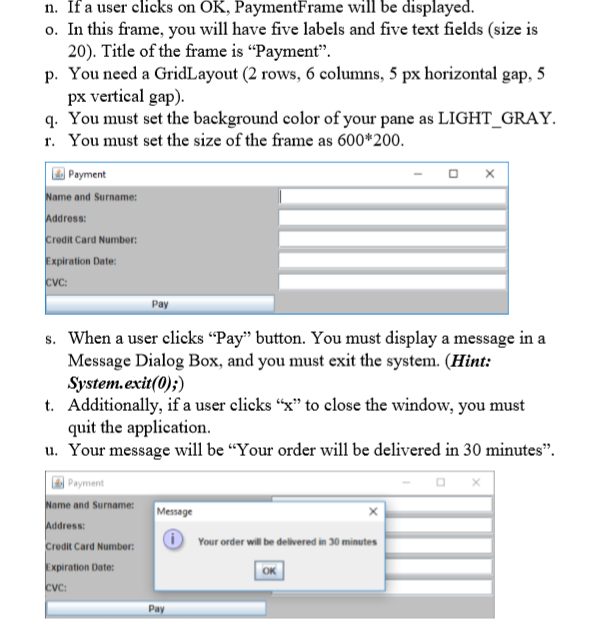
n. If a user clicks on OK, PaymentFrame will be displayed. o. In this frame, you will have five labels and five text fields (size is 20). Title of the frame is "Payment. p. You need a GridLayout (2 rows, 6 columns, 5 px horizontal gap, 5 px vertical gap) q. You must set the background color of your pane as LIGHT GRAY. r. You must set the size of the frame as 600*200 Payment and Surname: dress: redit Card Number: xpiration Date: Pay s. When a user clicks "Pay" button. You must display a message in a Message Dialog Box, and you must exit the system. (Hint: System.exit(O);) Additionally, if a user clicks "x" to close the window, you must quit the application t. u. Your message will be "Your order will be delivered in 30 minutes" Payment and Surname: Message Your order will be delivered in 30 minutes Card Number: xpiration Date: OK
Step by Step Solution
There are 3 Steps involved in it

Get step-by-step solutions from verified subject matter experts
 Study Help