







Question: Write a sketch using Arduino IDE and include the full code as a text in your solution. Design and simulate the hardware circuit using Proteus.
Write a sketch using Arduino IDE and include the full code as a text in your solution.
Design and simulate the hardware circuit using Proteus. Then, include the following images in your solution:
a The design of your circuit before running your simulation.
b All states of your simulation showing all possible cases.
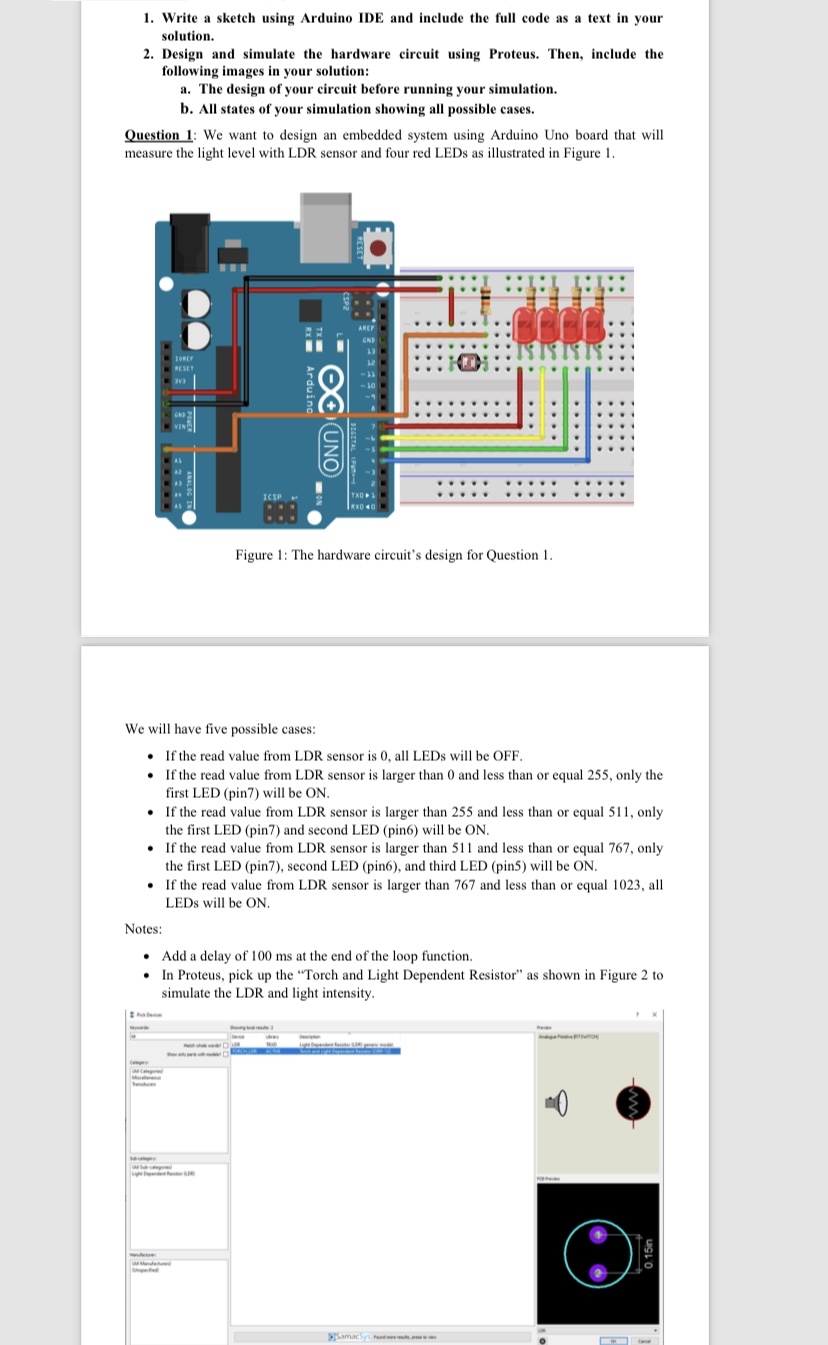
Question : We want to design an embedded system using Arduino Uno board that will measure the light level with LDR sensor and four red LEDs as illustrated in Figure
We will have five possible cases:
If the read value from LDR sensor is all LEDs will be OFF.
If the read value from LDR sensor is larger than and less than or equal only the first LED pin will be ON
If the read value from LDR sensor is larger than and less than or equal only the first LED pin and second LED pin will be ON
If the read value from LDR sensor is larger than and less than or equal only the first LED pin second LED pin and third LED pin will be ON
If the read value from LDR sensor is larger than and less than or equal all LEDs will be ON
Notes:
Add a delay of ms at the end of the loop function.
In Proteus, pick up the "Torch and Light Dependent Resistor" as shown in Figure to simulate the LDR and light intensity.
Step by Step Solution
There are 3 Steps involved in it
1 Expert Approved Answer
Step: 1 Unlock

Question Has Been Solved by an Expert!
Get step-by-step solutions from verified subject matter experts
Step: 2 Unlock
Step: 3 Unlock
 Study Help