







Question: - Write an exact JavaFX program as shown in the example. I don't need any methods for calculations, but the ListView and the Clear button
- Write an exact JavaFX program as shown in the example. I don't need any methods for calculations, but the ListView and the Clear button should would.
so far I have this:
package practice;
import javafx.application.Application;
import javafx.collections.FXCollections;
import javafx.geometry.Pos;
import javafx.geometry.HPos;
import javafx.geometry.Insets;
import javafx.scene.Scene;
import javafx.scene.control.Button;
import javafx.scene.control.Label;
import javafx.scene.control.ListView;
import javafx.scene.control.ScrollPane;
import javafx.scene.control.SelectionMode;
import javafx.scene.control.TextField;
import javafx.scene.layout.BorderPane;
import javafx.scene.layout.FlowPane;
import javafx.scene.layout.GridPane;
import javafx.scene.layout.Pane;
import javafx.stage.Stage;
public class Calculator extends Application {
private TextField tfAnnualInterestRate = new TextField();
private TextField tfNumberOfYears = new TextField();
private TextField tfLoanAmount = new TextField();
private TextField tfMonthlyPayment = new TextField();
private TextField tfTotalPayment = new TextField();
private TextField inves = new TextField();
private TextField annualR = new TextField();
private TextField futureValue = new TextField();
private Button btCalculate = new Button("Calculate");
private Button clButton = new Button("Clear");
@Override // Override the start method in the Application class
public void start(Stage primaryStage) {
// Create UI
GridPane gridPane = new GridPane();
gridPane.setHgap(5);
gridPane.setVgap(5);
gridPane.setPadding(new Insets(0, 10, 0, 10));
FlowPane Fpane = new FlowPane(10, 10);
BorderPane pane = new BorderPane();
String[] titles = {"Loan Calculator", "Investment Value Calculator", "Close"};
ListView
list.getSelectionModel().setSelectionMode(SelectionMode.SINGLE);
pane.setLeft(new ScrollPane(list));
pane.setCenter(gridPane);
gridPane.add(new Label("Annual Interest Rate:"), 0, 0);
gridPane.add(tfAnnualInterestRate, 1, 0);
gridPane.add(new Label("Number of Years:"), 0, 1);
gridPane.add(tfNumberOfYears, 1, 1);
gridPane.add(new Label("Loan Amount:"), 0, 2);
gridPane.add(tfLoanAmount, 1, 2);
gridPane.add(new Label("Monthly Payment:"), 0, 3);
gridPane.add(tfMonthlyPayment, 1, 3);
gridPane.add(new Label("Total Payment:"), 0, 4);
gridPane.add(tfTotalPayment, 1, 4);
//Three Addition for Investment Value Calculator
// gridPane.add(new Label("Investment Amount"), 0, 0);
// gridPane.add(inves, 0, 0);
// gridPane.add(new Label("Anuual Interest Rate"), 0, 0);
// gridPane.add(annualR, 0, 0);
// gridPane.add(new Label("Future Value"), 0 ,0);
// gridPane.add(futureValue, 0, 0);
gridPane.add(btCalculate, 1, 5);
gridPane.add(clButton, 0,5);
list.getSelectionModel().selectedItemProperty().addListener(
ov -> {
gridPane.getChildren().clear();
for (Integer i: list.getSelectionModel().getSelectedIndices()) {
Fpane.getChildren().add(gridPane);
}
});
// Set properties for UI
// gridPane.setAlignment(Pos.CENTER);
tfAnnualInterestRate.setAlignment(Pos.BOTTOM_RIGHT);
tfNumberOfYears.setAlignment(Pos.BOTTOM_RIGHT);
tfLoanAmount.setAlignment(Pos.BOTTOM_RIGHT);
tfMonthlyPayment.setAlignment(Pos.BOTTOM_RIGHT);
tfTotalPayment.setAlignment(Pos.BOTTOM_RIGHT);
tfMonthlyPayment.setEditable(false);
tfTotalPayment.setEditable(false);
GridPane.setHalignment(btCalculate, HPos.LEFT);
// Create a scene and place it in the stage
Scene scene = new Scene(pane, 600, 200);
primaryStage.setTitle("Calculator GUI"); // Set title
primaryStage.setScene(scene); // Place the scene in the stage
primaryStage.show(); // Display the stage
}
public static void main(String[] args) {
launch(args);
}
}
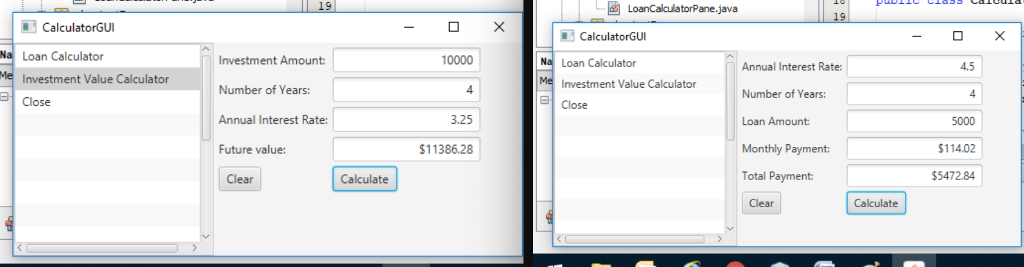
LoanCalculatorPane.java CalculatorGUI Loan Calculator Investment Value Calculator Close Investment Amount Number of Years: Annual Interest Rate: Future value: 10000 4 3.25 $11386.28 CalculatorGUI Loan Calculator Investment Value Calculator Close 4.5 4 5000 $114.02 5472.84 Annual Interest Rate: Number of Years: Loan Amount: Monthly Payment Clear Calculate Total Payment Clear Calculate LoanCalculatorPane.java CalculatorGUI Loan Calculator Investment Value Calculator Close Investment Amount Number of Years: Annual Interest Rate: Future value: 10000 4 3.25 $11386.28 CalculatorGUI Loan Calculator Investment Value Calculator Close 4.5 4 5000 $114.02 5472.84 Annual Interest Rate: Number of Years: Loan Amount: Monthly Payment Clear Calculate Total Payment Clear Calculate
Step by Step Solution
There are 3 Steps involved in it

Get step-by-step solutions from verified subject matter experts
 Study Help