







Question: WRITE IN C++ PLEASE. Instructions Using heaps and priority queuing, design and implement an emergency room simulator. The purpose of the simulator is to model
WRITE IN C++ PLEASE.
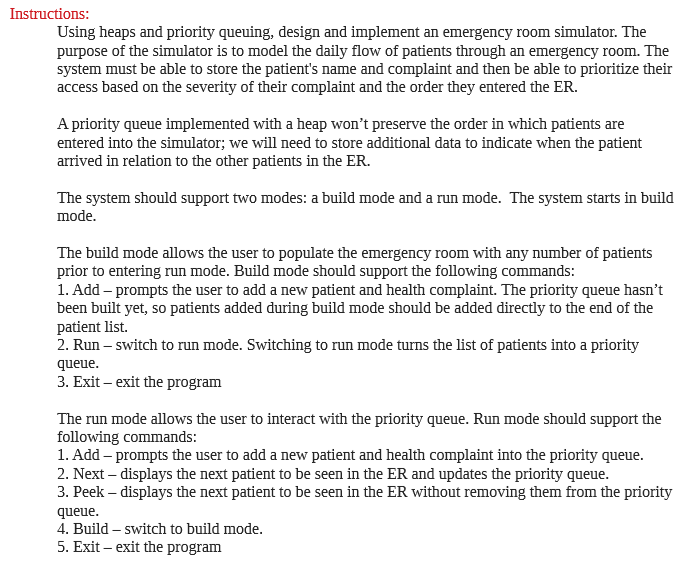
Instructions Using heaps and priority queuing, design and implement an emergency room simulator. The purpose of the simulator is to model the daily flow of patients through an emergency room. The system must be able to store the patient's name and complaint and then be able to prioritize their access based on the severity of their complaint and the order they entered the ER. A priority queue implemented with a heap won't preserve the order in which patients are entered into the simulator; we will need to store additional data to indicate when the patient arrived in relation to the other patients in the ER. The system should support two modes: a build mode and a run mode. The system starts in build mode The build mode allows the user to populate the emergency room with any number of patients prior to entering run mode. Build mode should support the following commands 1. Add - prompts the user to add a new patient and health complaint. The priority queue hasn't been built yet, so patients added during build mode should be added directly to the end of the patient list. 2. Run - switch to run mode. Switching to run mode turns the list of patients into a priority queue 3. Exit - exit the program The run mode allows the user to interact with the priority queue. Run mode should support the following commands 1. Add - prompts the user to add a new patient and health complaint into the priority queue 2. Next - displays the next patient to be seen in the ER and updates the priority queue 3. Peek - displays the next patient to be seen in the ER without removing them from the priority queue 4. Build - switch to build mode 5. Exit - exit the program Instructions Using heaps and priority queuing, design and implement an emergency room simulator. The purpose of the simulator is to model the daily flow of patients through an emergency room. The system must be able to store the patient's name and complaint and then be able to prioritize their access based on the severity of their complaint and the order they entered the ER. A priority queue implemented with a heap won't preserve the order in which patients are entered into the simulator; we will need to store additional data to indicate when the patient arrived in relation to the other patients in the ER. The system should support two modes: a build mode and a run mode. The system starts in build mode The build mode allows the user to populate the emergency room with any number of patients prior to entering run mode. Build mode should support the following commands 1. Add - prompts the user to add a new patient and health complaint. The priority queue hasn't been built yet, so patients added during build mode should be added directly to the end of the patient list. 2. Run - switch to run mode. Switching to run mode turns the list of patients into a priority queue 3. Exit - exit the program The run mode allows the user to interact with the priority queue. Run mode should support the following commands 1. Add - prompts the user to add a new patient and health complaint into the priority queue 2. Next - displays the next patient to be seen in the ER and updates the priority queue 3. Peek - displays the next patient to be seen in the ER without removing them from the priority queue 4. Build - switch to build mode 5. Exit - exit the program
Step by Step Solution
There are 3 Steps involved in it

Get step-by-step solutions from verified subject matter experts
 Study Help