







Question: write in C programing: In this phase, you first need to define: 1-constant called MAXSIZE ( max number of books stored) equal to 100. 2-
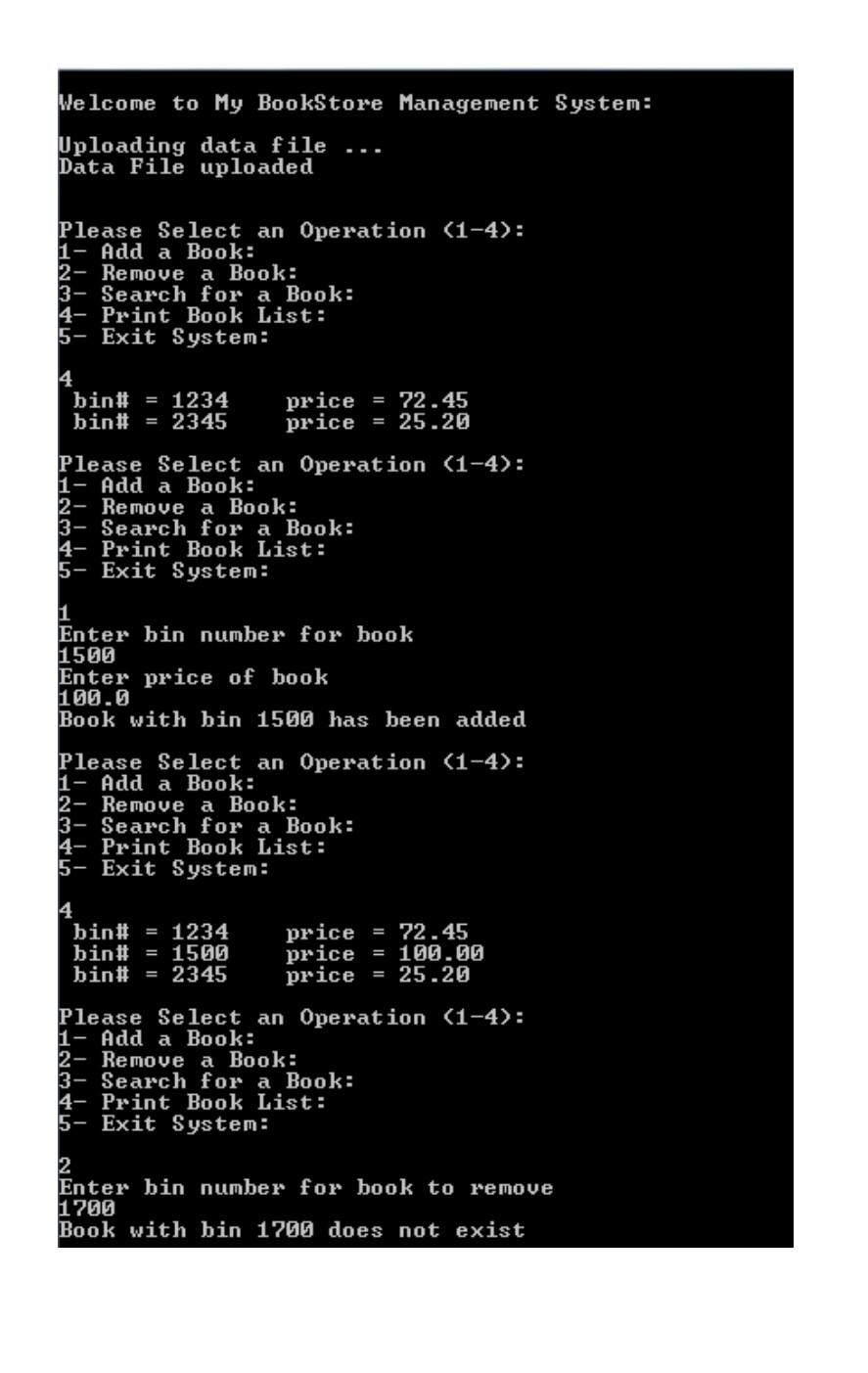
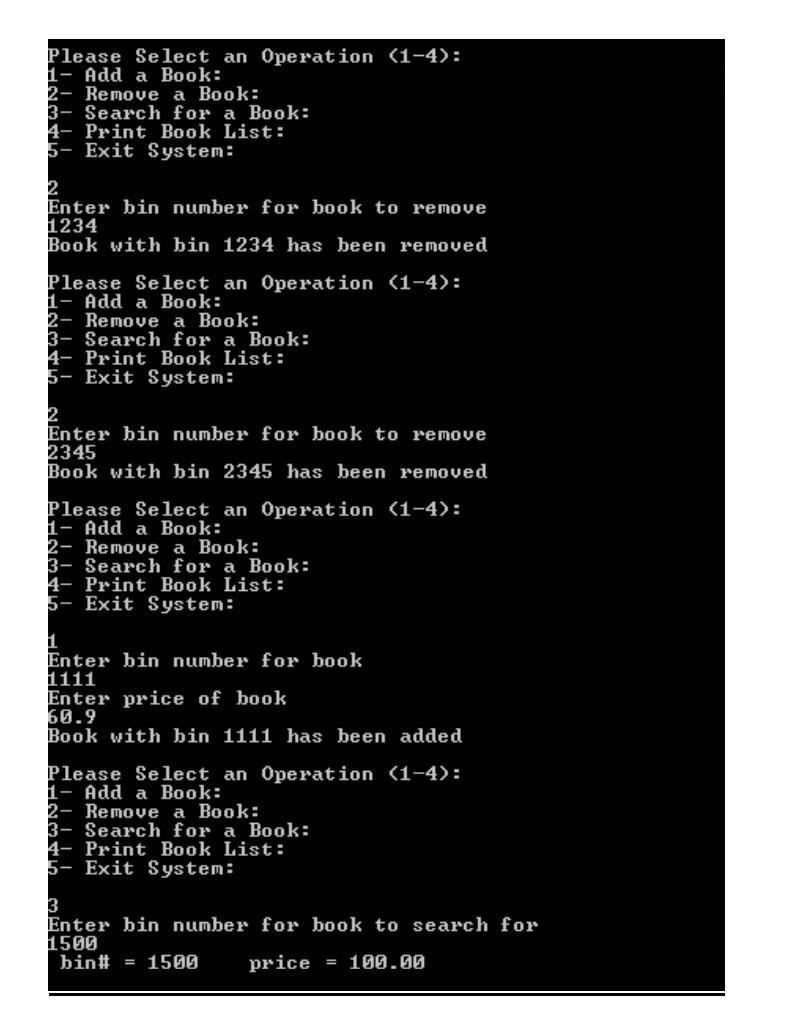
write in C programing: In this phase, you first need to define: 1-constant called MAXSIZE ( max number of books stored) equal to 100. 2- global variable called size =0 ( current number of books stored ) The main function should define three arrays: int bins[MAXSIZE] ; double prices[MAXSIZE]; int publishYear[MAXSIZE]; you now need to implement the major parts of the functions you created in phase one as follows: void displayMainMenu(); // displays the main menu shown above This function will remain similar to that in phase one with one minor addition which is the option: 4- Print Book List which calls the function printBooksInformation() void uploadDataFile ( int bins[], double prices[],int publishYear[]); This function will receive the arrays containing the bin (id) numbers and the prices as parameters and the publish year of the book. The function will open a file called books.txt for reading and will read all the book bin numbers, prices and publish year and store them in the arrays. The global variable size should be set to the number of books read from the file and stored in the array. void addBook( int bins[], double prices[],int publishYear[]); This function will receive the arrays containing the bin numbers, the prices, and the publish year. The function will check to see if the list is not full. If list is not full ( size 0) then it will search for the bin number to be removed and if not found will display an error message. If the bin number exists, the function will remove it by deleting the bin number, price and publish year from bins, prices and pulishYear arrays and size will be decremented by 1. void searchForBook(int bins [], double prices[], int publishYear[]); This function will receive the arrays containing the bin numbers, the prices and the publish year as parameters. The function will check if the list is not empty. If it is not empty (size > 0) then it will ask the user to enter a bin number and will search for that bin number. If the bin number is not found it will display an error message. If the bin number is found then it will be displayed along with the price in a suitable format on the screen. void updateDataFile(int bins[], double prices[], int publishYear[]); This function will receive the arrays containing the bin numbers, the prices, and the publishYear, as parameters. The function will open the file called books.txt for writing and will write to that file the bin number and price of each book in the array. void printBooksInformation (int bins[], double prices[], int publishYear[]); // NEW FUNCTION This function will receive the arrays containing the bin numbers , the prices and the publish year as parameters. This function will print the information (bins and prices) currently stored in the arrays. SAMPLE RUN: Make sure your program works very similar to the following sample run: Assuming that at the beginning of the run file books.txt has the following information stored: 1234 72.45 2002 2345 25.20 1990

**please write code in C programing in the faster time Adhere to instructions.
this two Phase
Welcome to My BookStore Management System: Uploading data file Data File uploaded Please Select an Operation (1-4): 1- Add a Book: 2- Remove a Book: 3- Search for a Book: 4- Print Book List: 5- Exit System: 4 bin# = 1234 bin# = 2345 price = 72.45 price = 25.20 Please Select an Operation (1-4): 1- Add a Book: 2- Remove a Book: 3- Search for a Book: 4- Print Book List: 5- Exit System: 1 Enter bin number for book 1500 Enter price of book 100.0 Book with bin 1500 has been added Please Select an Operation (1-4): 1- Add a Book: 2- Remove a Book: 3- Search for a Book: 4- Print Book List: 5- Exit System: 4 bin# = 1234 bin# = 1500 bin# = 2345 price = 72.45 price = 100.00 price = 25.20 Please Select an Operation (1-4): 1- Add a Book: 2- Remove a Book: 3- Search for a Book: 4- Print Book List: 5- Exit System: 2 Enter bin number for book to remove 1700 Book with bin 1700 does not exist Please Select an Operation (1-4): 1- Add a Book: 2- Remove a Book: 3- Search for a Book: 4- Print Book List: 5- Exit System: 2 Enter bin number for book to remove 1234 Book with bin 1234 has been removed Please Select an Operation (1-4): 1- Add a Book: Remove a Book: 3- Search for a Book: 4- Print Book List: 5- Exit System: 2 Enter bin number for book to remove 2345 Book with bin 2345 has been removed Please Select an Operation (1-4): 1- Add a Book: 2- Remove a Book: 3- Search for a Book: 4- Print Book List: 5- Exit System: 11 Enter bin number for book 1111 Enter price of book 60.9 Book with bin 1111 has been added Please Select an Operation (1-4): 1- Add a Book: 2- Remove a Book: 3- Search for a Book: 4- Print Book List: 5- Exit System: 3 Enter bin number for book to search for 1500 bin# = 1500 price = 100.00 Please Select an Operation (1-4): 1- Add a Book: 2- Remove a Book: 3- Search for a Book: 4- Print Book List: 5- Exit System: 4 bin# = 1111 price = 60.90 bin# = 1500 price = 100.00 Please Select an Operation (1-4): 1- Add a Book: 2- Remove a Book: 3- Search for a Book: 4- PrintBook List: 5- Exit System: 1 Enter bin number for book 1444 Enter price of book 150.0 Book with bin 1444 has been added Please Select an Operation (1-4): 1- Add a Book: 2- Remove a Book: 3- Search for a Book: 4- Print Book List: 5- Exit System: bin# = 1111 price = 60.90 bin# = 1444 price = 150.00 bin# = 1500 price = 100.00 Please Select an Operation (1-4): 1- Add a Book: 2- Remove a Book: 3- Search for a Book: 4- Print Book List: 5- Exit System: 5 Updating data file Data File updated Thank you for using My BookStore Management System. GoodBye
Step by Step Solution
There are 3 Steps involved in it

Get step-by-step solutions from verified subject matter experts
 Study Help