







Question: Write in C Spring 2016 Lab Assignment 11 ET2100 In computer programming in general a string is a sequence of characters. In the C language
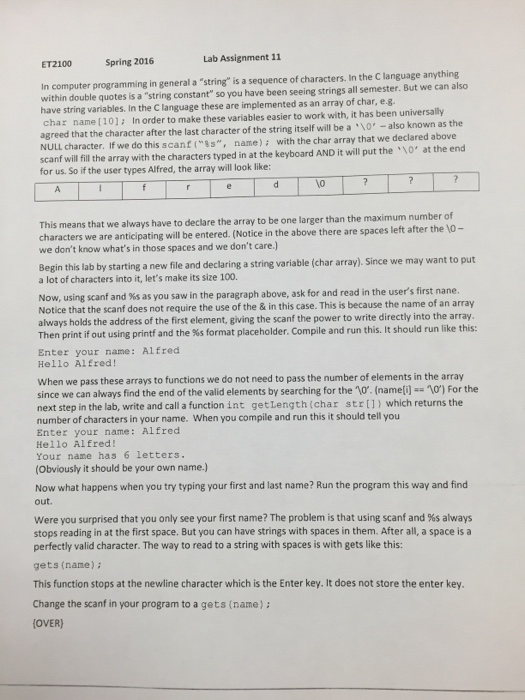
Spring 2016 Lab Assignment 11 ET2100 In computer programming in general a "string" is a sequence of characters. In the C language anything within double quotes is a "string constant" so you have been seeing strings all semester. But we can also have string variables. In the C language these are implemented as an array of char, e.g. char name (10]: In order to make these variables easier to work with, it has been universally agreed that the character after the last character of the string itself will be a 0,-also known as the NULL c scanf wil fill the array with the characters typed in at the keyboard AND it will put the "\0' at the end for us. So if the user types Alfred, the array will look like: name) ; with the char array that we declared above haracter. If we do this scanf ( "%s", This means that we always have to declare the array to be one larger than the maximum number of we don't know what's in those spaces and we don't care.) a lot of characters into it, let's make its size 100. ters we are anticipating will be entered. (Notice in the above there are spaces left after the 10- Begin thislab by starting a new file and declaring a string variable (char array). Since we may want to put Now, using scanf and %s as you saw in the paragraph above, ask for and read in the user's first nane. Notice that the scanf does not require the use of the & in this case. This is because the name of an array always holds the address of the first element, giving the scanf the power to write directly into the array Then print if out using printf and the %s format placeholder. Compile and run this. It should run like this: Enter your name: Alfred Hello Alfred! When we pass these arrays to functions we do not need to pass the number of elements in the array since we can always find the end of the valid elements by searching for the 10. (namei)10) For the next step in the lab, write and call a function int getLength (char str[l) which returns the number of characters in your name. When you compile and run this it should tell you Enter your name: Alfred Hello Alfred! Your name has 6 letters. (Obviously it should be your own name.) Now what happens when you try typing your first and last name? Run the program this way and find out. were you surprised that you only see your first name? The problem is that using scanf and %s always stops reading in at the first space. But you can have strings with spaces in them. After all, a space is a perfectly valid character. The way to read to a string with spaces is with gets like this: gets (name) This function stops at the newline character which is the Enter key. It does not store the enter key. Change the scanf in your program to a gets (name): OVER)
Step by Step Solution
There are 3 Steps involved in it

Get step-by-step solutions from verified subject matter experts
 Study Help