







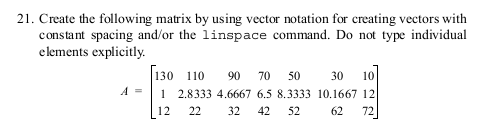
Question: Write in MATLAB... 21. Create the following matrix by using vector notation for creating vectors with onstant spacing and/or the linspace command. Do not type
Write in MATLAB...
21. Create the following matrix by using vector notation for creating vectors with onstant spacing and/or the linspace command. Do not type individual elements explicitly 130 110 90 70 50 30 10 A 2.8333 4.6667 6.5 8.3333 10.1667 12 12 22 32 42 52 62 72
Step by Step Solution
There are 3 Steps involved in it
1 Expert Approved Answer
Step: 1 Unlock

Question Has Been Solved by an Expert!
Get step-by-step solutions from verified subject matter experts
Step: 2 Unlock
Step: 3 Unlock
 Study Help