







Question: Write in SQL Queries and please DO NOT use JOIN or SUBQUERIES. FK-Account amount) Suppose you work at a bank as a data analyst. Your
Write in SQL Queries and please DO NOT use JOIN or SUBQUERIES.
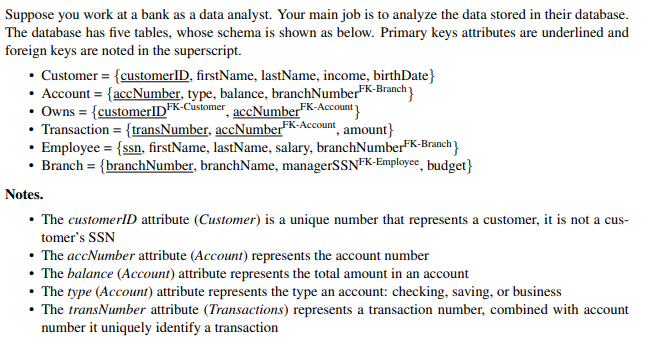
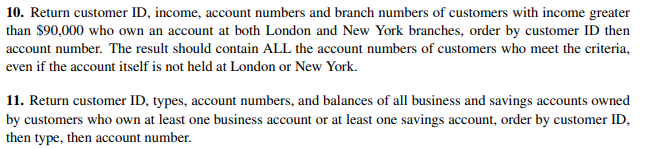
FK-Account amount) Suppose you work at a bank as a data analyst. Your main job is to analyze the data stored in their database. The database has five tables, whose schema is shown as below. Primary keys attributes are underlined and foreign keys are noted in the superscript. Customer = {customerID, firstName, lastName, income, birthDate} Account = {accNumber, type, balance, branchNumberFK-Branch Owns = {customerIDFK-Customer accNumber FK-Account Transaction = {transNumber, accNumber" Employee = {ssn, firstName, lastName, salary, branchNumberFK-Branch} Branch = {branchNumber, branchName, managerSSNFK-Employee, budget} Notes. The customerID attribute (Customer) is a unique number that represents a customer, it is not a cus- tomer's SSN The accNumber attribute (Account) represents the account number The balance (Account) attribute represents the total amount in an account The type (Account) attribute represents the type an account: checking, saving, or business The transNumber attribute (Transactions) represents a transaction number, combined with account number it uniquely identify a transaction 10. Return customer ID, income, account numbers and branch numbers of customers with income greater than $90,000 who own an account at both London and New York branches, order by customer ID then account number. The result should contain ALL the account numbers of customers who meet the criteria, even if the account itself is not held at London or New York. 11. Return customer ID, types, account numbers, and balances of all business and savings accounts owned by customers who own at least one business account or at least one savings account, order by customer ID, then type, then account number
Step by Step Solution
There are 3 Steps involved in it

Get step-by-step solutions from verified subject matter experts
 Study Help