







Question: Write short shell scripts according to the following specifications. Submit a listing and document what you tested and the results. The scripts are all
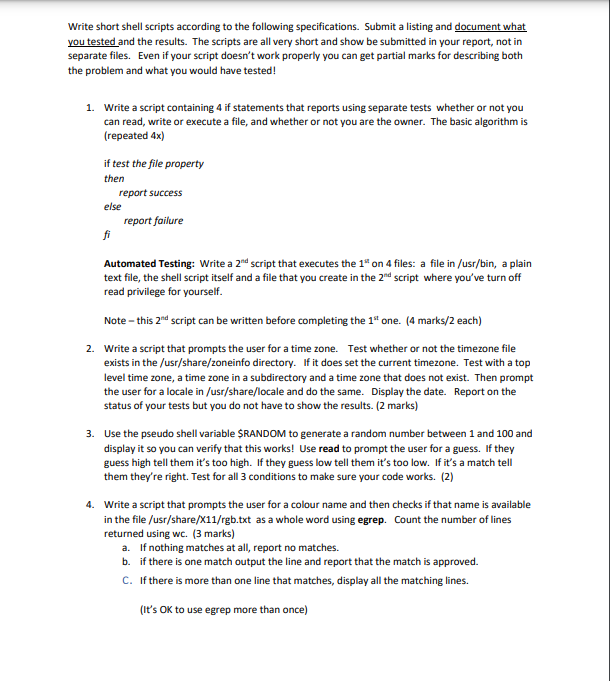
Write short shell scripts according to the following specifications. Submit a listing and document what you tested and the results. The scripts are all very short and show be submitted in your report, not in separate files. Even if your script doesn't work properly you can get partial marks for describing both the problem and what you would have tested! 1. Write a script containing 4 if statements that reports using separate tests whether or not you can read, write or execute a file, and whether or not you are the owner. The basic algorithm is (repeated 4x) if test the file property then report success report failure else fi Automated Testing: Write a 2nd script that executes the 1" on 4 files: a file in /usr/bin, a plain text file, the shell script itself and a file that you create in the 2nd script where you've turn off read privilege for yourself. Note - this 2nd script can be written before completing the 1st one. (4 marks/2 each) 2. Write a script that prompts the user for a time zone. Test whether or not the timezone file exists in the /usr/share/zoneinfo directory. If it does set the current timezone. Test with a top level time zone, a time zone in a subdirectory and a time zone that does not exist. Then prompt the user for a locale in /usr/share/locale and do the same. Display the date. Report on the status of your tests but you do not have to show the results. (2 marks) 3. Use the pseudo shell variable $RANDOM to generate a random number between 1 and 100 and display it so you can verify that this works! Use read to prompt the user for a guess. If they guess high tell them it's too high. If they guess low tell them it's too low. If it's a match tell them they're right. Test for all 3 conditions to make sure your code works. (2) 4. Write a script that prompts the user for a colour name and then checks if that name is available in the file /usr/share/X11/rgb.txt as a whole word using egrep. Count the number of lines returned using wc. (3 marks) a. If nothing matches at all, report no matches. b. if there is one match output the line and report that the match is approved. C. If there is more than one line that matches, display all the matching lines. (It's OK to use egrep more than once)
Step by Step Solution
There are 3 Steps involved in it
Here is a script containing 4 if statements that reports using separate tests whether or not you can read write or execute a file and whether or not y... View full answer

Get step-by-step solutions from verified subject matter experts
 Study Help