







Question: Write SQL commands for the following: a. Create two different forms of the INSERT command to add a student with a student ID of 65798
Write SQL commands for the following:
a. Create two different forms of the INSERT command to add a student with a student ID of 65798 and last name Lopez to the STUDENT table.
b. Now write a command that will remove this student from the STUDENT table.
c. How would your command look like if your task was to remove any student with the last name Lopez from the STUDENT table?
d. Create an SQL command that will modify the name of course ISM 4212 from Database to Introduction to Relational Databases.
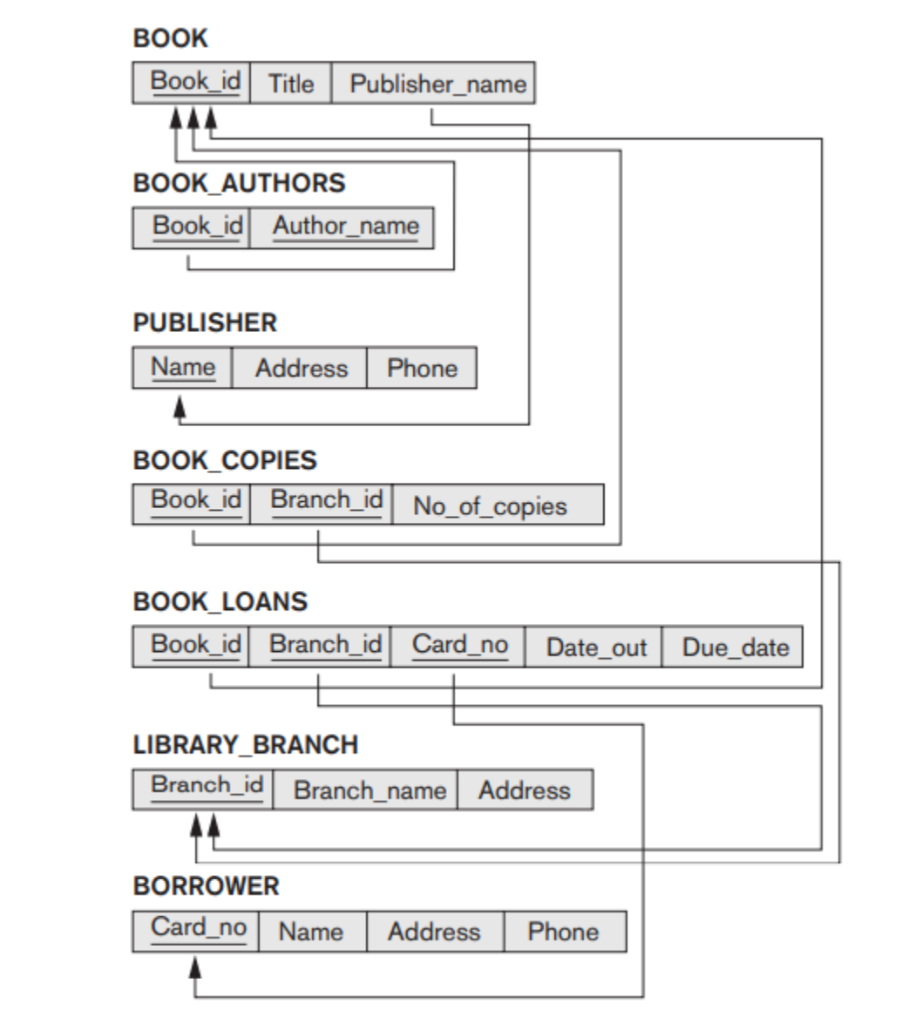
BOOK \begin{tabular}{|l|l|l|} \hline Book_id & Title & Publisher_name \\ \hline \end{tabular} BOOK_AUTHORS Book_id Author_name PUBLISHER \begin{tabular}{|c|c|c|} \hline Name & Address & Phone \\ \hline \end{tabular} BOOK_COPIES \begin{tabular}{|l|l|l|} \hline Book_id & Branch_id & No_of_copies \\ \hline \end{tabular} BOOK_LOANS \begin{tabular}{|l|l|l|l|l|} \hline Book_id & Branch_id & Card_no & Date_out & Due_date \\ \hline \multicolumn{1}{l|}{} & D & & \end{tabular} LIBRARY_BRANCH \begin{tabular}{|c|c|c|} \hline Branch_id & Branch_name & Address \\ \hline \multicolumn{1}{|c|}{} \\ \hline \end{tabular} BORROWER \begin{tabular}{|c|l|l|l|} \hline Card_no & Name & Address & Phone \\ \hline \multicolumn{3}{|l}{} \\ \hline \end{tabular}Step by Step Solution
There are 3 Steps involved in it
1 Expert Approved Answer
Step: 1 Unlock

Question Has Been Solved by an Expert!
Get step-by-step solutions from verified subject matter experts
Step: 2 Unlock
Step: 3 Unlock
 Study Help