







Question: Write SQL The Orion.employee_danation is Challenge 7. Subsetting Data Using the ESCAPE Clause Create a report that displays the Employee ID and Recipients for all
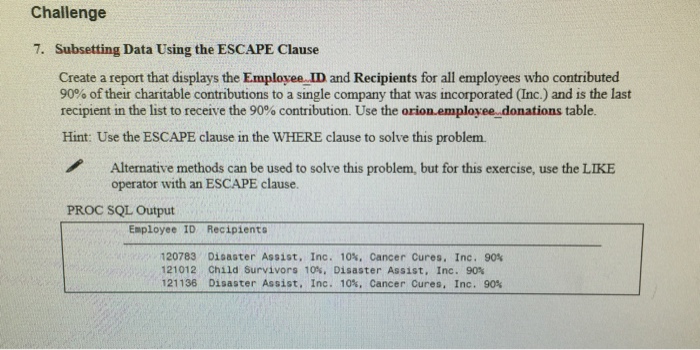
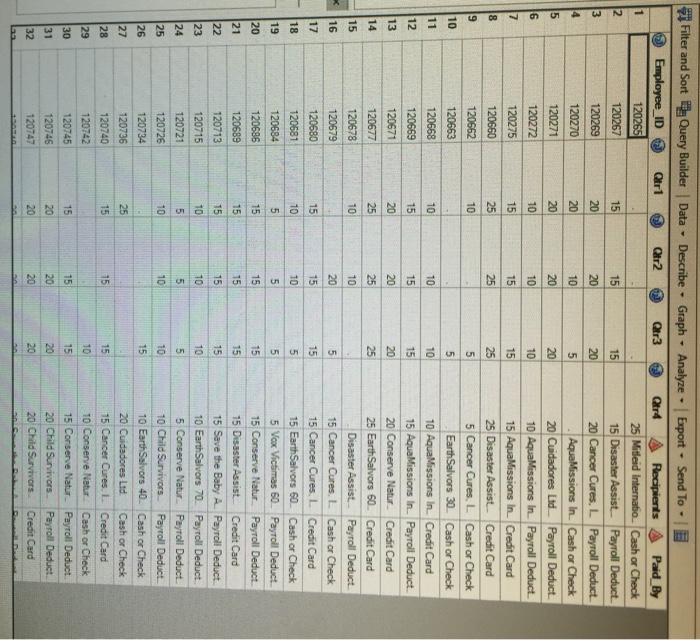
Challenge 7. Subsetting Data Using the ESCAPE Clause Create a report that displays the Employee ID and Recipients for all employees who contributed 90% of their charitable contributions to a single company that was incorporated Inc.) and is the last recipient in the list to receive the 90% contribution. Use the orion employee donations table. Hint: Use the ESCAPE clause in the WHERE clause to solve this problem. Alternative methods can be used to solve this problem, but for this exercise, use the LIKE operator with an ESCAPE clause. PROC SQL Output Employee ID Recipients 120783 Disaster Assist, Inc. 10%, Cancer Cures. Inc. 90% 121012 Child Survivors 10%. Disaster Assist, Inc. 90% 121136 Disaster Assist, Inc. 10%, Cancer Cures, Inc. 90% Challenge 7. Subsetting Data Using the ESCAPE Clause Create a report that displays the Employee ID and Recipients for all employees who contributed 90% of their charitable contributions to a single company that was incorporated Inc.) and is the last recipient in the list to receive the 90% contribution. Use the orion employee donations table. Hint: Use the ESCAPE clause in the WHERE clause to solve this problem. Alternative methods can be used to solve this problem, but for this exercise, use the LIKE operator with an ESCAPE clause. PROC SQL Output Employee ID Recipients 120783 Disaster Assist, Inc. 10%, Cancer Cures. Inc. 90% 121012 Child Survivors 10%. Disaster Assist, Inc. 90% 121136 Disaster Assist, Inc. 10%, Cancer Cures, Inc. 90%
Step by Step Solution
There are 3 Steps involved in it

Get step-by-step solutions from verified subject matter experts
 Study Help