Question: Write the code operation: arduino_code #include LiquidCrystal lcd (12, 11, 10, 9, 8, 7); const int voltage Sensor_1 Al; const int current Sensor_1 = 10;
Write the code operation:
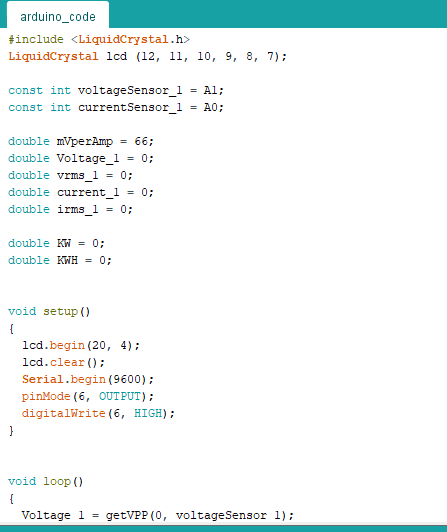
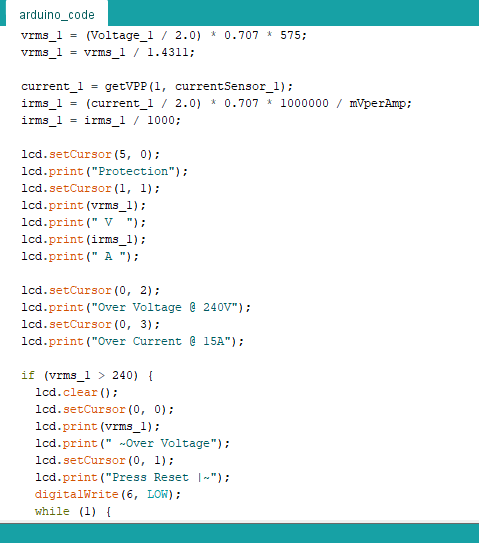
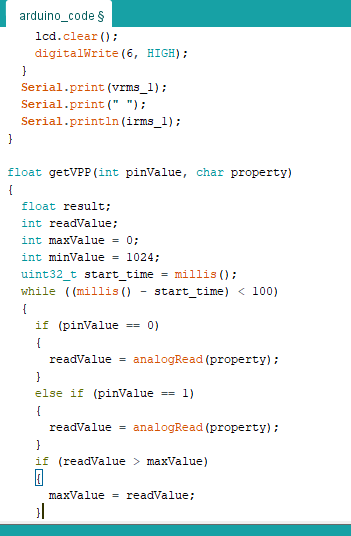
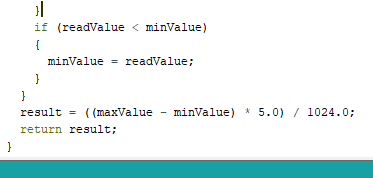
arduino_code #include LiquidCrystal lcd (12, 11, 10, 9, 8, 7); const int voltage Sensor_1 Al; const int current Sensor_1 = 10; double mVperAmp = 66; double Voltage_1 = 0; double vrms_1 = 0; double current_1 = 0; double irms_1 0; double KW = 0; double KWH = 0; void setup() { lcd.begin(20, 4); lcd.clear(); Serial.begin(9600); pinMode (6, OUTPUT); digitalWrite(6, HIGH); } void loop() { Voltage 1 = getVPP (0, voltageSensor 1); arduino_code vrms 1 = (Voltage_1 / 2.0) * 0.707 * 575; vrms_1 = vrms_1 / 1.4311; current_1 - getVPP(1, current Sensor_l); irms_1 (current_1 / 2.0) * 0.707 * 1000000 / mVperAmp; irms_1 = irms_1 / 1000; lcd.setCursor(5, 0); lcd.print("Protection"); lcd.setCursor(1, 1); lcd.print (vrms_1); lcd.print(" V "); lcd.print(irms_1); lcd.print(" A "); lcd.setCursor(0, 2); lcd.print("Over Voltage @ 240V"); lcd.setCursor(0, 3); lcd.print("Over Current @ 15A"); if (vrms_1 > 240) { lcd.clear(); lcd.setCursor(0, 0); lcd.print (vrms_1); lcd.print(" Over Voltage"); lcd.setCursor(0, 1); lcd.print("Press Reset -"); digitalWrite(6, LOW); while (1) arduino_codes lcd.clear(); digitalWrite(6, HIGH); } Serial.print (vrms_1); Serial.print(" "); Serial.println(irms_1); } float getVPP (int pinValue, char property) { float result; int readValue; int maxValue = 0; int minValue = 1024; uint32_t start_time = millis(); while ((millis() start_time) maxValue) . maxValue = readValue; }| | if (readValue LiquidCrystal lcd (12, 11, 10, 9, 8, 7); const int voltage Sensor_1 Al; const int current Sensor_1 = 10; double mVperAmp = 66; double Voltage_1 = 0; double vrms_1 = 0; double current_1 = 0; double irms_1 0; double KW = 0; double KWH = 0; void setup() { lcd.begin(20, 4); lcd.clear(); Serial.begin(9600); pinMode (6, OUTPUT); digitalWrite(6, HIGH); } void loop() { Voltage 1 = getVPP (0, voltageSensor 1); arduino_code vrms 1 = (Voltage_1 / 2.0) * 0.707 * 575; vrms_1 = vrms_1 / 1.4311; current_1 - getVPP(1, current Sensor_l); irms_1 (current_1 / 2.0) * 0.707 * 1000000 / mVperAmp; irms_1 = irms_1 / 1000; lcd.setCursor(5, 0); lcd.print("Protection"); lcd.setCursor(1, 1); lcd.print (vrms_1); lcd.print(" V "); lcd.print(irms_1); lcd.print(" A "); lcd.setCursor(0, 2); lcd.print("Over Voltage @ 240V"); lcd.setCursor(0, 3); lcd.print("Over Current @ 15A"); if (vrms_1 > 240) { lcd.clear(); lcd.setCursor(0, 0); lcd.print (vrms_1); lcd.print(" Over Voltage"); lcd.setCursor(0, 1); lcd.print("Press Reset -"); digitalWrite(6, LOW); while (1) arduino_codes lcd.clear(); digitalWrite(6, HIGH); } Serial.print (vrms_1); Serial.print(" "); Serial.println(irms_1); } float getVPP (int pinValue, char property) { float result; int readValue; int maxValue = 0; int minValue = 1024; uint32_t start_time = millis(); while ((millis() start_time) maxValue) . maxValue = readValue; }| | if (readValue









 Study Help