







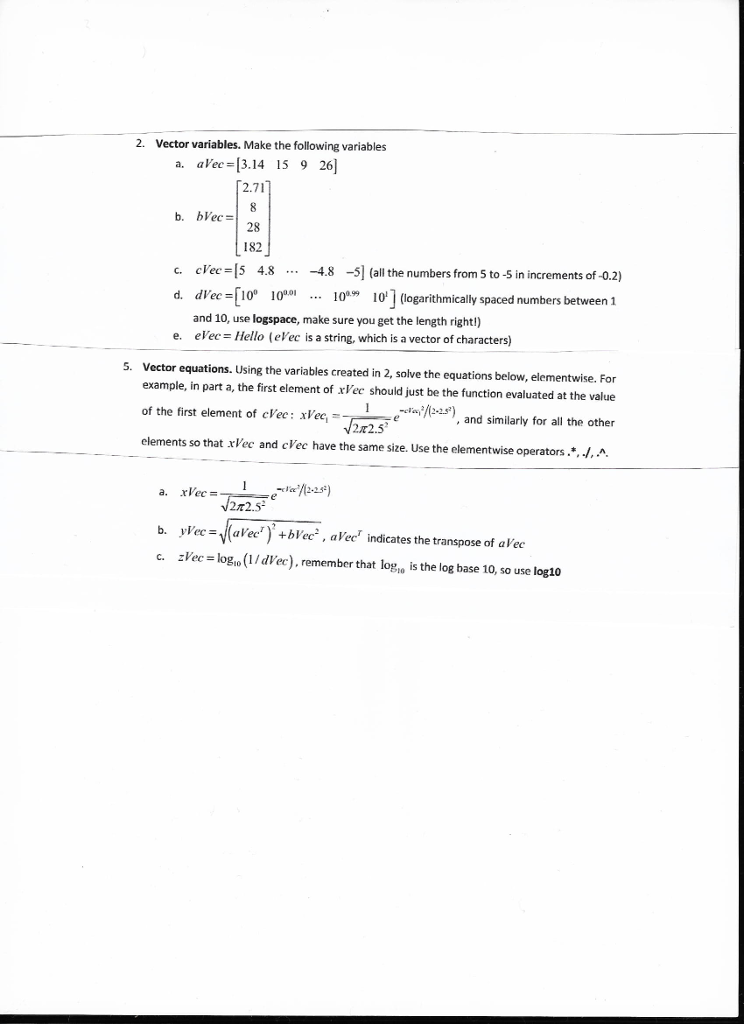
Question: WRITE THE CODE + THE OUTPUTS OR TAKE A SCREENSHOT 2. Vector variables. Make the following variables a. aVec 3.14 15 9 26) 2.71 b.
WRITE THE CODE + THE OUTPUTS OR TAKE A SCREENSHOT
2. Vector variables. Make the following variables a. aVec 3.14 15 9 26) 2.71 b. bVec = 28 182 c. cVec-5 4.8 .. -4.8 -5](all the numbers from 5 to -5 in increments of -0.2) d di ec =[10" 10"" 10 10'](logarithmically spaced numbers between 1 and 10, use logspace, make sure you get the length rightl) evec = Hello ( elec is a string, which is a vector of characters) e, Vector equations. Using the variables created in 2, solve the equations below, elementwise. For example, in part a, the first element of xVec should just be the function evaluated at the value of the first element of cVec: xVee elements so that xVec and cVee have the same size. Use the elementwise operators 5. in 2-2-52), and similarly for all the other 2r2.5 vvec= |(arec), +bVec2, aVecr indicates the transpose of al'ec zVec = log,o(I / dVec). remember that logo is the log base 10, so use log10 b. c. 2. Vector variables. Make the following variables a. aVec 3.14 15 9 26) 2.71 b. bVec = 28 182 c. cVec-5 4.8 .. -4.8 -5](all the numbers from 5 to -5 in increments of -0.2) d di ec =[10" 10"" 10 10'](logarithmically spaced numbers between 1 and 10, use logspace, make sure you get the length rightl) evec = Hello ( elec is a string, which is a vector of characters) e, Vector equations. Using the variables created in 2, solve the equations below, elementwise. For example, in part a, the first element of xVec should just be the function evaluated at the value of the first element of cVec: xVee elements so that xVec and cVee have the same size. Use the elementwise operators 5. in 2-2-52), and similarly for all the other 2r2.5 vvec= |(arec), +bVec2, aVecr indicates the transpose of al'ec zVec = log,o(I / dVec). remember that logo is the log base 10, so use log10 b. c
Step by Step Solution
There are 3 Steps involved in it

Get step-by-step solutions from verified subject matter experts
 Study Help