







Question: Write the data in variable artist_songs into a csv file, 'songs.txt', where the first column is singer name and second column is a song name.
Write the data in variable artist_songs into a csv file, 'songs.txt', where the first column is singer name and second column is a song name. Each line should have a singer and a song name. Use "Name" and "Song" as headers. Do not include double quotation marks (") in your CSV but you should include apostrophes where necessary (for example, for the song "We Don't Talk Anymore").
I did this so far but I am confused with what to do with the code.
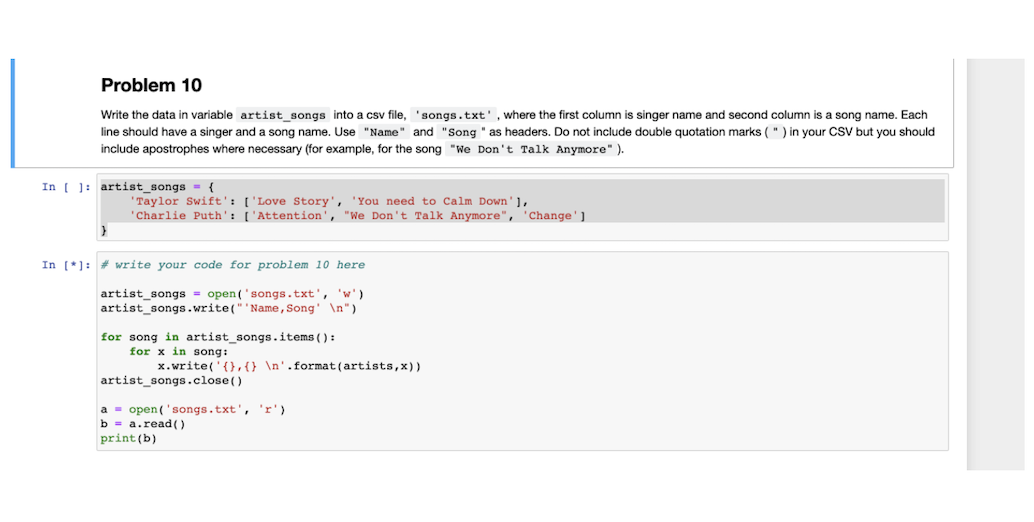
Problem 10 Write the data in variable artist_songs into a csv file, 'songs.txt', where the first column singer name and second column is a song name. Each line should have singer and a song name. Use "Name" and "Song " as headers. Do not include double quotation marks (") in your CSV but you should include apostrophes where necessary (for example, for the song "We Don't Talk Anymore"). In [ ]: artist_songs = { Taylor Swift': [ 'Love Story', 'You need to calm Down'], Charlie Puth': [ 'Attention', "We Don't Talk Anymore", Change'] In [*]: # write your code for problem 10 here artist_songs = open('songs.txt', 'W') artist_songs.write("Name, Song' ") for song in artist_songs. items(): for x in song: x.write('{}, {} '.format(artists,x)) artist_songs.close() 'r') a = open('songs.txt', b = a.read() print(b)
Step by Step Solution
There are 3 Steps involved in it

Get step-by-step solutions from verified subject matter experts
 Study Help