







Question: Write the following codes in c + + Programming language please. Note 1 : Only standard C + + libraries are used. Note 2 :
Write the following codes in c Programming language please.
Note: Only standard C libraries are used.
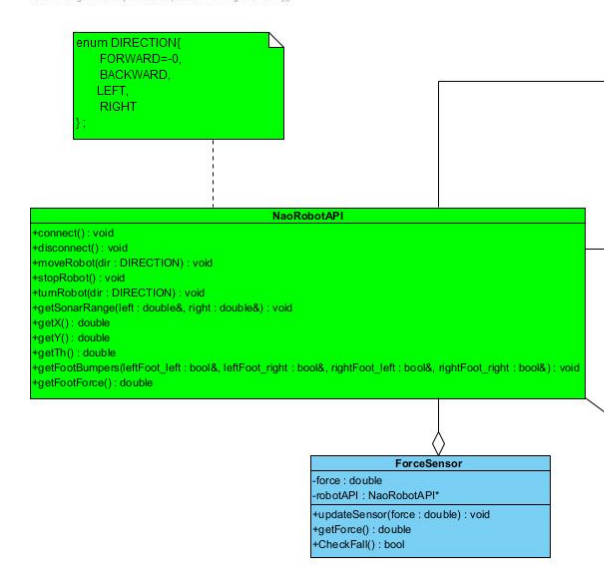
Note: Create two classes as given in uml diagram picture each class should have
headeclassNameh a cpp fileclassNamecpp and a test program for each class.
Note: The class Names are NaoRobotAPI and forceSansor as given in the uml diagram.
Class NaoRobotAPI: This class allows you to use and work with the simulator.
It is given so that you can develop the programs. Changing when you do not have the source code cpp
you have no chance. However, what the member functions you will use do and the parameters they require
descriptions can be found in the NaoRobotAPI.h file.
Note: The description for Class NaoRobotAPI is given at below.
Class ForceSensor: The robot has four force sensors under each foot sole. this sensor
The force calculated by using the values is taken as the force applied by the robot to the ground. this sensor
Provides data retention and management.
updateSensorforce: Loads the current sensor value of the robot into the force variable.
getForce: Returns the force information of the sensor
checkFall: The force value measured while the robot is standing, when the robot falls to the ground, its base touches the ground.
Since it will not, it will decrease by a significant amount. Based on this, true if the robot is detected to fall, otherwise
will return false.
Note: Class ForceSensor: Also should has a headerfileclassNameha cpp file
classNamecpp and a test class.
Note : NaoRobotAPI.h description and uml diagram is given at below.
class NaoRobotAPI
public:
Constructor
NaoRobotAPI;
Connects to the simulated robot and makes initializations
void connect;
Close the connection to the simulated robot
void disconnect;
The robot moves a few steps
Move directions can be FORWARD BACKWARD, LEFT, RIGHT
void moveRobotDIRECTION;
The robot turns
Move directions can be LEFT RIGHT
void turnRobotDIRECTION;
The robot stops
void stopRobot;
Returns the sonar range values which are located on the chest of the robot
in meters
void getSonarRangedouble &left, double &right;
Returns the position of the robot on xaxis in meters
double getX;
Returns the position of the robot on yaxis int meters
double getY;
Returns the orientation of the robot about zaxis in degrees
double getTh;
On the front of the foot of the robots, there are four bumper sensors
False if no touch, true if foot touch to an obstacle.
void getFootBumpersbool& leftFootleft, bool& leftFootright,
bool& rightFootleft, bool& rightFootright;
Returns the total force at the bottom of the foot in Kgf
double getFootForce;
;
#endif NAOROBOTAPIH
NaoRobotAPI
connect : void
disconnect : void
moveRobotdir : DIRECTION : void
stopRobot : void
tumRobotdir : DIRECTION : void
getSonarRangeleft : double& right : double& : void
getX : double
getY : double
getTh : double
getFootBumpers leftFootleft : bool& leftFootright : bool& rightFootleft : bool& rightFootright : bool& : void
getFootForce : double
Note: Please write correct codes and make sure that codes are working.
Step by Step Solution
There are 3 Steps involved in it
1 Expert Approved Answer
Step: 1 Unlock

Question Has Been Solved by an Expert!
Get step-by-step solutions from verified subject matter experts
Step: 2 Unlock
Step: 3 Unlock
 Study Help