







Question: WRITE THE FORMULAS. THAT IS WHAT I NEED HELP WITH. PLEASE All answers must be entered as a formula. Click OK to begin. OK Help
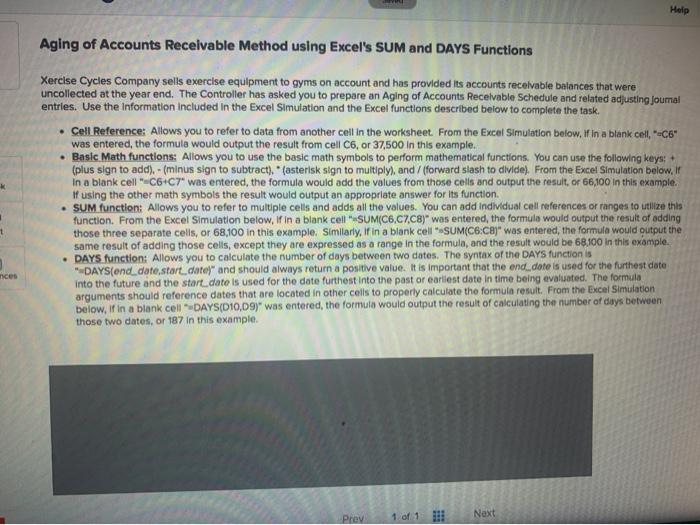
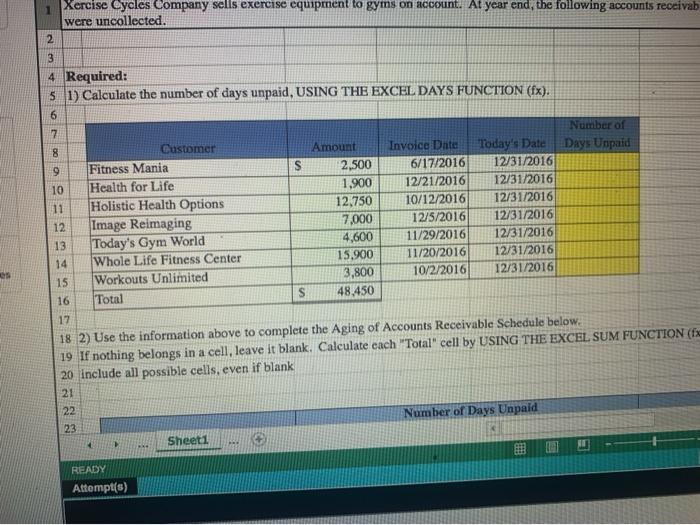
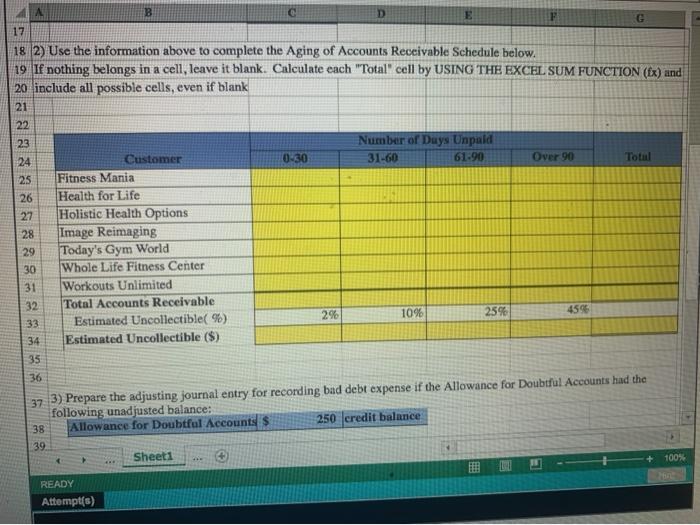
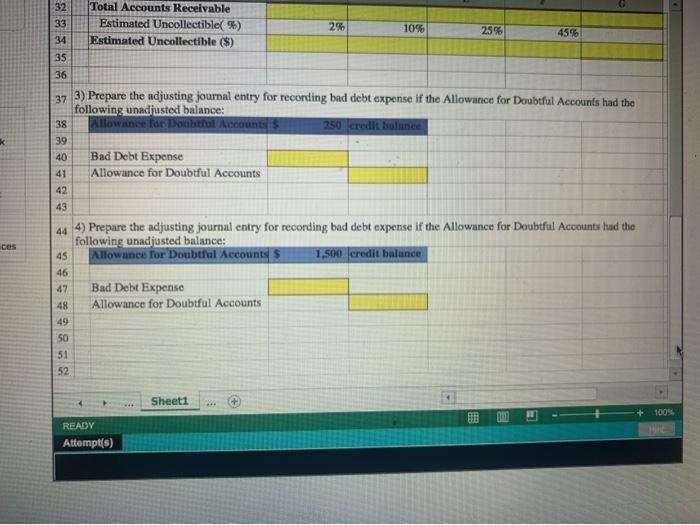
All answers must be entered as a formula. Click OK to begin. OK Help Aging of Accounts Receivable Method using Excel's SUM and DAYS Functions Xercise Cycles Company sells exercise equipment to gyms on account and has provided its accounts receivable balances that were uncollected at the year end. The Controller has asked you to prepare an Aging of Accounts Receivable Schedule and related adjusting Joumal entries. Use the information included in the Excel Simulation and the Excel functions described below to complete the task. . Cell Reference: Allows you to refer to data from another cell in the worksheet. From the Excel Simulation below. If in a blank cell, -C6" was entered the formula would output the result from cell C6, or 37,500 In this example. Basic Math functions: Allows you to use the basic math symbols to perform mathematical functions. You can use the following keys: (plus sign to add). - (minus sign to subtract)." asterisk sign to multiply), and / (forward slash to divide). From the Excel Simulation below, ir In a blank cell-C6 C7' was entered, the formula would add the values from those cells and output the result or 66,100 In this example If using the other math symbols the result would output an appropriate answer for its function. SUM function: Allows you to refer to multiple cells and adds all the values. You can add individual cell references or ranges to utilize this function. From the Excel Simulation below, if in a blank cell SUM(C6,C7.CB)" was entered, the formula would output the result of adding those three separate cells, or 68,100 in this example. Similarly, if in a nk "SUM(C6.CH)" was entered the formula would output the same result of adding those cells, except they are expressed as a range in the formula, and the result would be 68.100 In this example. DAYS function: Allows you to calculate the number of days between two dates. The syntax of the DAYS function is DAYS(end date start date)" and should always return a positive value. It is important that the end dote is used for the furthest date into the future and the start date is used for the date furthest into the past or earliest date in time being evaluated. The formula arguments should reference dates that are located in other cells to properly calculate the formula result. From the Excel Simulation below, if in a blank cell DAYS(D10,09)" was entered the formula would output the result of calculating the number of days between those two dates, or 187 in this example nices Next Prev Xercise Cycles Company sells exercise equipment to gyms on account. At year end, the following accounts receivab were uncollected. 2 3 4 Required: 5 1) Calculate the number of days unpaid, USING THE EXCEL DAYS FUNCTION (fx). 6 S es 7 Number of 8 Customer Amount Invoice Date Today's Date Days Unpaid 9 Fitness Mania 2,500 6/17/2016 12/31/2016 10 Health for Life 1,900 12/21/2016 12/31/2016 11 Holistic Health Options 12.750 10/12/2016 12/31/2016 12 Image Reimaging 7,000 12/5/2016 12/31/2016 13 Today's Gym World 4,600 11/29/2016 12/31/2016 14 Whole Life Fitness Center 15.900 11/20/2016 12/31/2016 15 Workouts Unlimited 3,800 10/2/2016 12/31/2016 16 Total S 48.450 17 18 2) Use the information above to complete the Aging of Accounts Receivable Schedule below. 19 If nothing belongs in a cell, leave it blank. Calculate each "Total" cell by USING THE EXCEL SUM FUNCTION (fx 20 include all possible cells, even if blank 21 22 Number of Days Unpaid 23 Sheets KI READY Attempt(s) SIN 27 A B D E 17 F G 18 2) Use the information above to complete the Aging of Accounts Receivable Schedule below. 19 If nothing belongs in a cell, leave it blank. Calculate each "Total" cell by USING THE EXCEL SUM FUNCTION (Ex) und 20 include all possible cells, even if blank 21 22 23 Number of Days Unpaid 24 Customer 0-30 31-60 61.90 Over 90 Total 25 Fitness Mania 26 Health for Life Holistic Health Options 28 Image Reimaging 29 Today's Gym World 30 Whole Life Fitness Center 31 Workouts Unlimited 32 Total Accounts Receivable 33 Estimated Uncollectible(%) 2% 1096 25% 4595 34 Estimated Uncollectible ($) 35 36 37 3) Prepare the adjusting journal entry for recording bad debt expense if the Allowance for Doubtfal Accounts had the following unadjusted balance: 38 Allowance for Doubtful Accounts $ 250 credit balance 39 Sheet1 100% READY Attempt(s) Total Accounts Receivable Estimated Uncollectible(%) Estimated Uncollectible ($) 2% 10% 2596 32 33 34 35 36 45% k 37 3) Prepare the adjusting journal entry for recording bad debt expense if the Allowance for Doubtful Accounts had the following unadjusted balance: 38 Allowance for Doubthal Accounts 250 credit bounce 39 40 Bad Debt Expense 41 Allowance for Doubtful Accounts 42 43 44 4) Prepare the adjusting journal entry for recording bad debt expense if the Allowance for Doubtful Accounts had the following unadjusted balance: 45 Allowance for Doubtful Accounts 1,500 credit balance 46 47 Bad Debt Expense 48 Allowance for Doubtful Accounts ces 50 51 52 Sheet1 ++ 100% READY Attempt(s)
Step by Step Solution
There are 3 Steps involved in it

Get step-by-step solutions from verified subject matter experts
 Study Help