







Question: Write the function find_zero that is defined like this function x = find_zero(f,x1,x2). The first input argument is special. It is a function handle. A
Write the function find_zero that is defined like this function x = find_zero(f,x1,x2). The first input argument is special. It is a function handle. A function handle is gotten by typing @ and the name of any function. For example, x = find_zero(@sin,-1,1) will give f the function handle for MATLABs built-in sin function. Then, inside find_zero, the statement y = f(-1) would set y = sin(-1). Note that the @ sign is not used inside the function. Only the caller uses it. All other arguments to find_zero are scalar numbers, and x1 is less than x2. The goal of the function is to find an x that lies in the range from x1 to x2 such that after the command, y = f(x), is executed inside the function find_zero, y is approximately zero as defined by abs(y)
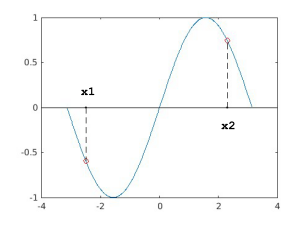
0.5 -0.5 x1. x2
Step by Step Solution
There are 3 Steps involved in it

Get step-by-step solutions from verified subject matter experts
 Study Help