







Question: Write the MATLAB CODES for the Following: The Excel File is Given Below: Problem 1: In the Homework17 folder on Blackboard, an Excel spreadsheet entitled
Write the MATLAB CODES for the Following:
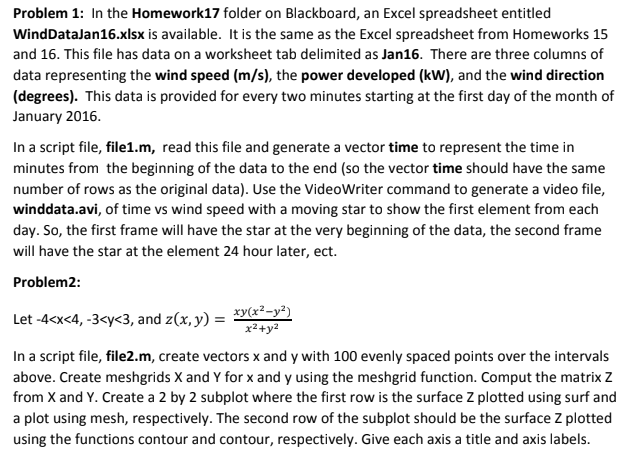
The Excel File is Given Below:
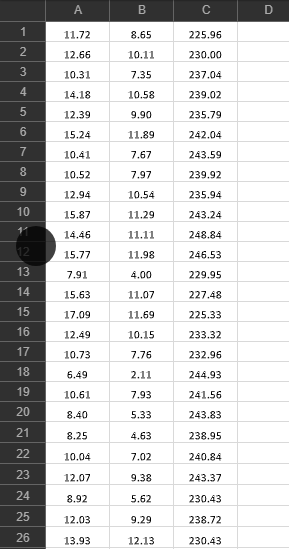
Problem 1: In the Homework17 folder on Blackboard, an Excel spreadsheet entitled WindDataJan16.xlsx is available. It is the same as the Excel spreadsheet from Homeworks 15 and 16. This file has data on a worksheet tab delimited as Jan16. There are three columns of data representing the wind speed (m/s), the power developed (kW), and the wind direction (degrees). This data is provided for every two minutes starting at the first day of the month of January 2016. In a script file, file1.m, read this file and generate a vector time to represent the time in minutes from the beginning of the data to the end (so the vector time should have the same number of rows as the original data). Use the VideoWriter command to generate a video file, winddata.avi, of time vs wind speed with a moving star to show the first element from each day. So, the first frame will have the star at the very beginning of the data, the second frame will have the star at the element 24 hour later, ect. Problem2 Let -4
Step by Step Solution
There are 3 Steps involved in it

Get step-by-step solutions from verified subject matter experts
 Study Help