







Question: Write the source code for the task together with your lab report of the task 2TA5K 1. Implemen the A* SEARCTI traverel behrque using python.
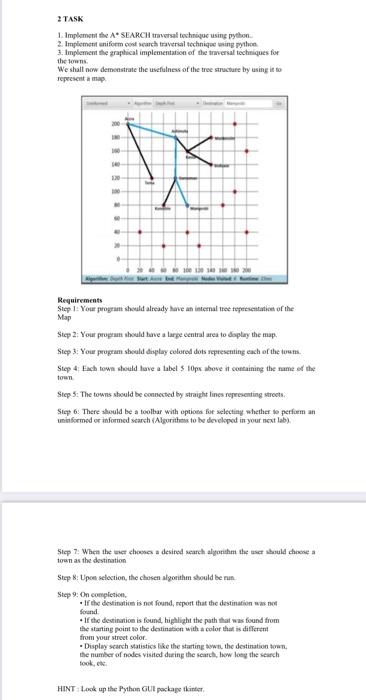
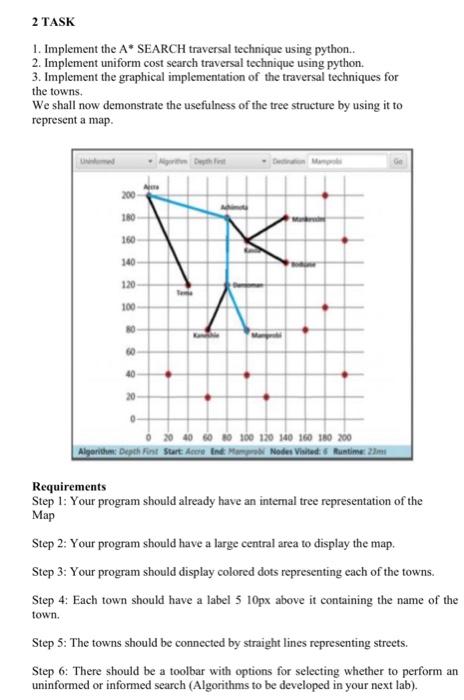
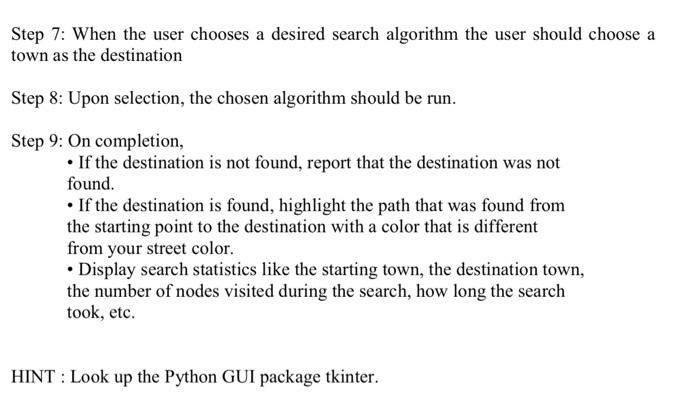
2TA5K 1. Implemen the A* SEARCTI traverel behrque using python. 2. Implement eniferm coed search traveral techniqee weing sythoa 3. Implement the graphical implementation of the traversal techniques for the fowns. We shalt now demeastrate the usefulness of the tree stucture by using ie to repecsent a map. Requirements Step 1: Your progrant sheuld already have an ieternal tree fepecsentatice of the Map Step 2: Your propram should have a large ecniral area to doplay the map. Step 3: You program sbould dipplay colored dots scpresenting each of the touns. Step 4: Each town should lave a label 5 10pr above if containing the name of the town. Step 5: The towns should be conbected by straight lines representing strects: Step 6: There should be a toolbar with eptioes foe selecting whether io perform an uninformod or informed search (Algorithese to be developod in your next lab). Step 7. When the becr chowses a desired search alpotidnm the user should chose a toen as the destination Step 8: Upoen selection, the chosen algorithm should be run Step 9: On completion, - If the destination is not fosind, report that the destination was net foend. - If the destination is found, highlight the path that was found from the starting peint to the deatination with te color that is diflerent from your strect cotor. - Display search statistics like the startine tewn, the destination toan. the number of nodes visited dieine the search, how loey the search took, the. 2 TASK 1. Implement the A SEARCH traversal technique using python.. 2. Implement uniform cost search traversal technique using python. 3. Implement the graphical implementation of the traversal techniques for the towns. We shall now demonstrate the usefulness of the tree structure by using it to represent a map. Requirements Step 1: Your program should already have an intemal tree representation of the Map Step 2: Your program should have a large central area to display the map. Step 3: Your program should display colored dots representing each of the towns. Step 4: Each town should have a label 510px above it containing the name of the town. Step 5: The towns should be connected by straight lines representing streets. Step 6: There should be a toolbar with options for selecting whether to perform an uninformed or informed search (Algorithms to be developed in your next lab). Step 7: When the user chooses a desired search algorithm the user should choose a town as the destination Step 8: Upon selection, the chosen algorithm should be run. Step 9: On completion, - If the destination is not found, report that the destination was not found. - If the destination is found, highlight the path that was found from the starting point to the destination with a color that is different from your street color. - Display search statistics like the starting town, the destination town, the number of nodes visited during the search, how long the search took, etc. HINT : Look up the Python GUI package tkinter. 2TA5K 1. Implemen the A* SEARCTI traverel behrque using python. 2. Implement eniferm coed search traveral techniqee weing sythoa 3. Implement the graphical implementation of the traversal techniques for the fowns. We shalt now demeastrate the usefulness of the tree stucture by using ie to repecsent a map. Requirements Step 1: Your progrant sheuld already have an ieternal tree fepecsentatice of the Map Step 2: Your propram should have a large ecniral area to doplay the map. Step 3: You program sbould dipplay colored dots scpresenting each of the touns. Step 4: Each town should lave a label 5 10pr above if containing the name of the town. Step 5: The towns should be conbected by straight lines representing strects: Step 6: There should be a toolbar with eptioes foe selecting whether io perform an uninformod or informed search (Algorithese to be developod in your next lab). Step 7. When the becr chowses a desired search alpotidnm the user should chose a toen as the destination Step 8: Upoen selection, the chosen algorithm should be run Step 9: On completion, - If the destination is not fosind, report that the destination was net foend. - If the destination is found, highlight the path that was found from the starting peint to the deatination with te color that is diflerent from your strect cotor. - Display search statistics like the startine tewn, the destination toan. the number of nodes visited dieine the search, how loey the search took, the. 2 TASK 1. Implement the A SEARCH traversal technique using python.. 2. Implement uniform cost search traversal technique using python. 3. Implement the graphical implementation of the traversal techniques for the towns. We shall now demonstrate the usefulness of the tree structure by using it to represent a map. Requirements Step 1: Your program should already have an intemal tree representation of the Map Step 2: Your program should have a large central area to display the map. Step 3: Your program should display colored dots representing each of the towns. Step 4: Each town should have a label 510px above it containing the name of the town. Step 5: The towns should be connected by straight lines representing streets. Step 6: There should be a toolbar with options for selecting whether to perform an uninformed or informed search (Algorithms to be developed in your next lab). Step 7: When the user chooses a desired search algorithm the user should choose a town as the destination Step 8: Upon selection, the chosen algorithm should be run. Step 9: On completion, - If the destination is not found, report that the destination was not found. - If the destination is found, highlight the path that was found from the starting point to the destination with a color that is different from your street color. - Display search statistics like the starting town, the destination town, the number of nodes visited during the search, how long the search took, etc. HINT : Look up the Python GUI package tkinter
Step by Step Solution
There are 3 Steps involved in it

Get step-by-step solutions from verified subject matter experts
 Study Help