







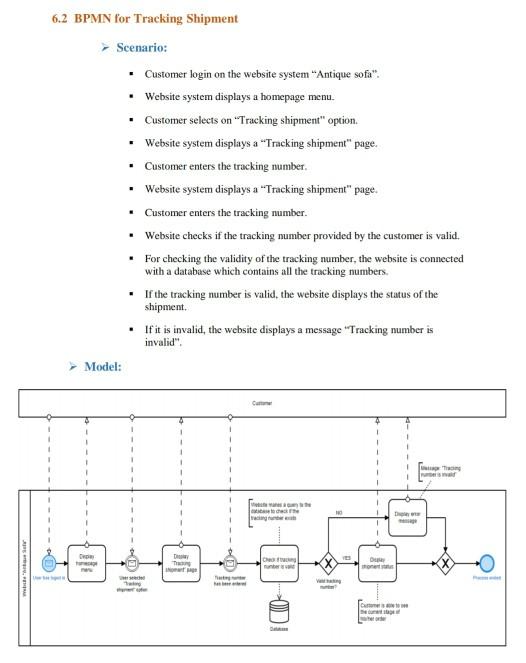
Question: write the use case DESCRIPTION for this tracking shipment this is a template for the use case description 6.2 BPMN for Tracking Shipment Scenario: Customer
write the use case DESCRIPTION for this tracking shipment
this is a template for the use case description
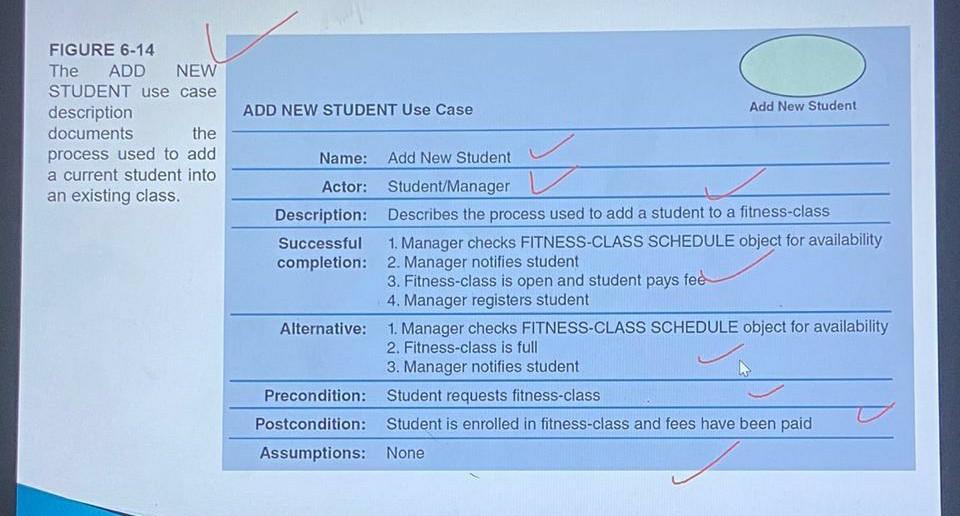
6.2 BPMN for Tracking Shipment Scenario: Customer login on the website system "Antique sofa". . Website system displays a homepage menu Customer selects on "Tracking shipment" option Website system displays a "Tracking shipment" page. Customer enters the tracking number Website system displays a "Tracking shipment" page. Customer enters the tracking number. . Website checks if the tracking number provided by the customer is valid, For checking the validity of the tracking number, the website is connected with a database which contains all the tracking numbers . If the tracking number is valid, the website displays the status of the shipment, . If it is invalid, the website displays a message "Tracking number is invalid". Model: C Team COM JO ADD NEW STUDENT Use Case Add New Student FIGURE 6-14 The ADD NEW STUDENT use case description documents process used to add a current student into an existing class. the Name: Add New Student Actor: Student/Manager Description: Describes the process used to add a student to a fitness-class Successful 1. Manager checks FITNESS-CLASS SCHEDULE object for availability completion: 2. Manager notifies student 3. Fitness-class is open and student pays fee 4. Manager registers student Alternative: 1. Manager checks FITNESS-CLASS SCHEDULE object for availability 2. Fitness-class is full 3. Manager notifies student Precondition: Student requests fitness-class Postcondition: Student is enrolled in fitness-class and fees have been paid Assumptions: None 6.2 BPMN for Tracking Shipment Scenario: Customer login on the website system "Antique sofa". . Website system displays a homepage menu Customer selects on "Tracking shipment" option Website system displays a "Tracking shipment" page. Customer enters the tracking number Website system displays a "Tracking shipment" page. Customer enters the tracking number. . Website checks if the tracking number provided by the customer is valid, For checking the validity of the tracking number, the website is connected with a database which contains all the tracking numbers . If the tracking number is valid, the website displays the status of the shipment, . If it is invalid, the website displays a message "Tracking number is invalid". Model: C Team COM JO ADD NEW STUDENT Use Case Add New Student FIGURE 6-14 The ADD NEW STUDENT use case description documents process used to add a current student into an existing class. the Name: Add New Student Actor: Student/Manager Description: Describes the process used to add a student to a fitness-class Successful 1. Manager checks FITNESS-CLASS SCHEDULE object for availability completion: 2. Manager notifies student 3. Fitness-class is open and student pays fee 4. Manager registers student Alternative: 1. Manager checks FITNESS-CLASS SCHEDULE object for availability 2. Fitness-class is full 3. Manager notifies student Precondition: Student requests fitness-class Postcondition: Student is enrolled in fitness-class and fees have been paid Assumptions: None
Step by Step Solution
There are 3 Steps involved in it
1 Expert Approved Answer
Step: 1 Unlock

Question Has Been Solved by an Expert!
Get step-by-step solutions from verified subject matter experts
Step: 2 Unlock
Step: 3 Unlock
 Study Help