







Question: Write this program in PYTHON Objects: Practice designing a program and reviewing Python file and os module usage. (NOTE: be sure to review the example
Write this program in PYTHON
Objects: Practice designing a program and reviewing Python file and os module usage. (NOTE: be sure to review the example programs formattedOutput.py and changeDirectory.py found at: www.cs.uni.edu/~fienup/cs1520s18/homework/example_programs_hw1.zip )
Electronic Quiz Grader Program
The eLearning multiple-choice-quiz grader has broken down, so Professor Smart N. Lazy wants you to write a program (quizGrader.py) to grade the classs eLearning quizzes. After extracting the files from: http://www.cs.uni.edu/~fienup/cs1520s18/homework/hw1.zip
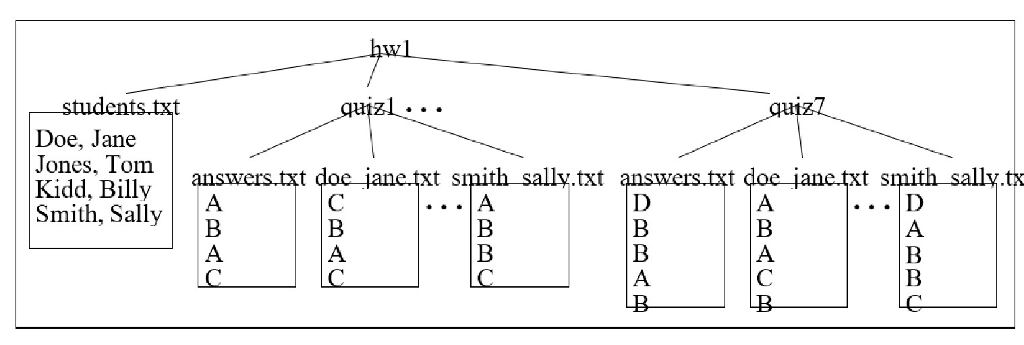
you will find that the hw1 folder contains:
students.txt - a text file containing the student names in the class one or more quiz# directories - each directory contains an answers.txt text file with the correct answers and text files for each student who took the quiz. The student file names are lastname_firstname.txt
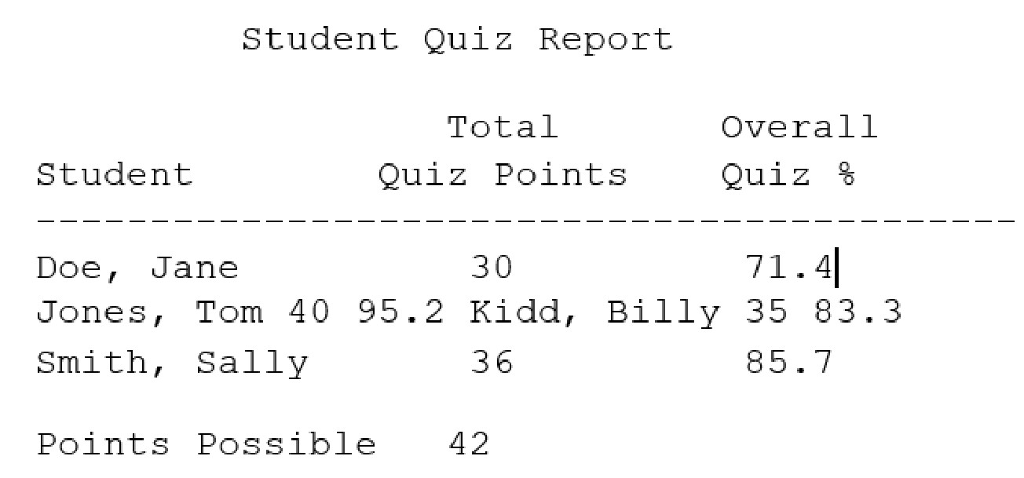
Your program (called quizGrader.py) should run from inside the hw1 directory (i.e., develop it inside the hw1 directory) to generate a gradeReport.txt file that looks something like:
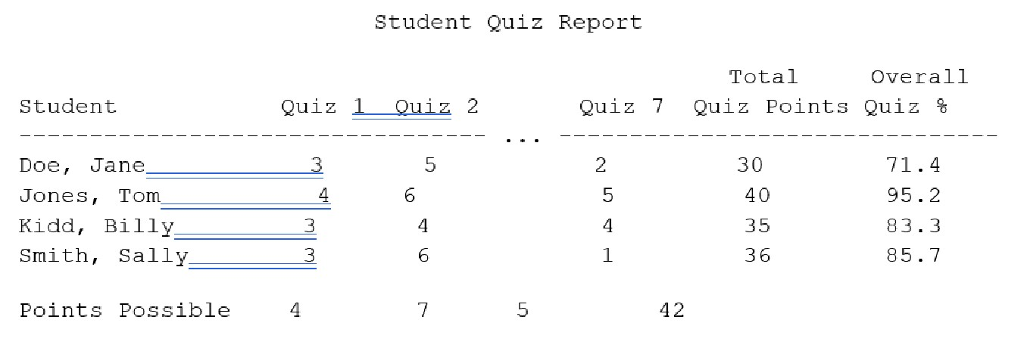
For extra credit, you can report more details (e.g., individual quiz scores for each student):
When you write your program, be sure you:
think about the functional-decomposition (top-down) design before you start to write code. Youll need to turn in a design document, so you should might as well start there.
use meaningful variable names with good style (i.e., useCamelCase)
use comments (""" Multi-line Comment """) at the start of the program and immediately after each function definition describing what they do (see lab1 diceOutcomes.py program)
use a main function (see lab1 diceOutcomes.py program) located at the top of program with a call to it at the bottom to start execution
use global constants where appropriate with good style (ALL_CAPS_AND_UNDERSCORES). (Put your global constants after your initial comments describing the program and before your main function definition so they can be found and changed easily in future versions of your program.)
students.txt Doe, Jane Jones, Tom Kidd, Billy answers txt doe jane txt smith sally.txt answers txt doe jane txt smith sally.tx Smith, Sally students.txt Doe, Jane Jones, Tom Kidd, Billy answers txt doe jane txt smith sally.txt answers txt doe jane txt smith sally.tx Smith, Sally
Step by Step Solution
There are 3 Steps involved in it

Get step-by-step solutions from verified subject matter experts
 Study Help