







Question: write using DDL Taskvidssignments(s) Crating Database objects by asing Data Definition Language (DDL): 1. Using the Data Definition Language statement, create new database named Univeraify.
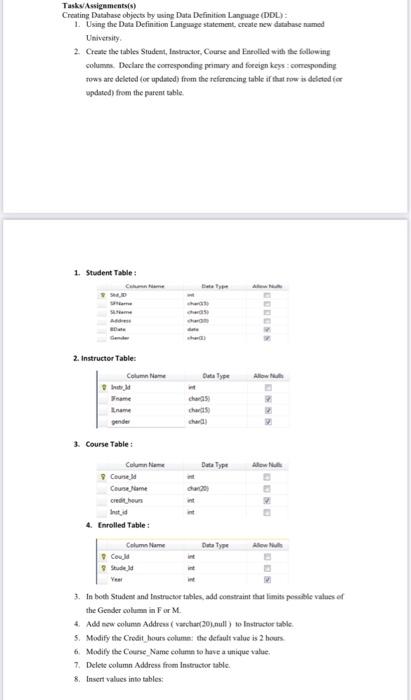
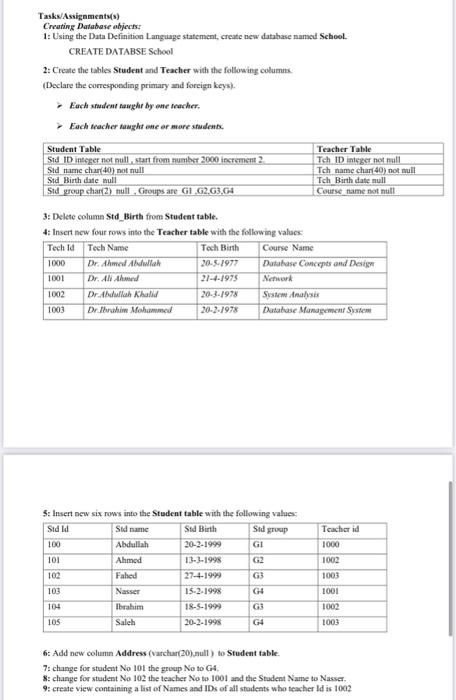
Taskvidssignments(s) Crating Database objects by asing Data Definition Language (DDL): 1. Using the Data Definition Language statement, create new database named Univeraify. 2. Create the tables Student, lestructor, Course asd Eiroolled with llee following solumms. Doclare the corresponding primary and foreign keys : comerponding fows ate deleted (or updabed) from the referencing table if that fow is delatod fer opdated) from the parent table. 1. Student Table : 2. Instructer Table: 3. Course Table : 4. annwues sauie : 3. In bodh Studest and tinstrecbe tabies, add constraint that limits posselele values of the Gender ooluem in F or M. 4. Add new colune Address ( vachar(20),null ) to Instructor table. 5. Modify the Crodit bours column: the default value is 2 bours. 6. Modify the Ceurse. Name eolumin so have a unique value. 7. Delete column Address from Inseructor table. 8. Invert values into tables: Tasks/Assignments(s) Creating Database abjects: 1: Using the Data Definition Language statement, create new database named Sehool. CREATE DATABSE School 2: Create the tables Student and Teacher with the following columns. (Declare the corresponding primary and foreign keys). Each student nainght by ane teacher. Each teacher tamght enc ar mare students. 3: Delete column Std_Birth from Student table. 4: Insert new four rows into the Teacher table with the following values: 5: Insert new six rows into the Student table with the following values: 6: Add new column Address (varelur(20),null) to Student table. 7: change for studeat No 101 the group No to G4. 8: change for student No 102 the teacher No to 1001 and the Stadent Name to Nasser. 9: create view containing a list of Names and IDs of all studeats who teacher Id is 1002
Step by Step Solution
There are 3 Steps involved in it

Get step-by-step solutions from verified subject matter experts
 Study Help