







Question: Writing a benchmark program The following code uses the module time to do a benchmark. A benchmark is a program that runs several instructions or
Writing a benchmark program
The following code uses the module time to do a benchmark. A benchmark is a program that runs several instructions or repeated instructions to measure the time required. Depending on the employed time, we can decide if a computer is faster than another or if a code is faster than another. Write this program in the IDLE (python editor) and run it several times (5 times or more, press the function key F5 to run a program).
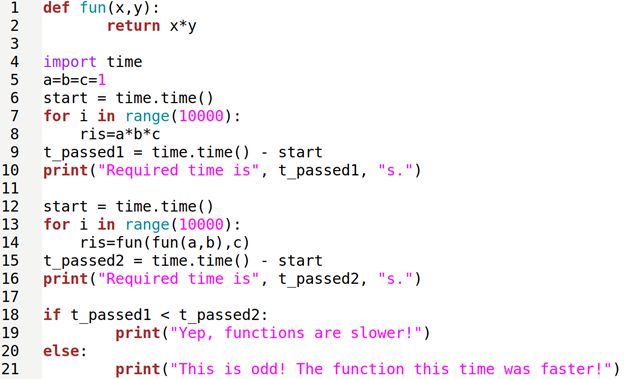
The code executes the same operation several times (10000) in two ways, one using a direct calculation (line 9: ris=a*b*c) and one using a function to a multiplication between two numbers used twice (line 15: ris=fun(fun(a, b), c)).
Moreover, the program takes track of the time employed to run 10000 times a direct operation on t_passed1 and the time required to call 10000 the function doing the same calculation on t_passed2.
Finally, the program compares those passed times and decides which one is the faster implementation.
Running several times such that program, you will see that one of the two implementations (direct operation vs function) is generally faster. However, the result you can obtain from a benchmark is firmly dependent on the simultaneous jobs carried by a computer at that moment. For such a reason, you should run the code several times to decide on a response (or disable any other program in the background).
Now say what affirmations apply to direct operations or to call of functions:
| Direct operations | Functions | Affirmation |
|
|
| are faster |
|
|
| They require less program memory since we can reuse code |
|
|
| They are easy to read and understand because they have less code read. |
|
|
| They are easy to maintain (modify, improve, correct) because they have less code. |
Provide the screenshot of the run-output (entire screen, no cuts).
Step by Step Solution
There are 3 Steps involved in it

Get step-by-step solutions from verified subject matter experts
 Study Help