







Question: Writing a Function in Python USING A FILE with the house data in an excel sheet CALLED data.csv : Function name: home_profile Parameters: address (string),
Writing a Function in Python USING A FILE with the house data in an excel sheet CALLED data.csv : 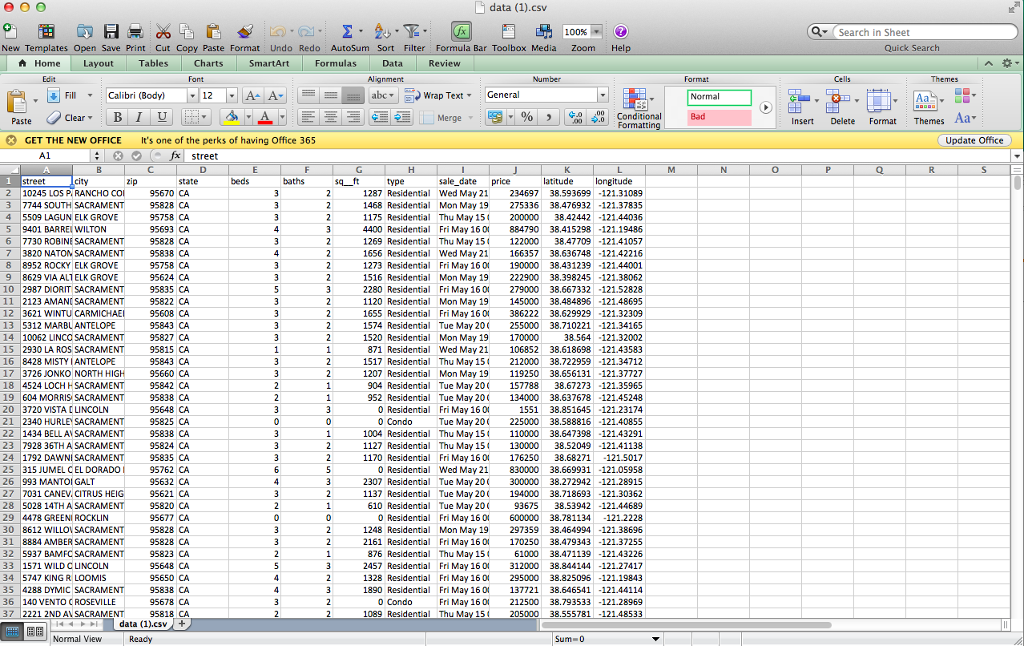
Function name: home_profile
Parameters: address (string), redo_file (boolean)
Return value: None
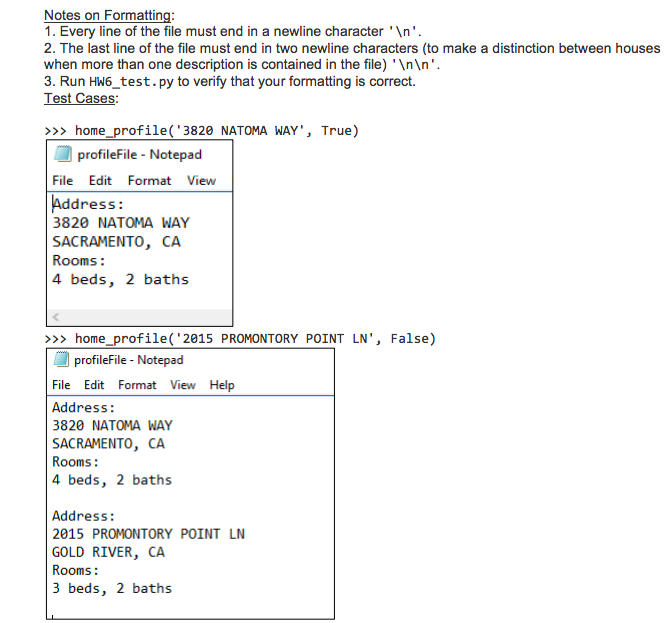
Description: Write a profile of the home whose address (string) is passed into the function to a file named profileFile.txt. Assume the address given is always valid. If the boolean value redo_file is True, then start the file over (begin at a blank file and write the house description to the initially empty file). If redo_file is False, then simply append the description of the address passed in to the bottom of the file. Write the address of the home to profileFile.txt in the following format:
Address:
[ADDRESS OF HOME PASSED IN]
[CITY], [STATE]
Rooms:
[NUMBER OF BEDROOMS] beds, [NUMBER OF BATHS], baths
data (1).cSv Search in Sheet New Templates Open Save Print Cut Copy Paste Format Undo Redo AutoSum Sort Filter Formula Bar Toolbox Media ZoomHelp Paste Clear B I A GET THE NEW OFFICE It's one of the perks of having Office 365 0 2 10245 LOS P. RANCHO CO 3 7744 SOUTH SACRAMENT 4 5509 LAGUN ELK GROVE 5 9401 BARRELWILTON 6 7730 ROBINESACRAME 7 3820 NATON SACRAMENT 95838 CA 8 8952 ROCKY ELK GROVE 9 8629 VIA ALTELK GROVE 10 2987 DIORIT SACRAME 11 2123 AMANI SACRAMENT 12 3621 WINTU CARMICHAE 13 5312 MARBLANTELOPE 14 10062 LINCC SACRAME 15 2930 LA ROS SACRAMENT 95815 CA 16 8428 MISTY IANTELOPE 17 3726 JONKO NORTH 18 4524 LOCHH SACRAMENT 95842 CA 19 604 MORRIS SACRAMEN 20 3720 VISTA LINCOLN 21 2340 HURLE SACRAMEN 22 1434 BELLA SACRAMENT 95838 CA 23 7928 36THA SACRAMEN 24 1792 DAWNI SACRAMEN 25 315 JUMEL CEL DORADO 26 993 MANTOI GALT 27 7031 CANEV. CITRUS HEIG 28 5028 14TH A SACRAMEN 29 4478 GREENI ROCKLIN 30 8612 WILLOV SACRAMEN 31 8884 AMBER SACRAMEN 32 5937 BAMFC SACRAMEN 33 1571 WILD C LINCOLN 34 5747 KING R LOOMIS 35 4288 DYMIC SACRAMEN 36 140 VENTO CROSEVILLE 37 2221 2ND A SACRAMEN 1287 Residential Wed May 21 234697 38593699-121.31089 1468 Residential Mon May 19 275336 38.76932-121.37835 1175 Residential Thu May 15 200000 384244121.44036 4400 Residential Fri May 160 884790 38.415298121.19486 1269 Residential Thu May 15 122000 3847709121.41057 166357 38.636748 -121.42216 1273 Residental Fri May 160 190000 38.431239-121.44001 1516 Residential Mon May 19 222900 38.398245121.38062 2280 Residential Fri May 160 279000 38.667332121.52828 1120 Residential Mon May 19 145000 38.484896121.48695 1655 Residential Fri May 160 386222 38.629929121.32309 1574 Residential Tue May 20 255000 38.710221121.34165 1656 Residential Wed May 21 1520 Residential Mon May 19 170000 871 Residential Wed May 21106852 38.618698121.43583 1517 Residential Thu May 15 212000 38.722959121.34712 1207 Residential Mon May 19 119250 38.656131121.37727 904 Residentia Tue May 20 157788 38.67273121.35965 952 Residential Tue May 20 134000 38.637678121.45248 1551 38.851645-121.23174 Tue May 20225000 38.588816-121.40855 1004 Residential Thu May 15 110000 38.647398 -121.43291 1127 Residential Thu May 15 130000 38.52049 -121.41138 1170 Residential Fri May 160 176250 38.68271121.5017 0 Residential Wed May 21 830000 38.669931 -121.05958 2307 Residential Tue May 20 300000 38.272942-121.28915 1137 Residential Tue May 20 194000 38.718693-121.30362 9367 38.53942 -121.44689 0 Residential Fri May 160 600000 38.781134 -121.2228 1248 Residential Mon May 19 297359 38.464994 -121.38696 2161 Residental Fri May 160170250 38.479343-121.37255 61000 38.471139-121.43226 2457 Residenial Fri May 16 0 312000 38.844144-121.27417 1328 Residenial Fri May 16 0 295000 38.825096-121.19843 1890 Residenial Fri May 16 0 137721 38.646541-121.44114 Fri May 160 212500 38.793533-121.28969 1089 Residenti Thu May 15 205000 38.555781 -121.48533 610 Residental Tue May 200 876 Residential Thu May 15
Step by Step Solution
There are 3 Steps involved in it

Get step-by-step solutions from verified subject matter experts
 Study Help